Glance launcher icon not showing on Edge devices

Hi,

My app has a glance with a launcher icon. This works fine on watches, but on Edge devices the icon doesn’t seem to render. In the simulator it shows up correctly, but users sent screenshots where the icon area is just blank.

This is how it looks in the simulator:
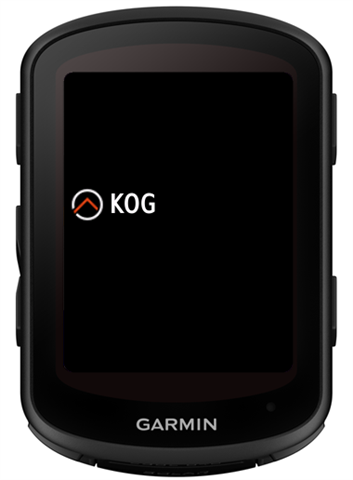
And this is how it looks on the device in day mode and night mode (on the Edge, “Garmin” is what “KOG” is in the simulator screenshot above):
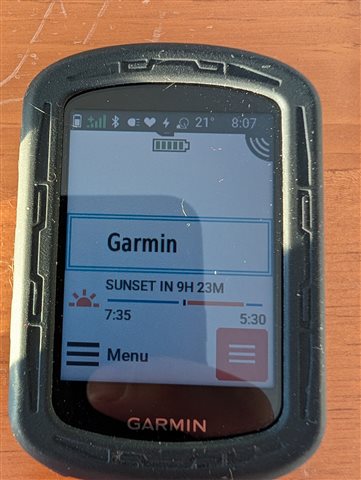
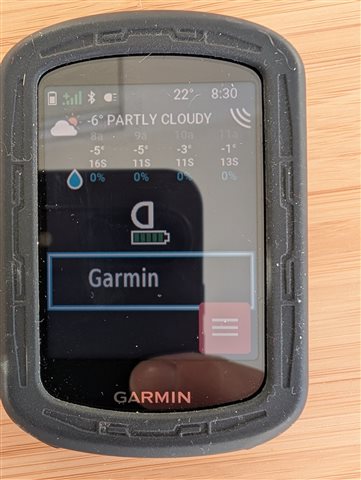
In both cases the logo is missing.

Has anyone run into this before, or do you have an idea what could cause it?

  • no it's not. 

    <svg id="svg" xmlns="">http://www.w3.org/2000/svg" xmlns:xlink="">http://www.w3.org/1999/xlink" width="400" height="400" viewBox="0 0 400 400">
    <g id="svgg">
    <path id="path0" d="M126.563 1.785 C 113.833 6.158,103.702 16.910,100.436 29.513 C 98.583 36.663,98.583 363.337,100.436 370.487 C 103.744 383.253,114.521 394.503,127.231 398.456 C 134.962 400.860,252.538 400.854,260.326 398.449 C 272.624 394.650,282.934 384.325,286.747 371.988 C 289.156 364.193,289.156 35.807,286.747 28.012 C 282.934 15.675,272.624 5.350,260.326 1.551 C 255.493 0.058,252.975 0.001,193.472 0.020 L 131.641 0.040 126.563 1.785 M343.359 17.559 C 304.142 26.168,292.577 80.972,325.525 102.070 C 339.038 110.723,369.162 112.227,374.562 104.518 C 376.700 101.466,376.148 96.340,373.383 93.576 L 370.985 91.178 363.717 91.655 C 340.764 93.163,329.297 83.450,329.297 62.500 C 329.297 42.565,342.551 31.651,363.672 34.194 C 374.995 35.558,381.104 27.669,374.414 20.321 C 370.902 16.464,354.852 15.037,343.359 17.559 M28.026 19.284 C 22.943 22.439,23.047 21.525,23.047 62.891 C 23.047 107.216,23.187 107.813,33.594 107.813 C 42.303 107.813,44.071 104.265,44.398 86.133 L 44.655 71.875 57.769 71.875 C 72.648 71.875,74.154 71.364,75.839 65.741 C 78.353 57.348,73.739 54.688,56.666 54.688 L 44.531 54.688 44.531 44.922 L 44.531 35.156 56.934 35.156 C 71.384 35.156,73.545 34.835,76.065 32.315 C 79.664 28.716,79.085 22.168,74.909 19.243 C 72.182 17.333,31.111 17.369,28.026 19.284 M201.058 41.699 C 210.893 45.808,213.264 51.540,213.274 71.228 L 213.281 86.597 228.194 86.853 L 243.107 87.109 244.991 89.301 C 246.027 90.507,246.875 92.333,246.875 93.359 C 246.875 94.386,246.027 96.212,244.991 97.417 L 243.107 99.609 228.194 99.866 L 213.281 100.122 213.281 120.373 L 213.281 140.625 228.161 140.625 C 244.795 140.625,246.875 141.301,246.875 146.703 C 246.875 151.949,244.608 152.705,228.064 152.977 L 213.281 153.220 213.281 173.485 L 213.281 193.750 228.018 193.750 L 242.756 193.750 244.815 195.810 C 246.034 197.028,246.875 198.740,246.875 200.000 C 246.875 201.260,246.034 202.972,244.815 204.190 L 242.756 206.250 228.018 206.250 L 213.281 206.250 213.281 226.515 L 213.281 246.780 228.064 247.023 C 244.608 247.295,246.875 248.051,246.875 253.297 C 246.875 258.699,244.795 259.375,228.161 259.375 L 213.281 259.375 213.281 267.931 L 213.281 276.487 216.678 278.825 C 245.964 298.974,237.985 343.867,203.547 352.711 C 173.387 360.455,145.355 330.976,154.508 301.139 C 157.274 292.126,165.975 280.861,172.461 277.896 C 174.133 277.132,174.219 276.662,174.219 268.234 L 174.219 259.375 159.338 259.375 L 144.457 259.375 142.541 257.308 C 140.120 254.695,140.110 252.249,142.509 249.458 L 144.393 247.266 159.306 247.023 L 174.219 246.780 174.219 226.515 L 174.219 206.250 160.193 206.250 C 144.892 206.250,142.844 205.814,141.364 202.242 C 138.576 195.510,142.479 193.750,160.193 193.750 L 174.219 193.750 174.219 173.485 L 174.219 153.220 159.306 152.977 L 144.393 152.734 142.509 150.542 C 140.110 147.751,140.120 145.305,142.541 142.692 L 144.457 140.625 159.338 140.625 L 174.219 140.625 174.219 120.313 L 174.219 100.000 160.912 100.000 C 142.007 100.000,136.210 96.630,142.509 89.301 L 144.393 87.109 159.306 86.853 L 174.219 86.597 174.219 71.843 C 174.219 52.533,175.761 48.137,184.408 42.807 C 188.217 40.459,196.734 39.892,201.058 41.699 " stroke="none" fill="#888888" fill-rule="evenodd">
    </path>
    </g>
    </svg>
    <bitmap id="thermometer" filename="thermometer-fahrenheit-celsius.svg" dithering="none" />
  • There is something going on in the latest x40 FW with regards to glance icons.  My weather radar app has showed the glance icon up until I decided to check after reading this thread.  With 30.18, the icon is missing.  I have not made any changes to the app so it defiantly is FW related.

    I created a bug report:

    forums.garmin.com/.../glance-launcher-icon-not-shown-on-edge-x40-devices

  • Can you also post a screenshot of the widget (when you click on the glance)? The same icon is displayed there too.

  • Can you also post a screenshot of the widget (when you click on the glance)? The same icon is displayed there too.

    It looks fine there. In my app as well, bitmaps rendered inside the app display correctly.

    However, when drawing primitives with dc.setAntiAlias(true), I see similar artifacts on the real device, though not in the simulator. When I disable anti-aliasing, the artifacts disappear.

  • I guess that because in the glance the firmware tries to draw the icon on the whatever background it has there it does something different from when we draw it in onUpdate. Though maybe if we tried to draw it over a similar background then it would also look strange