Glance launcher icon not showing on Edge devices

Hi,

My app has a glance with a launcher icon. This works fine on watches, but on Edge devices the icon doesn’t seem to render. In the simulator it shows up correctly, but users sent screenshots where the icon area is just blank.

This is how it looks in the simulator:
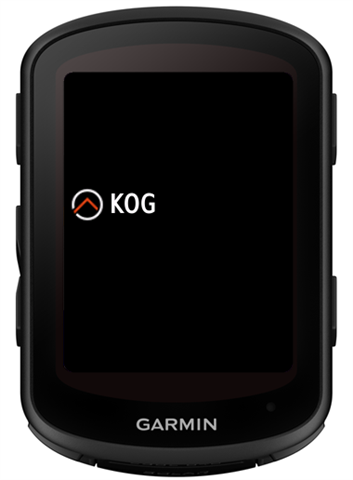
And this is how it looks on the device in day mode and night mode (on the Edge, “Garmin” is what “KOG” is in the simulator screenshot above):
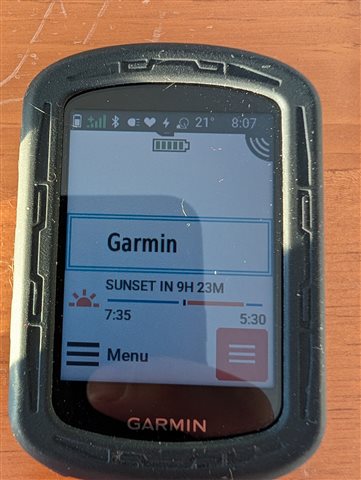
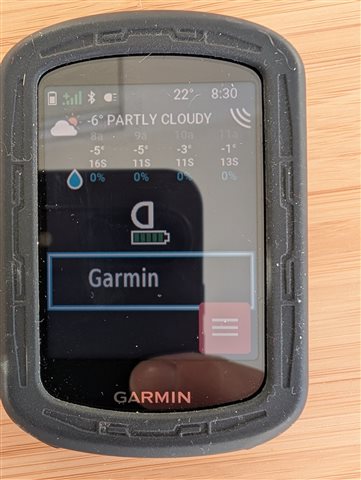
In both cases the logo is missing.

Has anyone run into this before, or do you have an idea what could cause it?

  • Did you implement getGlanceTheme() in your AppBase subclass?

    As we discussed the function in the other thread, I was also wondering whether getGlanceTheme() might have had an impact on this issue. However, the Edge x40 series is not listed among the supported devices for getGlanceTheme(), so it would be surprising if it actually made a difference. That said, it is not like Garmin has not surprised as before.

    It may well be that the issue is limited to Edge x40 devices, my affected user is on an Edge 540.

  • I don't own any x40, but my code works on both the 840 and the 1040 simulator and it shows my custom launcher icon on the left side  in the glance view. But behavior on the sim does not guarantee the same behaviour on a physical device unfortunately

  • I don't own any x40, but my code works on both the 840 and the 1040 simulator and it shows my custom launcher icon on the left side  in the glance view.

    Same here, everything works fine in the simulator. Only on the physical device the glance icon is not displayed.

  • I have an Edge 850 now for testing. While the issue does not occur on that device, I noticed that Garmin seems to apply some processing to the logo.

    Below is a screenshot from the actual device. The white border around my icon elements is not part of the SVG I use, does not appear in the simulator, and I have not seen it on any other physical device. I am not sure whether this happens during compilation or only on the device itself.

    I can only guess that this might be Garmin’s way of ensuring the icon works on both bright and dark backgrounds. For native glances, icons invert automatically, but that isn’t applied to CIQ glances.

    In general, CIQ glances look rougher compared to native ones, particularly because it seems that anti-aliasing is not applied to the fonts.

  • Garmin doesn't care about whether your logo looks nice on bright and dark background. They don't even care if it's visible. You can have a black logo on black background.

    As far as I know the processing of the images is during the build. And each prg will get it's own version, so the 1 image needs to be good for both dark and light is not even an issue in most cases.

    Try to experiment with different parameters for the drawable and also with different file formats. Maybe a transparent gif or png will be better for you. Or you can change the logo in a clever way. For example add an opaque circular background.

    Also don't forget that many of the devices have a very limited color palette. To get the best result don't use vector graphic, and only use the colors of the palette. It's more work, but will give you better result.

  • Garmin doesn't care about whether your logo looks nice on bright and dark background.

    I am not sure if “caring” is the right term, but Garmin seems to apply some kind of processing to the edges between solid and transparent areas. This happens both when I provide the logo as an SVG and as a PNG.

    It could be a rendering issue, possibly related to how anti-aliasing is handled on the device.

    This is how the logo looks in the simulator:

    And this is how it looks on the device:

    I also tried adding a frame around the logo, but then the white border simply appears around that frame instead.

    The only way I have found to get rid of the issue is to remove transparency from the logo entirely. However, that is not the visual effect I am trying to achieve.

  • All useful info to search back on in the future... 2 questions:
    1) Are your icons scaled for the device? I guess this should not apply to SVG of course but for PNG the images _look_ like it's a scaling thing and re-assigning pixels and transparency with some antialiassing at the edge of the opague-transparent pixels.  I've been pixel-pushing around my small PNG icon images to set 100% transparency or opaque to make a hard edge.
    2) ... but still don't get a glance icon on an Edge 1040 - same code (no jungles, just resource folders) is fine sideloading to FR255 but not Edge1040.  Can anyone with a free-to-install app that is available on Edge devices pop the store UID link in here and I'll download on Edge 1040 with current firmware to see if anything shows, please.

  • There is something going on in the latest x40 FW with regards to glance icons.  My weather radar app has showed the glance icon up until I decided to check after reading this thread.  With 30.18, the icon is missing.  I have not made any changes to the app so it defiantly is FW related.

  • Tried your Expat Weather Widget, it shows the same problem. At least I assume that those white artefacts are not part of the icon?