Layer not rendering when added to a View

Hi,

I’d like to use a layer to display a visual indicator in my app. The indicator should be a circle along the edge of the screen in a specific color, or a rectangle, depending on the screen shape. I want this indicator to appear not only on my own View implementations, but also on top of CustomMenu implementations, which is why I’m trying to use a layer.

I tried following the example in the documentation (https://developer.garmin.com/connect-iq/core-topics/user-interface/), but my layer never shows up.

Since posting code here often fails, I’m linking directly to the relevant files.

Layer implementation:
https://github.com/openhab/openhab-garmin/blob/main/source/connectivity/WifiIndicatorLayer.mc

I’ve confirmed the constructor code runs. A Dc is returned and drawing calls execute.

For testing, I added the layer to one of my views in the view constructor:
https://github.com/openhab/openhab-garmin/blob/main/source/user-interface/loading-views/WifiCheckView.mc

Is there anything else I need to do to get the layer to display?

Also, is my understanding correct that the layer is drawn on top of the view’s base Dc?

  • Do you need a layer for that? I don't use layers, I draw to buffers and add those together. On the end I check if I need to put something on top, and if so I put it on top, if it needs to go away, only the buffers are pushed to dc, and if something changes the buffers are redrawn.

  • I tried your code in the sim (for fr955), after disabling WifiCheckTimer to ensure that the wi-fi check view sticks around, and I see the same thing that you. (Ofc I run the app with BLE disabled).

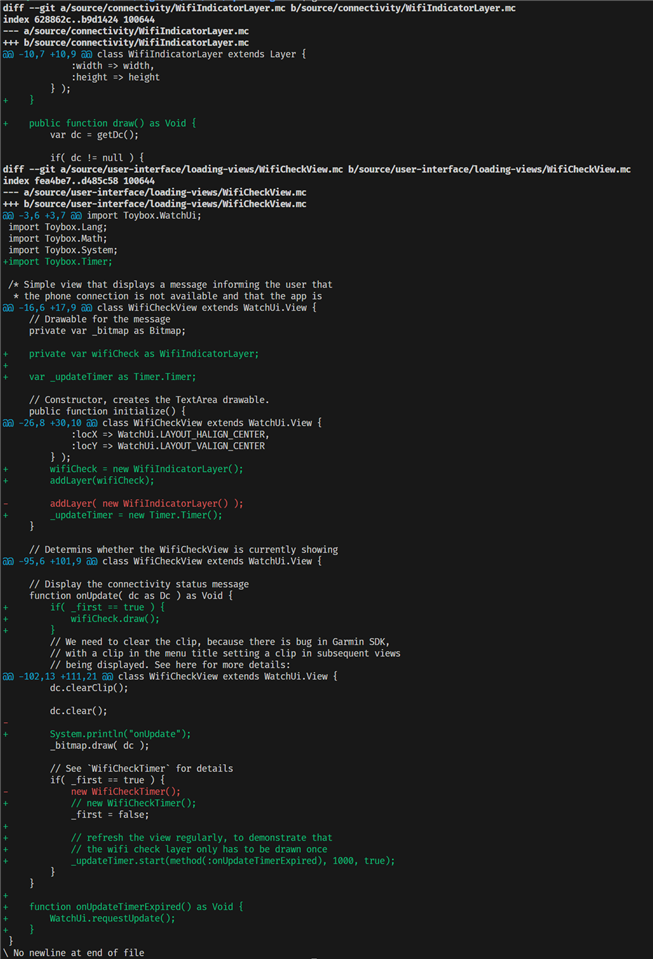
    I found that, contrary to the example in the doc, it seems that drawing on the layer's DC in View.initialize() (either before or after addLayer()) is too early. Same with doing so in onLayout().

    The only way I could get it to work was to draw on the layer in the view's onUpdate(). I did find I only had to do this once. (I also modded the code to call watchUi.requestUpdate() regularly, to demonstrate that the layer only has to be drawn once, even though the View dc is cleared with on every update).

    These are the mods I made:

    Evergreen complaint: these forums suck

  • Thanks, I hadn’t thought about doing the drawing in an update. I’ll have to try whether it’s possible to reuse a layer across views without redrawing it. I also need to check whether overriding onUpdate() in a CustomMenu works reliably. In any case, if I end up having to touch every onUpdate(), the layer does not really seem to offer any advantage over a BufferedBitmap in terms of handling.