add the -d build option to App Settings Editor

The App Settings Editor for the Simulator is requiring the "Rebuild" option otherwise it presents a blank screen:
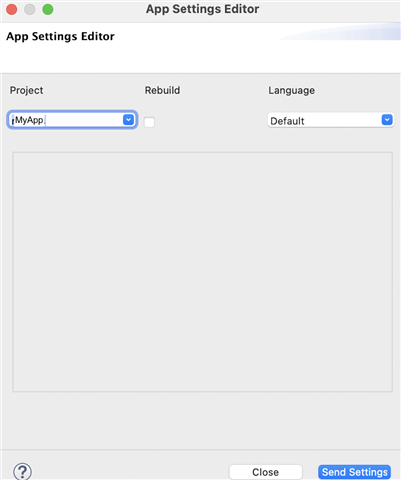
   

When I do check the "Rebuild" option, the build fails with "Duplicate declaration of symbol" because I'm using Jungles excludeAnnotations

project.manifest = manifest.xml

rectangle.excludeAnnotations = round
round.excludeAnnotations = rectangle

and it's missing the -d option, like -d fenix5_sim

So, my question is, how do I get the Rebuild option to build with a -d option?  In Eclipse please, I'm not ready for VSC yet.

Or, alternatively, how do I get the App Settings Editor to run without the Rebuild option? (I don't recall having this requirement before now)

Mac, Eclipse, SDK 4.0.4

  • Did you run SDKManager from the applications folder first, as suggested? Does it indicate that all your devices are downloaded or not?

    Yes, all good. lots of devices.

    Build app: "Failed to connect to the simulator"

    As mentioned, this has frequently occurred on earlier SDK's and I would start the simulator manually. 

    Iwas advised this is the work-around (some time ago, from the Forum I think, lost in time)

    When I start the 4.0.4 simulator with:

    sudo .//Library/"Application Support/Garmin/ConnectIQ"/Sdks/connectiq-sdk-mac-4.0.4-2021-07-01-9df386fcd/bin/ConnectIQ.app/Contents/MacOS/simulator

    it reports:

    Unable to connect to an ANT device; no devices available
    01:51:25 PM: Debug: SetLayout

    An empty sim window opens, but I get the "Unable to load device fenix5" error.


    [EDIT]

    When I revert to 3.2.5 and run the sim manually that no longer works. Same error: no devices available. So now I'm really stuck!

  • I guess this window is intended to be intuitive, but it's a bit obscure to me:

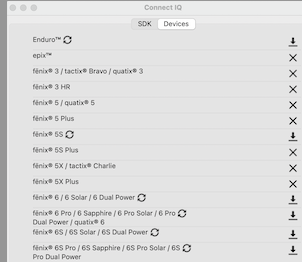
    What do the icons mean? Why are some X and some down arrow? I guess it's indicating which are downloaded, but downloading devices is a new concept. Sorry for being a bit obtuse.

  • Maybe your plugin settings are corrupt somehow? You could always try moving/renaming the ~/.p2 folder and reinstalling Eclipse. 

    what is the "~/.p2" folder?

  • What do the icons mean? Why are some X and some down arrow? I guess it's indicating which are downloaded, but downloading devices is a new concept. Sorry for being a bit obtuse.

    Those icons are buttons:

    - X means the device is installed - if you click on the X the device will be uninstalled.

    - The down arrow means that a download is available for the given device. If you click on the icon, the device will be downloaded

    what is the "~/.p2" folder?

    ~ is your home folder (/Users/YOURUSERNAME on Mac). I assume you're familiar with "~" as you mentioned you came from a Unix background.

    .p2 is a hidden folder which has shared information for all of your Eclipse installations, including plugin settings (which includes the settings for the Connect IQ plugin).

    [https://stackoverflow.com/questions/62230297/what-are-m2-and-p2-folders-and-can-i-delete-them]

    Since I'm unable to recreate your problem with a fresh installation of Eclipse on Mac OS, the best advice I can give you is to "uninstall" Eclipse (which includes moving/removing the .p2 folder) and reinstall Eclipse.

    If I recall correctly, someone else had a problem with Connect IQ plugin in Eclipse (on Windows) and doing a reinstall as described above solved their problem.

  • As far device downloads/updates go, I think it would be a lot easier to just configure the SDK Manager to automatically download updates for all devices.

    Menu > Connect IQ SDK Manager > Preferences

    That way, if you open the SDK Manager and there are missing/outdated devices, it should automatically download them for you.

  • the best advice I can give you is to "uninstall" Eclipse (which includes moving/removing the .p2 folder) and reinstall Eclipse.

    Yes, I was afraid of that!

    It seems, fro Googling around, that uninstalling Eclipse from a Mac is a bit involved. iMyMac looks like yet another app to install, which I'm not enthusiastic about. Your reference to the .p2 folder simply reinforces that perception.

    Apart from .p2 and the Eclipse package in Applications, are there any other locations you know of that I need to worry about?

    (Could I just uninstall the CIQ plugin from Eclipse?)

  • Sure, you could try uninstalling and reinstalling the CIQ plugin first. I suppose I assumed you had already tried that a long time ago since you've been having so many problems with CIQ.

    If that doesn't work, you could try:

    1) Moving the.p2 folder away

    2) Downloading the eclipse installer again (if necessary). (Or just use your existing Eclipse installer if you have it)

    3) Running the eclipse installer

    If you're worried about losing your existing installation, have the installer use a different target location. That's why I also suggested moving .p2 instead of deleting it. If this doesn't work, you should be able to get your old install back without much problems.

    It seems, fro Googling around, that uninstalling Eclipse from a Mac is a bit involved. iMyMac looks like yet another app to install, which I'm not enthusiastic about. Your reference to the .p2 folder simply reinforces that perception.

    Yeah, I don't think you need an app like iMyMac to uninstall eclipse. The page that recommends using iMyMac to uninstall Eclipse is -- wait for it -- hosted on [https://www.imymac.com] -- it's transparently self-promotional. There's several sites which claim to have "how-to guides" for uninstalling something, and one of the options is always "coincidentally" to download software offered by the site itself. These are not organic blog posts from helpful users -- they're ads. You'll notice, for example, that no site other than [imymac.com] actually suggests using imymac to uninstall Eclipse....

    If you look for advice from actual users on places like eclipse.org and stackoverflow, you'll see things like this:

    https://www.eclipse.org/forums/index.php/t/1073664/

    "In general, Eclipse doesn't have a traditional install or uninstall process. It's basically just a folder of the application and then a workspace that you would have selected/created when you first run it.
    If you used the Eclipse Installer, you may also have a bundle pool folder named .p2 under your user home directory. There can also be .eclipse in your user home. Other than that, there shouldn't be anything Eclipse-related. installation is just removing those folders.
    "

    I just mentioned .p2 specifically because from my experience that's where plugin settings are located, and some of the answers on stackoverflow don't even mention it.

  •  I really appreciate your assistance. (are you in my timezone UTC+10?)

    I have gone for the nuclear option: delete Eclipse and reinstall.

    As expected it has not gone well. 

    After a couple of aborted attempts, Eclipse is up and running,

    I have added Connect IQ plugin (it included SDK 4.0 manager), it's showing Connect IQ in the menu bar,

    but the SDK Manager didn't load.

    Eclipse>Preferences>Connect IQ is looking for SDK manager in "/Volumes/Connect IQ SDK Manager/SdkManager.app/," and of course it isn't there.

    I have now pointed it to the SdkManager.app in my Downloads folder.

    SDK manager now runs.

    But it's not a clean rebuild: It's remembered previous projects (in the run configurations dropdown for example)

    But the side panel showing the app's components is not displayed:

    and now, when I restarted Eclipse, the Connect IQ entry in the menu bar has disappeared!

  • Now I do it again and those problems disappear! 

    Stand by for the next issues!!!!

  • I have had sometimes the same problem. Deleting once the settings file in %TMP% folder on windows machines on c:/ stations has solved this problem. You can find it in tmp/garmin/settings somewhere with your application name, if I remember correctly.