add the -d build option to App Settings Editor

The App Settings Editor for the Simulator is requiring the "Rebuild" option otherwise it presents a blank screen:
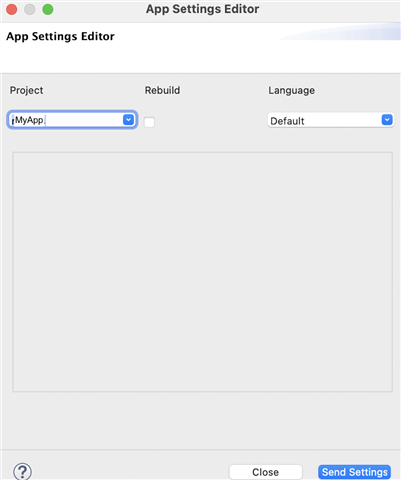
   

When I do check the "Rebuild" option, the build fails with "Duplicate declaration of symbol" because I'm using Jungles excludeAnnotations

project.manifest = manifest.xml

rectangle.excludeAnnotations = round
round.excludeAnnotations = rectangle

and it's missing the -d option, like -d fenix5_sim

So, my question is, how do I get the Rebuild option to build with a -d option?  In Eclipse please, I'm not ready for VSC yet.

Or, alternatively, how do I get the App Settings Editor to run without the Rebuild option? (I don't recall having this requirement before now)

Mac, Eclipse, SDK 4.0.4

  • Did you try building and running your app before opening the app settings editor?

    Right click project >  Run As > Connect IQ App

  • Yes, it didn't make any difference whether I run it that way or from the "Run new configuration" white/green icon in the menu bar.

    I still get a blank screen in the App Settings Editor when the Rebuild option is unchecked.

    (I have restarted my Mac as well)

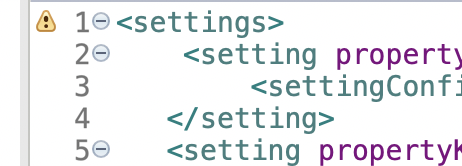
    I wonder if this yellow icon is significant in my settings.xml?

    I can't get any more info when I click on it.

    full file:

    <settings>
       	<setting propertyKey="@Properties.enableTackAnalysis" title="@Strings.enableTackAnal"  > 
         	<settingConfig type="boolean"/> 
       </setting>  
       <setting propertyKey="@Properties.cycleScreenBool" title="@Strings.cycleScreenBoolString"  > 
         	<settingConfig type="boolean"/> 
        </setting>  
       <setting propertyKey="@Properties.bowOffset" title="@Strings.bowOffsetSettingString"  > 
         	<settingConfig type="numeric"/> 
        </setting>       
        <setting propertyKey="@Properties.boatName" title="@Strings.boatNameSettingString"  > 
         	<settingConfig type="alphaNumeric"/> 
        </setting>     
        <setting propertyKey="@Properties.enableCourses" title="@Strings.enableCoursesString"  > 
         	<settingConfig type="boolean"/> 
        </setting>  
        <setting propertyKey="@Properties.liveRunning" title="@Strings.liveRunningString"  > 
         	<settingConfig type="boolean"/>  
        </setting> 
         </settings>

    But I'm seeing that warning icon on all my resource XML's, but not on my source files. I haven't noticed it before.

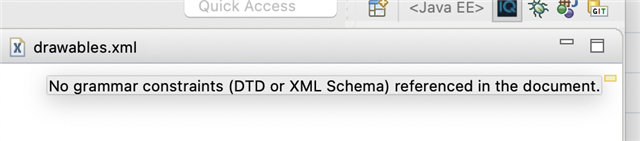
  • I think the warning is a red herring. Hovering over the yellow icon on the right:

    Is a warning about XML syntax.

  • Yes, it didn't make any difference whether I run it that way or from the "Run new configuration" white/green icon in the menu bar.

    I still get a blank screen in the App Settings Editor when the Rebuild option is unchecked.

    The App Settings Editor for the Simulator is requiring the "Rebuild" option otherwise it presents a blank screen:

    I'm super curious how you know that it would work if the Rebuild option is checked, given that you're unable to build that way.

    Have you tried using the Project drop-down to re-select your app (even if it's already selected)?

    Are you able to successfully use the App Settings Editor under any circumstances?

    Have you tried the ApplicationStorage example (which has settings)? If it works, under what circumstances does it work: With rebuild, without rebuild, or both?

  • I'm super curious how you know that it would work if the Rebuild option is checked, given that you're unable to build that way.

    Good question. It worked previously, before I engaged in some research by running earlier versions of my project. I deleted my project from the workspace, imported an earlier version (from cloning from bitbucket) then restoring the current version, and now it fails. 

    Have you tried using the Project drop-down to re-select your app (even if it's already selected)?

    I only have one project in my workspace, so that's not an option.

    Are you able to successfully use the App Settings Editor under any circumstances?

    Haven't tried another app, a good suggestion.

    Have you tried the ApplicationStorage example (which has settings)? If it works, under what circumstances does it work: With rebuild, without rebuild, or both?

    No. Will do. Good suggestion. 

  • Have you tried the ApplicationStorage example (which has settings)? If it works, under what circumstances does it work: With rebuild, without rebuild, or both?

    Great suggestion.

    I couldn't fail the ApplicationStorage example. 

    When I added some Jungles excludeAnnotations, and some annotated duplicate functions (like my code),  the Editor with Rebuild checked reported compile fail, but it still displayed the Settings page.

    So, the problem IS my code.

    But where???

    All I have done is to re-import my working code into my workspace. I'll revisit my code to see what has gone wrong.

  • Interesting.

    I compared my settings with ApplicationStorage example and found whereas I was storing my settings in a settings.xml file  (as shown in my earlier post) in my resources folder, ApplicationStorage has them in the properties.xml inside a <resources>... tab, and has no settings.xml file.

    When I re-jigged my code to match, by moving my <settings> code to properties.xml and embedding them all in a <resources> tab,  hey presto, it's all working.

    I won't dwell on why my previous structure has worked for three years and now fails, that's for another day.

    Thanks for the insight, you forced me to question one of my assumption which I was wrong. The challenge is that we have so many assumptions, the challenge is to identify them. Then testing them is a simple task. 

  • Too soon!

    Something's happening.

    All was fine, I edited the settings and ran the app in the simulator a couple of times with no issues.

    Now, an hour later, I am running again with exactly the same code but different settings (testing with different data) and I'm back to square 1. The App Settings Editor page is blank! 

    I've tried fiddling with the xml's with no success.

    ARGH!

  • I only have one project in my workspace, so that's not an option.

    I think you're making an unfounded assumption here. Even if you have only project in your workspace, you're still able to use the drop-down to reselect the current project (the effect is roughly the same as closing and re-opening the app  settings editor). Having said that, I don't think it will help. It is quick than closing and re-opening the app settings editor, though.

    Good question. It worked previously, before I engaged in some research by running earlier versions of my project. I deleted my project from the workspace, imported an earlier version (from cloning from bitbucket) then restoring the current version, and now it fails. 

    That still doesn't answer my question about why you assumed that checking Rebuild would fix the problem, but I'm assuming we've moved past that now. I actually kinda agree that it's too bad that Rebuild doesn't use the last "-d" option as it's yet another example of inconsistent/unexpected Connect IQ behavior. I've complained about this years ago, so I'm guessing it will never be fixed.

    (There's no app settings editor for VS Code, by the way.)

    So, the problem IS my code.

    Yes, that was the point of this exercise, to try to isolate the source of the actual problem.

    Now, an hour later, I am running again with exactly the same code but different settings (testing with different data) and I'm back to square 1. The App Settings Editor page is blank! 

    Can you share a simplified version of your project with an example of settings that produces this behavior?

    I realize this is frustrating for you, but I don't think there's any other way for anyone to help you.

    Alternatively, have you tried using the new settings editor which is built-in to the sim?

    File > Edit Persistent Storage > Edit Application.Properties Data

    The shortcut to open this should be CMD-P. (Although I haven't tried this on a Mac so I'm not 100% sure.)

  • I realize this is frustrating for you, but I don't think there's any other way for anyone to help you.

    I really appreciate the assistance and am happy to provide whatever might assist.

    Can you share a simplified version of your project with an example of settings that produces this behavior?

    I provided the settings earlier follows:

    <settings>
       	<setting propertyKey="@Properties.enableTackAnalysis" title="@Strings.enableTackAnal"  > 
         	<settingConfig type="boolean"/> 
       </setting>  
       <setting propertyKey="@Properties.cycleScreenBool" title="@Strings.cycleScreenBoolString"  > 
         	<settingConfig type="boolean"/> 
        </setting>  
       <setting propertyKey="@Properties.bowOffset" title="@Strings.bowOffsetSettingString"  > 
         	<settingConfig type="numeric"/> 
        </setting>       
        <setting propertyKey="@Properties.boatName" title="@Strings.boatNameSettingString"  > 
         	<settingConfig type="alphaNumeric"/> 
        </setting>     
        <setting propertyKey="@Properties.enableCourses" title="@Strings.enableCoursesString"  > 
         	<settingConfig type="boolean"/> 
        </setting>  
        <setting propertyKey="@Properties.liveRunning" title="@Strings.liveRunningString"  > 
         	<settingConfig type="boolean"/>  
        </setting> 
          </settings>

    As I mentioned, these were working fine a couple of hours ago after tweaking the resources.

    I'm not sure what would constitute a "simplified version". It's quite a big project

    Alternatively, have you tried using the new settings editor which is built-in to the sim?

    File > Edit Persistent Storage > Edit Application.Properties Data

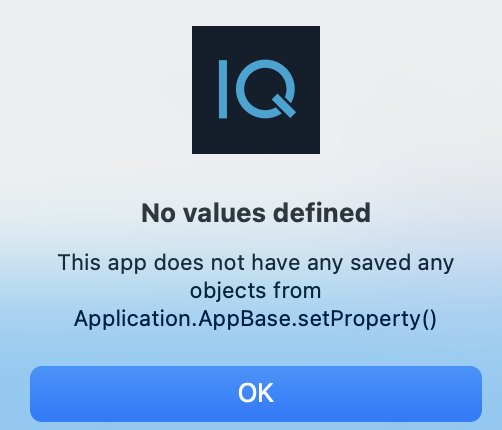
    Both options :

    return

    It seems that editing the resource files earlier "unstuck" something which made the settings work, but now that door has closed. I don't think it's my code: since I haven't changed it since it worked a few hours ago. There must be something in the back end of Eclipse of the SDK which is tripping me up.

    I am most appreciative of your continued involvement.