


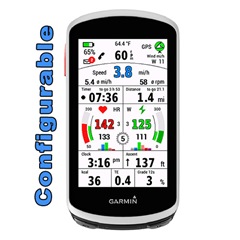
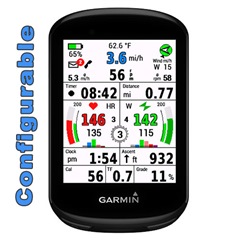
EDGE All in One is a single data field.
One for Edge 1030, 1040 and 1050, the other for Edge 530 and 830, 540, 840 and Explore2
It displays many values for cycling - around the most important values: speed, cadence, heart rate and power.
A detailed description can be found here:
EDGE 1030 + 1040 + 1050 (English and Deutsch and French):
mcinner.at/.../GuideAllinOne_E.pdf
mcinner.at/.../GuideAllinOne_D.pdf
http://mcinner.at/files/GuideAllinOne_F.pdf
EDGE 530, 830, 540, 840 and Explore2:
mcinner.at/.../GuideAllinOne58.pdf
This datafield is free of charge, but if you like it and use it, it would be nice to be invited to a beer: paypal.me/AndreasWirth
I have tested the datafield intensively with my devices Edge 1030 and 1030 PLUS, 1040 and 530.
Download and install EdgeAllinOne as single datafield following these steps on your device:
Activity profile - Data Screens - Add New - Custom Data - Choose single layout
In the ConnectIQ collection select EdgeAllinOne1.
After installing this datafield on your device, various settings can be made. This is best done with Garmin Express or Garmin Connect Mobile. Instructions for this can be found here:
To use the power section, a power meter must be connected to the device and the values of the individual power zones must be stored in the settings.
For the heartrate graphs the heartrate zones are taken from your profile. It is therefore necessary that the zones are set in your device!
For the display of wind bearing and wind force, as well as the outdoor temperature, the data of a nearby weather station must be available via Garmin Connect Mobile. The app must therefore be loaded on the phone (but it can work in the background).
If you have questions or requests please write here and tell for which device!

