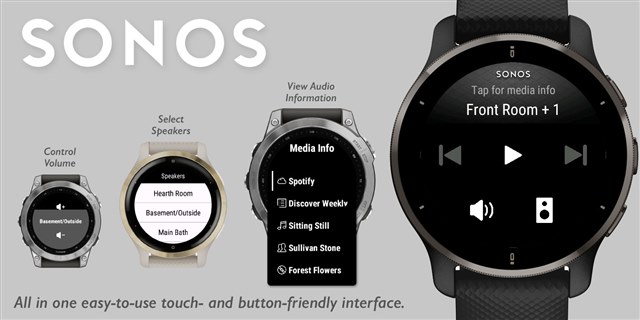
Widget / App: Sonos Control

Get the Sonos Control widget/app on Connect IQ Store

The easiest and most capable Sonos control app for your Garmin watch! Designed to be as intuitive as the built-in music controls, with a great touchscreen experience, but also works with button wearables. If you have one of the latest devices that have both (Fenix 7 or Epix 2), you can use either!

No complicated setup, just follow the prompts to sign into your Sonos account using the Garmin Connect mobile app to be able to:

  • Switch between all your speakers and groups
  • Play/Pause/Skip Back/Skip Forward
  • View the details of whatever audio is playing
  • See and control the volume (using tap/swipe/buttons)

Supports glances or widget views, or can be launched as an app (which leaves the the app open, instead of the widget returning to the watch face after a timeout)

MAIN CONTROLS:

  • Play/Pause/Skip: tap the button or use your up/down watch buttons to choose and start/select to select the button.
  • View media info: tap the top 1/3rd of the screen (the speaker group name), or hold down your menu button; select any row for full information
  • Change Volume: tap/select the Volume button, then tap top/bottom of screen, swipe up/down, or use the up/down watch buttons
  • Select Speaker: tap/select the Speaker button (lower right), then use the menu to select the desired speaker

This is an unofficial app, not affiliated with Sonos. If you have any questions, problems, or suggestions, please use the "Contact Developer" link to let me know.

Get the Sonos Control widget/app on Connect IQ Store

  • Hey  . Loved your widget on my Fenix 7. now upgraded to the epix, but seems like you pulled the app from the Connect IQ store? Any way to get it back? 

  • Same here - the Connect IQ store just says 'The page you're looking for was not found".  I LOVE this app - it's the only one that really works with Sonos. please reinstate?

  • Where has the great widget gone? I hope a new version will be released. If you can no longer continue the project yourself, it would be great to publish the sources. I'm sure someone will be found to continue it. 

  • I know this is an old thread - but -

    Would love to see this app back on the IQ store - it was great on my old Venu 2 and now I've upgraded to the Venu 4 and the app has gone . (I'm still using the old Sonos equipment)

  • This app was intriguing. The app seemed to be built off my source code for https://apps.garmin.com/apps/b6e8ca11-5964-4e15-ac14-bf3df54615ea, which was 100% fine from a license standpoint and I thought it was great that someone is giving the concept some love. Then it mysteriously disappeared suddenly.

    I have been wondering about whether I should invest time in rebuilding this app as a premium version of my free app. However I assumed that most people control their Sonos through other media apps like Spotify. Perhaps you or others reading this could comment on this.

  • Hi there, thanks for replying. In our house we always use the Sonos iphone or ipad apps (rather than Spotify direct) to play and control music, however, it was great to be able to pause or stop music from the Garmin watches. I'd love to see a Sonos app for the Venu 4 and think premium is reasonable . However, I can see 'issues' with users not appreciating that Sonos has 2 systems, 1)  the old legacy Sonos app (that I think your app and this one work on) for older Sonos hardware and 2) the new Sonos app for all the newer more connected Sonos hardware (that may 'only' require IFTTT type apps?)

  • I don't own a Sonos system anymore, although I seem to recall that once I updated my speakers and app to the new system, the API did continue working as intended; I guess I'd need to validate this somehow. Maybe you can elaborate on how users would get tripped up by this?

    Another thing that might trip up users is that nowadays Sonos can be paired as a Bluetooth speaker, rather than themselves being internet connected, and hence be controllable via the web API. In this setup I suspect there would be no way for a Garmin device to control it.

  • Ah, if your old app worked on both Sonos systems great. I was thinking if it only worked on either the old or the new Sonos , then there might be lots of complaints and 1 star reviews, from users of the 'wrong' system, especially if its a premium app. I only have old Sonos hardware to test on.