Smart Bike Lights (Data Field) / Bike Lights Control (Widget)

I've made two open source CIQ applications to control ANT+ lights:

- Smart Bike Lights (data field): https://apps.garmin.com/en-US/apps/0d9fd828-c932-4470-9c37-fd2828881888 

      Configurator: https://maca88.github.io/SmartBikeLights/ 

- Bike Lights Control (widget): https://apps.garmin.com/en-US/apps/fa3c2332-76e3-4ba1-8528-32a0fd617ab1 

     Configurator: https://maca88.github.io/BikeLightsControl/ 
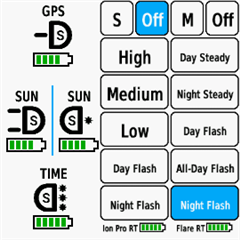
Smart Bike Lights features:
- Automatic light control (Smart mode) based on the configured filters (sunset, sunlight, speed, ...)
- Manual light control (only for Edge devices with a touch screen or devices with CIQ 3.2 and more than 32KB memory)
- Records lights modes that are displayed in Garmin Connect

Bike Lights Control features:
- Manual light control (available to all devices)

Both applications can be installed on the same device, which can be useful for low end devices (e.g. Edge 520) where "Bike Lights Control" can be used to change light modes manually and "Smart Bike Lights" for automatic light control.

Currently registered ANT+ lights:
- Bontrager Ion Pro RT
- Bontrager Ion 200 RT
- Bontrager Flare RT
- Garmin Varia RTL500
- Garmin Varia RTL510
- Garmin Varia RTL515
- Garmin Varia HL500
- Garmin Varia UT800

in case your ANT+ light is not on the list you can help by doing the following:

1. Install Bike Lights Control
2. Pair your bike light with your Garmin device
3. Open the widget:
- Edge with a touch screen: post which numbers are displayed on the buttons and what mode each button represents when pressed
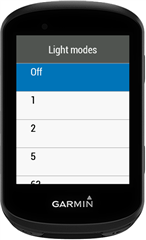
- Other devices: Select the "Light modes" menu and post which numbers are displayed in the menu and what mode each menu item represents when selected

Example for Bontrager Ion Pro RT:
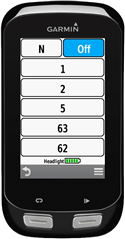

1 -> High steady beam
2 -> Medium steady beam
5 -> Low steady beam
63 -> Day flash
62 -> Night flash

There are some features that could be possible to add in the future, but would require Garmin to add them to the CIQ api. In case you are interested in any of the below features, consider upvoting their feature request thread:

1. Control lights based on the ambient light sensor available on some devices:
https://forums.garmin.com/developer/connect-iq/i/bug-reports/ambient-light-sensor-api-access 

Known issues:

1. Unable to use Tempe Visualizer or TyreWiz Data Field alongside Smart Bike Lights:
https://forums.garmin.com/developer/connect-iq/i/bug-reports/lightnetworklistener-onbikelightupdate-not-called-when-certain-data-fields-are-installed

  • Hi maca

    I am using it without relabeling (no Smart Bike Lights pulled up as a data screen and no serials or inputs) - blank fields. Right now one control setup works fine for radar and new Ion RT. I've set it up with the Garmin 1050 so both headlights and radar are networked (so three lights). 

    As a test, I added an adjacent data screen using Smart Bike Lights 2 for the prior micro-USB light and radar unit. This worked as a separate labeled unit. But I changed something and getting error 3.

    I did ION Pro reset reset to hold 15 sec and repaired. Had to redo 1050 setup from scratch. Now can't get the extra row as before. Not sure of tbwas an anomaly. But, did go through progressing of having old light work then just changing the serial for the new light. And back to error 3.

    Could be something I am doing. I've followed logic and check sequences and have not been able to get things to work out. Something seems different between the two lights (they do indicate new model), but not suse of they have played with the modes.

    Need a long weekekend day to rework through things. 

  • Based on this thread:  Garmin Varia Rearvue 820 Radar development it seems that this is meant for bigger companies like Wahoo and not CIQ developers.

  • Make sure to set the serial numbers for the headlights as otherwise Smart Bike Lights will combine both paired headlights into one an that could be the cause for error 3. You can check the docs for details: https://github.com/maca88/SmartBikeLights#control-multiple-lights-of-the-same-type 

  • The workaround for RearVue 820 was added in the latest version (0.32.0). Please check on GitHub for instructions on how to setup it: https://github.com/maca88/SmartBikeLights/discussions/114#discussioncomment-17117105 

    As I do not own the light, I do not know whether the workaround works, so please let us know if it actually works. 

  • Thanks for your work. It works with the workaround.

    Garmin 1040 Firmware 31.29

    Smart Bike Light App 0.32.0

    Varia 820 Firmware 6.70.0

    my config:

    ###0,73535488::1:#7,5!Tunnel:1:7:10:0G[2!LichtT:2:7:5:0I[200]0Er0,s0!LichtN:2:6:5:0I[200]0Es0,r0!Nacht:1:5:0:0Es0,r0!:1:0:0:0D=1##4,3:Varia Akku :0:16777215:-1!2,:-1,Off:0!1,Solid:4!1,Day Flash:7#0::#0:1#123!:13!7,4,0#0#0#0#B3843##24#0#0

  • I use Traffic. Very good anbd excellent page showing all the cat specs.

  • Yes, got it, And see how it works without serial numbers. This might be the best wsorkaround until someone buys the new ION Pro RT and can also corroborate that it works for the, and it's something I am doing. It inadvertently addresses both headlights together. I only use one, now the new USB-C version, This works without overwriting the numbered labels. 

  • I've recently purchased a Garmin Varia RTL 515 and I'm finding problems to set it up with my Garmin Edge 530. Varia is updated to the last version (3.36) and every time I go to the data field screen I get 'Error 1', 'Error 3' or 'No network ' message. I've checked my configuration several times and I don't find the mistake. Is there any issue with Varia's last version or am I missing something? This is my configuration:

    #4587520,196641::5614335:#4,4!Off:1:0:0:0H{2!Night:1:2:0:0Es0,r600!Day:1:0:0:0Er0,s0!:1:0:0:0D=1#0,73535488:1,2099926233:16711765:#4,4!Off:1:0:0:0H{2!Night:1:6:0:0Es0,r600!Brake:1:4:0:0A[-10!:1:7:0:0D=1#6:Ion 200 RT!Off:0!High:1!Medium:2!Low:5!Day Flash:63!Night Flash:62#5:Varia RTL515!Off:0!Day Steady:4!Night Steady:5!Day Flash:7!Night Flash:6#0::#1:1#0#0#B3121#2#3#0#0

  • Not sure if this is a configuration error on my part. I have the Bontrager Ion RT 200 and RearVue 820 in my light network on the 1040 solar. The tailight configuration I have for RearVue 820 in the SBL appears to be working. However, I could not get the Ion RT 200 to work. Specifically, I want the headlight to be in dayflash mode as soon as I start recording. Initially, I did a filter group, with a filter for timer state and operator greater than timer state of not recording. That did not work. Then I followed the example in Github and configured a filter using timespan from sunrise to sunset, but that also does not work. The configuration below is for the example using timespan from sunrise to sunset.

    #4587520,196641::1:#2,2!DAY:1:63:0:0Er0,s0!:1:0:0:0D=1#0,73535488::1:#2,2!radar:1:7:2:0I]10]0!:1:0:0:0D=1#7,6:Ion 200 RT:0:16777215:-1!2,:-1,Off:0!1,High:1!1,Medium:2!1,Low:5!1,Day Flash:63!1,Night Flash:62#6,5:Varia 820:0:16777215:-1!2,:-1,Off:0!1,Solid:4!1,Peloton:5!1,Day Flash:7!1,Night Flash:6#0::#1:1#123!:13!0,5,4,7#0#0#0#B3843#2#24#0#0

  • When I said the Ion RT 200 did not work, I meant when I started recording, the headlight remained off. I can however change the light mode using its light panel on the 1040 solar.