Smart Bike Lights (Data Field) / Bike Lights Control (Widget)

I've made two open source CIQ applications to control ANT+ lights:

- Smart Bike Lights (data field): https://apps.garmin.com/en-US/apps/0d9fd828-c932-4470-9c37-fd2828881888 

      Configurator: https://maca88.github.io/SmartBikeLights/ 

- Bike Lights Control (widget): https://apps.garmin.com/en-US/apps/fa3c2332-76e3-4ba1-8528-32a0fd617ab1 

     Configurator: https://maca88.github.io/BikeLightsControl/ 
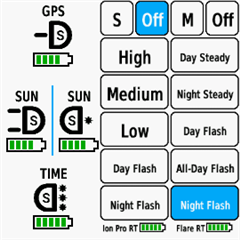
Smart Bike Lights features:
- Automatic light control (Smart mode) based on the configured filters (sunset, sunlight, speed, ...)
- Manual light control (only for Edge devices with a touch screen or devices with CIQ 3.2 and more than 32KB memory)
- Records lights modes that are displayed in Garmin Connect

Bike Lights Control features:
- Manual light control (available to all devices)

Both applications can be installed on the same device, which can be useful for low end devices (e.g. Edge 520) where "Bike Lights Control" can be used to change light modes manually and "Smart Bike Lights" for automatic light control.

Currently registered ANT+ lights:
- Bontrager Ion Pro RT
- Bontrager Ion 200 RT
- Bontrager Flare RT
- Garmin Varia RTL500
- Garmin Varia RTL510
- Garmin Varia RTL515
- Garmin Varia HL500
- Garmin Varia UT800

in case your ANT+ light is not on the list you can help by doing the following:

1. Install Bike Lights Control
2. Pair your bike light with your Garmin device
3. Open the widget:
- Edge with a touch screen: post which numbers are displayed on the buttons and what mode each button represents when pressed
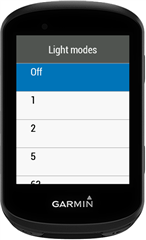
- Other devices: Select the "Light modes" menu and post which numbers are displayed in the menu and what mode each menu item represents when selected

Example for Bontrager Ion Pro RT:
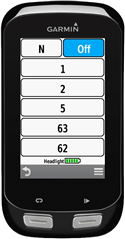

1 -> High steady beam
2 -> Medium steady beam
5 -> Low steady beam
63 -> Day flash
62 -> Night flash

There are some features that could be possible to add in the future, but would require Garmin to add them to the CIQ api. In case you are interested in any of the below features, consider upvoting their feature request thread:

1. Control lights based on the ambient light sensor available on some devices:
https://forums.garmin.com/developer/connect-iq/i/bug-reports/ambient-light-sensor-api-access 

Known issues:

1. Unable to use Tempe Visualizer or TyreWiz Data Field alongside Smart Bike Lights:
https://forums.garmin.com/developer/connect-iq/i/bug-reports/lightnetworklistener-onbikelightupdate-not-called-when-certain-data-fields-are-installed

  • I’m probably going to have some time to play with this later but I just picked up this Magicshine Hori 1300 Pro which has an ANT+ control but has trouble forming a light network outside of individual mode directly with my 1050. Which is fine but the beam adjustment etc also doesn’t really work well and can’t even turn it off. So I’m looking forward to figuring out a configuration for it and getting things working here! Great work on this!

  • Hi Maca,

    I use Garmin Varia RearVue 820 for few months. I'd like to switch off it in manual mode (M, Off), but it looks like not working same way as 515. I switched it off, light is off, but when a car/biker is identified (at same speed too) the ligh starts to blink. It is not warmly welcomed by my cycling mates. Is there any way, how to switch of the rear light completely?

    Thanks,

    Milos

  • You might need to disable this in the Garmin Varia App. 

  • Hi Maca,

    (this is a longer version of my send to 'developer' as it appears that was character limited)

    After many years of use, thank you for a great App well done, I updated my 'Bontrager Ion Pro RT' w/micro USB to a 'Trek Ion Pro RT' w/USB-C. I figured the transition would be seamless. But, cannot seem to get past either 'Error 3' for the new Trek Ion Pro RT and Varia RTL515, which are both configured, connected, and network formed.

    On my Edge 1050, I independently cleared and added the two sensors separately: the Varia works fine, the new Trek Ion Pro RT gives out 'Error 3'. So, I know issue is indeed with the new Trek Ion Pro RT. The serial number is updated (should have been the only change, I think), re-did the configurator trying different options, truncating serial # to 9 digits, many times, installed/uninstalled the app and data screens, and went back to just the Trek Ion Pro RT (removed the radar altogether). But, no go.

    I am truly wondering if there is a differences between the old Bontrager Ion Pro RT and the new Trek Ion Pro version.

    'SmartBikeLights' (or the 2 version) blank configuration of the 'Trek Ion Pro RT' and the 'Varia RTL515' outputs the following:

    Trek Ion Pro RT
    (note, there are two rows of N and Off, the Ns and Offs show up and dual select; not sure I remember this from years back)
    N, Off
    N, Off
    1 -> High steady beam
    2 -> Medium steady beam
    5 -> Low steady beam
    (note, no numbers activate flash modes)

    Varia RTL515
    M/N, Off
    4 -> High red light
    2 -> Medium red light
    5 -> Low steady beam
    6 -> Night flash
    7 -> Day flash

    My computer and sensors are:

    - Garmin Edge 1050, Software Version 30.18

    - Trek Ion Pro RT, ID: 37410, S#: 1784320546

    - Garmin Varia RTL515, ID: 298457, S#: 3607399897

    From a starting configurator screen: maca88.github.io/.../

    I add the two devices w/serial numbers - I note that there is no drop-down for 'Trek Ion Pro RT', I assume it is the same as the 'Bontrager Ion Pro RT':

    #4587520,196641:0,1784320546:1:##0,73535488:1,1459916249:1:##7,6:Ion Pro RT:0:16777215:-1!2,:-1,Off:0!1,High:1!1,Medium:2!1,Low:5!1,Day Flash:63!1,Night Flash:62#6,5:Varia 515:0:16777215:-1!2,:-1,Off:0!1,Solid:4!1,Peloton:5!1,Day Flash:7!1,Night Flash:6#0::#0:0#123!:123!#0#0#B4440#1#3#1#1

    Results in 'Error 3' as soon as I save. This similar for stand-alone Trek Ion Pro RT.
    If I remove/re-add the Data Screen I still get Error 3 - Configuration value is invalid, cannot figure out which one...

    If your time allows or others have suggestion, I would appreciate direction.

    Thank you, Tony

    PS,

    Further Update: I turned up my old Edge 830 and configured it with the new Trek Ion Pro light and get a similar Error 3

    Further update: I was able to charge my old Bontrager ION Pro RT and set it up to work on my Edge 830 with minimal headlight only configuration. Works fine. I then just updated the serial # in the configurator and it displays Error #3. In the secondary and tertiary these were blank and I see similar to the Edge 1050:(M vs N)

    M, Off
    M, Off
    1 -> High steady beam
    2 -> Medium steady beam
    5 -> Low steady beam
    (note, no numbers available to activate the flash modes)

    With Error 3, it does seem to me that the new Trek Ion Pro RT has a changed configuration, i.e. light mode that the configurator does not support

  • Hi, hoping to get some help or confirm whether I've hit a bug with the AT1600 and Bike Lights Control.

    Setup:
    - Garmin Edge 1040
    - Magene AT1600 (front)
    - Garmin Varia RTL515 (rear)
    - Bike Lights Control widget, latest version
    - 'Auto Shut-off When Headlight Turns Off' disabled in OnelapFit

    Symptom:
    During an active ride while moving, the AT1600 goes to Off after a few minutes. The widget correctly shows this, but pressing any mode button has no effect. The Varia is unaffected throughout. Crucially, the native Garmin swipe-down menu can recover the light immediately, confirming the ANT+ connection is intact - Bike Lights Control just can't send it back to an on mode once it hits Off.

    What I've tried:
    - Disabled auto shut-off in OnelapFit - no change
    - Tried Smart Bike Lights data field - same behaviour
    - Removed AT1600 from sensors list - widget can no longer see the light, so it clearly depends on native sensor pairing
    - Serial number identification in config - no change

    Current workaround: native Garmin network in Individual mode with AT1600 manually set to Low. Stable but loses quick mode switching.

    Note: I've since upgraded to Edge 1040 firmware 31.29, which includes a fix for CIQ data fields causing UI lag. I haven't retested Smart Bike Lights on the new firmware yet - possibly relevant?

    Questions:
    1. Can Bike Lights Control recover a light the native network has sent to Off, or does it lose control at that point by design?
    2. Could the AT1600 not being on the registered lights list cause the Off command to be mishandled?
    3. Is there a general guide for initial setup, I feel like I'm just missing some setting to ensure BLC or SBL is in charge of the settings.

    This is my string: #16384,90382865::1:##0,73535488::1:##8,7:AT 1600:0:16777215:-1!2,:-1,Off:0!1,High:2!1,Medium:3!1,Medium-Low:4!1,Low:5!1,Strobe:7!1,Fast Strobe:61#6,5:Varia 515:0:16777215:-1!2,:-1,Off:0!1,Solid:4!1,Peloton:5!1,Day Flash:7!1,Night Flash:6#0::#0:0#B3843#14#3#0#0

  • You can do the same workaround as in MyBikeRadar Traffic v3.0 to display the operation status on the screen while the Varia 820 is running
  • Hi, sorry for the late reply. 

    > With Error 3, it does seem to me that the new Trek Ion Pro RT has a changed configuration, i.e. light mode that the configurator does not support

    It is very weird that the new Trek Ion Pro RT has only three modes. Have you tried to do a factory reset? For Bontrager lights this helped when receiving Error 3. On Bontrager the factory reset can be done by pressing and holding the light power button for 15 seconds (release after the second flash). Usually it is required to do it twice as the first reset does turn off ANT+ and the second one re-enables it. I am assuming that Trek has the same method but I am not sure as I do not own one.   

    (note, there are two rows of N and Off, the Ns and Offs show up and dual select; not sure I remember this from years back)

    This is not normal, there should be only one N Off row when clearing the "Lights Configuration" app setting.


  • If I understand the workaround correctly, it is necessary to establish the ANT+ connection to the radar manually when it is paired via Bluetooth. Since many people seem to have this issue, I will try to add this workaround to the data field in the next few days.

  • Hi maca88, 

    Thank you for your efforts in creating such a great and useful app. Regarding the RearVue 820, if I understand correctly, Garmin has opened up its BLE connection to developers of Garmin IQ apps.
    developer.garmin.com/.../

  • I don't think that relates to CIQ apps