Smart Bike Lights (Data Field) / Bike Lights Control (Widget)

I've made two open source CIQ applications to control ANT+ lights:

- Smart Bike Lights (data field): https://apps.garmin.com/en-US/apps/0d9fd828-c932-4470-9c37-fd2828881888 

      Configurator: https://maca88.github.io/SmartBikeLights/ 

- Bike Lights Control (widget): https://apps.garmin.com/en-US/apps/fa3c2332-76e3-4ba1-8528-32a0fd617ab1 

     Configurator: https://maca88.github.io/BikeLightsControl/ 
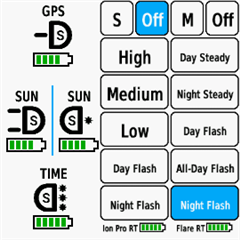
Smart Bike Lights features:
- Automatic light control (Smart mode) based on the configured filters (sunset, sunlight, speed, ...)
- Manual light control (only for Edge devices with a touch screen or devices with CIQ 3.2 and more than 32KB memory)
- Records lights modes that are displayed in Garmin Connect

Bike Lights Control features:
- Manual light control (available to all devices)

Both applications can be installed on the same device, which can be useful for low end devices (e.g. Edge 520) where "Bike Lights Control" can be used to change light modes manually and "Smart Bike Lights" for automatic light control.

Currently registered ANT+ lights:
- Bontrager Ion Pro RT
- Bontrager Ion 200 RT
- Bontrager Flare RT
- Garmin Varia RTL500
- Garmin Varia RTL510
- Garmin Varia RTL515
- Garmin Varia HL500
- Garmin Varia UT800

in case your ANT+ light is not on the list you can help by doing the following:

1. Install Bike Lights Control
2. Pair your bike light with your Garmin device
3. Open the widget:
- Edge with a touch screen: post which numbers are displayed on the buttons and what mode each button represents when pressed
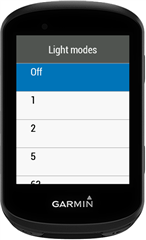
- Other devices: Select the "Light modes" menu and post which numbers are displayed in the menu and what mode each menu item represents when selected

Example for Bontrager Ion Pro RT:
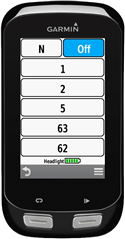

1 -> High steady beam
2 -> Medium steady beam
5 -> Low steady beam
63 -> Day flash
62 -> Night flash

There are some features that could be possible to add in the future, but would require Garmin to add them to the CIQ api. In case you are interested in any of the below features, consider upvoting their feature request thread:

1. Control lights based on the ambient light sensor available on some devices:
https://forums.garmin.com/developer/connect-iq/i/bug-reports/ambient-light-sensor-api-access 

Known issues:

1. Unable to use Tempe Visualizer or TyreWiz Data Field alongside Smart Bike Lights:
https://forums.garmin.com/developer/connect-iq/i/bug-reports/lightnetworklistener-onbikelightupdate-not-called-when-certain-data-fields-are-installed

  • Thanks a lot for creating the test version — I really appreciate it.

    I tested it and overall it does work, but in some cases it behaves a bit inconsistently.
    Here’s what I observed step by step:

    Expected / correct behavior:

    • When I open the activity, the data field initializes and the light is off.

    • When I start the activity, the light switches to the configured mode (in my case in the evening: mode 1).

    • When I pause the activity, the light turns off.

    • When I resume the activity, the light switches back to mode 1.

    So far, this works exactly as expected Thumbsup

    Unexpected behavior:

    • If I manually change the mode using the widget (e.g. to mode 6):

      • The light correctly switches to mode 6.

      • The widget highlights 6 and switches to manual mode.

    • But if I then switch to “S” (Smart mode):

      • Mode 1 gets highlighted in the UI,

      • but the light itself does not change and keeps flashing in mode 6.

    • Now, if I pause the activity:

      • The light turns off correctly.

    • When I resume the activity:

      • Mode 1 is highlighted,

      • but the light still continues flashing in mode 6.

    Manual (“M”) mode also behaves oddly:

    • Switching to mode 6 works and highlights correctly.

    • After that, switching to any other mode does nothing — no mode change and no highlight change.

    Let me know if you want me to test any specific scenario or build.

  • Got this working on my 1050 and RTC715:

    ###0,73535488::1:#4,4!CARON:1:7:2:0I[120]0!Brake:1:4:2:0A[-10!Night:1:6:2:0Es-1800,r1800!:1:0:0:0D=1##6,5:Varia 715:0:16777215:-1!2,:-1,Off:0!1,Solid:4!1,Peloton:5!1,Day Flash:7!1,Night Flash:6#0::#0:1#123!:123!#0#0#B4440##11#0#0

    What is wrong with this??, on my 1030 plus and RTL515:

    ###0,73535488::1:#4,4!CARON:1:7:2:0I[120]0!Brake:1:4:2:0A[-10!Night:1:6:2:0Es-1800,r1800!:1:0:0:0D=1##6,5:Varia 515:0:16777215:-1!2,:-1,Off:0!1,Solid:4!1,Peloton:5!1,Day Flash:7!1,Night Flash:6#0::#0:1#123!:123!#0#0#B3570##3#0#0

    Great app, thanks!!

  • Hi,

    Does anyone have problem with battery level in ion200rt? Widget shows me still low battery, event after charging my light. I have a second light - flare200rt and seems to be alright.

    I should appreciate od anyone give me solution

  • Sorry for the late reply, I took some time off.
    Unfortunately, I am not able to reproduce the issues with an ION Pro RT light.

    Manual (“M”) mode also behaves oddly:

    On the UI, the tapped light mode should be highlighted as soon the next ANT page 1 is transmitted from the light. 
    In this case it seems that the page 1 is not transmitted anymore, which is very odd.
    Does this happen only for mode 6 or does it happen also for other modes? If the smart mode works fine for mode 1 then it should also work in manual mode as the logic of changing the light mode is the same.

    But if I then switch to “S” (Smart mode):

    • Mode 1 gets highlighted in the UI,

    • but the light itself does not change and keeps flashing in mode 6.

    In this case looks like the command for changing the light mode was not processed by the light for some reason, but the light still continued to transmit page 1, which triggered the UI update. Does this happen every time or only occasionally?

  • The configuration for 1030 plus and RTL515 look fine and it should work. Can you elaborate what exactly does not work... do you see "No Network", "Error X" or does the light mode not change when it should?
    If you see No Network", you did not correctly paired the light. For pairing a Varia you need to hold the power button for 2-3 seconds until the pink light starts blinking (paring mode) and then you need to use the "All sensors" option when searching for new sensors in "Sensors" menu.
    If the light is correctly paired, make sure that the light is in "Smart mode". You should have "S" inside the light icon or in the top left button if full screen.

  • Hi,

    This is a known problem of Flare RT light firmware and the only workaround to fix this is to do a factory reset after charging it. There is a dedicated thread for this issue:  Bontrager Flare RT battery bug 

  • That might actually be related to how FR300 handles mode 1.

    From what I can observe on the FR300 ANT+:

    • Mode 1 does not behave like a true “100% steady” mode.

    • In practice, mode 1 looks identical to mode 2 (75%), both in brightness and behavior.

    • When cycling modes using the physical button, you can clearly see the light dim when it switches to mode 2, which suggests that mode 1 is either not implemented at all or is internally mapped to the same output as mode 2.

    So it is possible that:

    • The light does not really support mode 1, even though it accepts it via ANT+

    • Or it ignores the command internally, which would explain why:

      • the UI highlights mode 1

      • but the light keeps running in mode 6 (or whatever was active before)

    Given this, it might make sense to completely remove mode 1 from the configuration and test only with the modes that are known to actually work on the FR300 (2 / 4 / 6 / 7).

    If mode 1 is causing the internal state to diverge because the light doesn’t really have it, that could explain the inconsistent behavior when switching from Manual to Smart mode.

    I can test this variant as well if you think it’s worth trying.

  • Given this, it might make sense to completely remove mode 1 from the configuration and test only with the modes that are known to actually work on the FR300 (2 / 4 / 6 / 7).

    I removed mode 1 from the hardcoded configuration and re-build the application. You can get the new prg from the following link:
    https://github.com/maca88/SmartBikeLights/blob/test/internal-mode-state/Build/Edge%20840/SmartBikeLights.prg