


I've made two open source CIQ applications to control ANT+ lights:
- Smart Bike Lights (data field): https://apps.garmin.com/en-US/apps/0d9fd828-c932-4470-9c37-fd2828881888
Configurator: https://maca88.github.io/SmartBikeLights/
- Bike Lights Control (widget): https://apps.garmin.com/en-US/apps/fa3c2332-76e3-4ba1-8528-32a0fd617ab1
Configurator: https://maca88.github.io/BikeLightsControl/
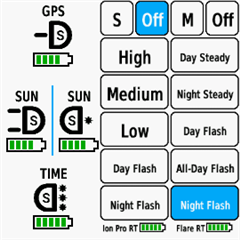
Smart Bike Lights features:
- Automatic light control (Smart mode) based on the configured filters (sunset, sunlight, speed, ...)
- Manual light control (only for Edge devices with a touch screen or devices with CIQ 3.2 and more than 32KB memory)
- Records lights modes that are displayed in Garmin Connect
Bike Lights Control features:
- Manual light control (available to all devices)
Both applications can be installed on the same device, which can be useful for low end devices (e.g. Edge 520) where "Bike Lights Control" can be used to change light modes manually and "Smart Bike Lights" for automatic light control.
Currently registered ANT+ lights:
- Bontrager Ion Pro RT
- Bontrager Ion 200 RT
- Bontrager Flare RT
- Garmin Varia RTL500
- Garmin Varia RTL510
- Garmin Varia RTL515
- Garmin Varia HL500
- Garmin Varia UT800
in case your ANT+ light is not on the list you can help by doing the following:
1. Install Bike Lights Control
2. Pair your bike light with your Garmin device
3. Open the widget:
- Edge with a touch screen: post which numbers are displayed on the buttons and what mode each button represents when pressed
- Other devices: Select the "Light modes" menu and post which numbers are displayed in the menu and what mode each menu item represents when selected
Example for Bontrager Ion Pro RT:
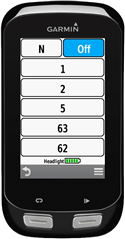
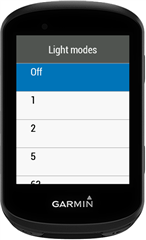
1 -> High steady beam
2 -> Medium steady beam
5 -> Low steady beam
63 -> Day flash
62 -> Night flash
There are some features that could be possible to add in the future, but would require Garmin to add them to the CIQ api. In case you are interested in any of the below features, consider upvoting their feature request thread:
1. Control lights based on the ambient light sensor available on some devices:
https://forums.garmin.com/developer/connect-iq/i/bug-reports/ambient-light-sensor-api-access
Known issues:
1. Unable to use Tempe Visualizer or TyreWiz Data Field alongside Smart Bike Lights:
https://forums.garmin.com/developer/connect-iq/i/bug-reports/lightnetworklistener-onbikelightupdate-not-called-when-certain-data-fields-are-installed


