Smart Bike Lights (Data Field) / Bike Lights Control (Widget)

I've made two open source CIQ applications to control ANT+ lights:

- Smart Bike Lights (data field): https://apps.garmin.com/en-US/apps/0d9fd828-c932-4470-9c37-fd2828881888 

      Configurator: https://maca88.github.io/SmartBikeLights/ 

- Bike Lights Control (widget): https://apps.garmin.com/en-US/apps/fa3c2332-76e3-4ba1-8528-32a0fd617ab1 

     Configurator: https://maca88.github.io/BikeLightsControl/ 
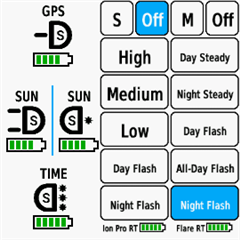
Smart Bike Lights features:
- Automatic light control (Smart mode) based on the configured filters (sunset, sunlight, speed, ...)
- Manual light control (only for Edge devices with a touch screen or devices with CIQ 3.2 and more than 32KB memory)
- Records lights modes that are displayed in Garmin Connect

Bike Lights Control features:
- Manual light control (available to all devices)

Both applications can be installed on the same device, which can be useful for low end devices (e.g. Edge 520) where "Bike Lights Control" can be used to change light modes manually and "Smart Bike Lights" for automatic light control.

Currently registered ANT+ lights:
- Bontrager Ion Pro RT
- Bontrager Ion 200 RT
- Bontrager Flare RT
- Garmin Varia RTL500
- Garmin Varia RTL510
- Garmin Varia RTL515
- Garmin Varia HL500
- Garmin Varia UT800

in case your ANT+ light is not on the list you can help by doing the following:

1. Install Bike Lights Control
2. Pair your bike light with your Garmin device
3. Open the widget:
- Edge with a touch screen: post which numbers are displayed on the buttons and what mode each button represents when pressed
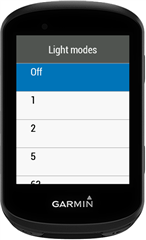
- Other devices: Select the "Light modes" menu and post which numbers are displayed in the menu and what mode each menu item represents when selected

Example for Bontrager Ion Pro RT:
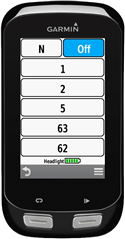

1 -> High steady beam
2 -> Medium steady beam
5 -> Low steady beam
63 -> Day flash
62 -> Night flash

There are some features that could be possible to add in the future, but would require Garmin to add them to the CIQ api. In case you are interested in any of the below features, consider upvoting their feature request thread:

1. Control lights based on the ambient light sensor available on some devices:
https://forums.garmin.com/developer/connect-iq/i/bug-reports/ambient-light-sensor-api-access 

Known issues:

1. Unable to use Tempe Visualizer or TyreWiz Data Field alongside Smart Bike Lights:
https://forums.garmin.com/developer/connect-iq/i/bug-reports/lightnetworklistener-onbikelightupdate-not-called-when-certain-data-fields-are-installed

  • Thanks for the explanation — that makes perfect sense.

    Regarding the workaround you mentioned (tracking the current mode internally instead of relying on the broadcasted one):
    I completely understand the risk of the internal state getting out of sync with the real mode.
    But in this specific case, I think that would still be much better than the current behavior.

    For the FR300, the light never confirms mode changes anyway, so Smart Bike Lights essentially has no reliable state to work with.
    If the app simply assumed:

    • “whenever I send a mode change, the light applies it”

    …that would already be more functional than the default ANT+ approach, and the occasional desynchronization wouldn’t be a big issue.
    Especially because the user typically changes modes manually through the app, not through the button.

    If you ever decide to create a side version / experimental build with this internal-state workaround, I’m absolutely willing to test it and provide feedback.
    Given how many limitations the FR300 has, even a partially-working solution would be a huge improvement.

    Let me know if that’s something you’d consider — I’d be happy to help with testing.

  • Just moved from 530 to 1040, is the best way to move between configs of lights the triple tap of the off button? No other quicker way to add a button for config primary, secondary etc? Thanks 

  • Hello

    For some reason, my Edge 1050 cannot update to the latest version; it remains stuck at version 0.27.1. Removing and reinstalling it doesn't help, and Garmin Express doesn't provide any update notifications.

  • I created a test version with the internal state workaround for Edge 840:
    https://github.com/maca88/SmartBikeLights/blob/test/internal-mode-state/Build/Edge%20840/SmartBikeLights.prg

    I hardcoded the configuration that you provided in an earlier post for FR300. You need to copy the prg file in the /Garmin/Apps folder on your Edge. Before that, you need to remove the existing data field that you use for FR300. The test version is called "Smart Bike Lights T". 

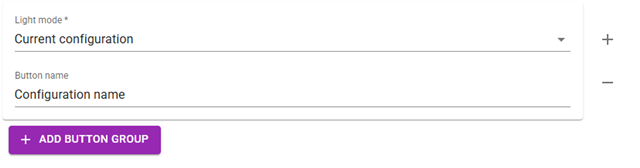
  • you can add a button on the light panel to switch the current configuration:

    with this button you will be able to move to the next available configuration (e.g. from Primary to Secondary) 

  • Hi,

    you need to make sure that you have the latest firmware, for Edge 1050 the latest firmware version is 29.22:
    Edge 1050 SW 29.22

    If you have the latest firmware and still unable to install the new version of Smart Bike Lights, you can try to use the Garmin Mobile app to install Smart Bike Lights. If also that does not help, then I suggest to contact Garmin support as application/firmware updates are outside of my control.

  • Thanks for creating the test version, I really appreciate it.

    I tested Smart Bike Lights T on my Edge 840, but unfortunately it looks like it doesn’t connect to the light at all.

    What I observe:

    • With the production version of Smart Bike Lights and the same configuration, I’m able to connect the FR300 and control it via Individual Light Network.

    • With the test version (Smart Bike Lights T), the data field stays on “No network” and the light never connects.

    I followed your instructions:

    • Removed the existing Smart Bike Lights data field used for the FR300

    • Copied the SmartBikeLights.prg test file into /Garmin/Apps

    • Added Smart Bike Lights T as a data field to the activity

    Despite that, the network never forms.

    Let me know if there’s anything else I should try, or if you want me to test something specific on my side.

  • Thanks. Is there away to check which configuration is current only within the data screen?

  • my bad, I re-upladed the prg file, same link. Now it should work.  

  • the current configuration can only be displayed when having the data field on the whole screen (light panel) by adding the "Current configuration" button.