Smart Bike Lights (Data Field) / Bike Lights Control (Widget)

I've made two open source CIQ applications to control ANT+ lights:

- Smart Bike Lights (data field): https://apps.garmin.com/en-US/apps/0d9fd828-c932-4470-9c37-fd2828881888 

      Configurator: https://maca88.github.io/SmartBikeLights/ 

- Bike Lights Control (widget): https://apps.garmin.com/en-US/apps/fa3c2332-76e3-4ba1-8528-32a0fd617ab1 

     Configurator: https://maca88.github.io/BikeLightsControl/ 
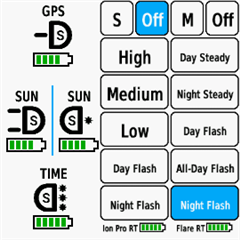
Smart Bike Lights features:
- Automatic light control (Smart mode) based on the configured filters (sunset, sunlight, speed, ...)
- Manual light control (only for Edge devices with a touch screen or devices with CIQ 3.2 and more than 32KB memory)
- Records lights modes that are displayed in Garmin Connect

Bike Lights Control features:
- Manual light control (available to all devices)

Both applications can be installed on the same device, which can be useful for low end devices (e.g. Edge 520) where "Bike Lights Control" can be used to change light modes manually and "Smart Bike Lights" for automatic light control.

Currently registered ANT+ lights:
- Bontrager Ion Pro RT
- Bontrager Ion 200 RT
- Bontrager Flare RT
- Garmin Varia RTL500
- Garmin Varia RTL510
- Garmin Varia RTL515
- Garmin Varia HL500
- Garmin Varia UT800

in case your ANT+ light is not on the list you can help by doing the following:

1. Install Bike Lights Control
2. Pair your bike light with your Garmin device
3. Open the widget:
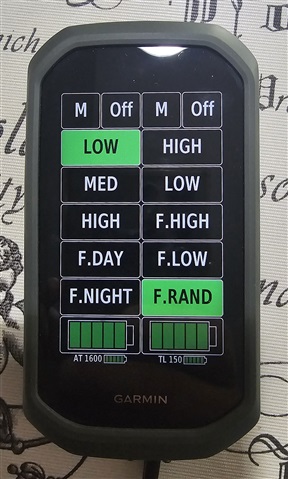
- Edge with a touch screen: post which numbers are displayed on the buttons and what mode each button represents when pressed
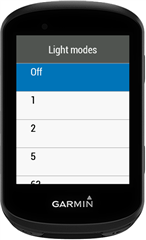
- Other devices: Select the "Light modes" menu and post which numbers are displayed in the menu and what mode each menu item represents when selected

Example for Bontrager Ion Pro RT:
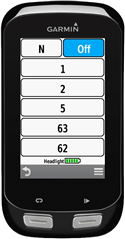

1 -> High steady beam
2 -> Medium steady beam
5 -> Low steady beam
63 -> Day flash
62 -> Night flash

There are some features that could be possible to add in the future, but would require Garmin to add them to the CIQ api. In case you are interested in any of the below features, consider upvoting their feature request thread:

1. Control lights based on the ambient light sensor available on some devices:
https://forums.garmin.com/developer/connect-iq/i/bug-reports/ambient-light-sensor-api-access 

Known issues:

1. Unable to use Tempe Visualizer or TyreWiz Data Field alongside Smart Bike Lights:
https://forums.garmin.com/developer/connect-iq/i/bug-reports/lightnetworklistener-onbikelightupdate-not-called-when-certain-data-fields-are-installed

  • Hi,

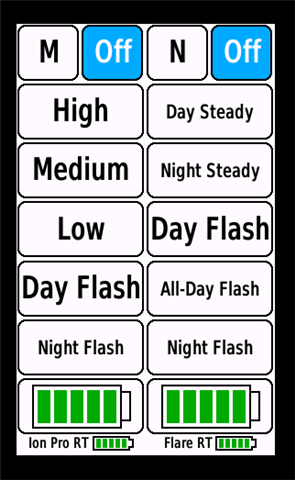
    - Is there a way of adding a filed or button per light where that shows the battery that appears in the bottom? I'm afraid it shows very small I can't realy read it (thinks I'm getting old)

    With the latest version 0.30.0 it is possible to add the battery inside a button:

    - Adding the option of a field showing battery in %

    That is not possible as ANT+ lights do only return a value from 1 (New) to 5 (Critical).

    Showing the calculated battery remaining in hour:minutes  for the selected light mode (this data would change to the remaining battery time each time you change light mode).

    In am not sure how valuable this would be given the fact that the battery status send via ANT+ is just an approximation (1-5). 

  • Would it be possible to run two instances of Smart Bike Lights side-by-side
    one instance using Individual Light Network just for the Ravemen FR300 ANT+,
    and the other instance running in the normal ANT+ Light Network mode for my Garmin Varia radar?

    Yes, that is possible.

    You can install "Smart Bike Lights #2" data field and configure it to use "Individual Light Network" with Ravemen FR300.

  • That's awesome! Thank you for implementing the battery inside the button!!!  Now i read perfectly the battery level.

    It works smoothly.

    My tail light is a Giant Recon+ 300 (I used the configuration from your database of the 150 and it worked).

    My front light is a Magene AT1600.

    The tails swith on automatically when I turn my Garmin ON. And the light starts flashing (is the mode I chose on the configurartion)

    The Magene requires that I push once the ON button.

    I saw on the IGPSporr light with their Computer that they shiw the batery in %. That's why I asked of possible.

    For the last option, I don't know if the lights communicate compsumption per mode. In that case it may be interesting as an orientation that it tells (example):

    2 Battery Bars:

    - Light High: 1h30'

    - Light Low: 3h00'

    1 Battery Bar:

    - Light High: 0h30'

    - Light Low: 1h00'

    Like this at least as you see that the battery bars go down you can advance the approx lbattery last per light mode. Also It may be a good option that you can configure a "Bip Sound" when the battery goes 1 bar down.

    In any case: My respects for your.job!!!

  • Hi Maca,

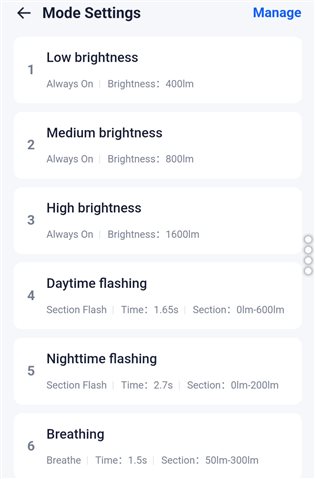
    I've bought Magene AT1600 front light. But I have problem to map the light modes I see in the vendor application with modes in your configuration application. I cannot find how to map "Breathing" and "Nightime flashing" from the light application in your configuration application:

    Thanks for help,

    Milos

  • I saw on the IGPSporr light with their Computer that they shiw the batery in %. That's why I asked of possible.

    Via ANT+ profile for lights it is not possible to get the percentage. IGPSporr lights are most likely sending the percentage via a custom communication protocol (e.g. custom BLE profile).

    For the last option, I don't know if the lights communicate compsumption per mode. In that case it may be interesting as an orientation that it tells (example):

    They do not. That is something that could be still added, but I am not sure whether it would be enough to define just duration for each mode when full (e.g. 8h when 5 bars and the rest calculated) or it would require to configure for each light mode the remaining duration for each bar. I never tested whether the bars do go down evenly when using the same mode.

    Also It may be a good option that you can configure a "Bip Sound" when the battery goes 1 bar down.

    Isn't the beep already triggered by Edge when the battery gets low?

  • Hi,

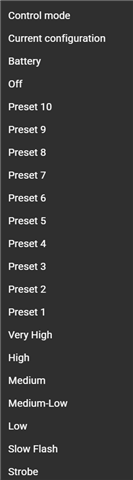
    "Breathing" -> Should be "Preset 6" in the Lights Configurator

    "Nightime flashing" -> Should be "Preset 5" in the Lights Configurator


  • I think there is one more thing that might be worth implementing (or at least considering) for the Individual Light Network, because it seems to be another side-effect of the FR300 not reporting mode changes back to the network.

    With the following configuration:

    #::1:-65536,1022#5,3!:2:7:0:0H]2Er-300,s300!:2:1:0:0H]2Es300,r-300!:1:0:0:0D=1###8,7:RAVEMEN FR300:0:16777215:-1!2,:-1,:-2!1,1:1!1,2:2!1,4:4!1,7:7!1,6:6!1,:-3##1:23553:#0:0#123!:123!#0#0#B4062#99##0#0

    I’ve noticed two issues:

    1. When auto-pause happens, the light turns off correctly,
      but when the activity resumes, the light does NOT turn back on.
      I assume this is because the FR300 never reports its current mode.

    2. When I manually cycle through modes using the physical button,
      and I switch to OFF, the light does turn off —
      but the OFF button doesn’t get highlighted in the UI.
      Then, when I try to turn the light back on from the app,
      it doesn’t activate the mode I select.
      Instead, it always turns on the previous mode that was active before turning the light off.

    This makes sense if the FR300 simply never broadcasts the current mode,
    but I wanted to check with you whether there is any workaround on the app side —
    maybe explicitly applying the requested mode?

    Not sure if this is technically possible with the limitations of Individual Light Network,
    but I thought it was worth mentioning.

  • I’ve tested Smart Bike Lights also with just the Garmin Varia RTL515, using the following configuration:

    ###0,73535488::1:#5,3!Day:2:7:0:0H]2Er-300,s300!Night:2:6:0:0H]2Es300,r-300!:1:0:0:0D=1##7,4:Varia 515:0:16777215:0!2,:-1,Off:0!2,Solid:4,Peloton:5!2,Day Flash:7,Night Flash:6!1,:-2#0::#0:0#123!:123!#0#0#B4062##3#0#0

    Everything works more or less correctly, except for one issue:

    When the activity is paused, the radar/light turns off — which is fine.
    But when the Edge goes to sleep and then wakes up, the RTL515 always turns on in Night Flash mode.
    Even after continuing the activity, it does not switch back to the correct mode automatically.

    The only way to fix it is to open the Smart Bike Lights data screen.
    When I switch to the screen, it briefly shows “No network”, and then after a moment the configuration loads and the radar/light switches to the proper mode again.

    Is this expected behavior?
    Do I really need to open the Smart Bike Lights data field after every sleep/wake cycle for the network to reinitialize?

    Just trying to understand whether this is a limitation of how Edge handles Light Networks after sleep, or if something could be improved on the app side.

    Thanks!

  • This makes sense if the FR300 simply never broadcasts the current mode,
    but I wanted to check with you whether there is any workaround on the app side —
    maybe explicitly applying the requested mode?

    Smart Bike Lights calculates the next light mode based on the configured filters every second. A command to set the next mode is only sent if the light’s currently broadcasted mode differs from the calculated one. Without the light updating its current mode, the configured filters will not work as expected.

    A partial workaround would be to track the current light mode internally instead of relying on the broadcasted value. However, since the light does not provide feedback confirming whether a mode change actually occurred, the internal state could become unsynchronized. This may lead to a new issue in which Smart Bike Lights displays a different selected mode than the one the light is actually using.

    In short, Smart Bike Lights filters do not work properly with the FR300, so I would not recommend using them.

  • Do I really need to open the Smart Bike Lights data field after every sleep/wake cycle for the network to reinitialize?

    I tested this on Edge 1040 and it works fine for me. After Edge wakes up from sleep, pressing the “play” button to resume the activity makes the filters work, even if Smart Bike Lights isn’t on the current data screen. Does this happen every time your device wakes up, or does it only fail sometimes?

    Unfortunately, sleep behavior differs from device to device, and CIQ doesn’t provide an API to detect when a device wakes from sleep or is about to go to sleep. Smart Bike Lights uses some workarounds to detect wake events, but it seems they don’t work on the Edge 840.