Smart Bike Lights (Data Field) / Bike Lights Control (Widget)

I've made two open source CIQ applications to control ANT+ lights:

- Smart Bike Lights (data field): https://apps.garmin.com/en-US/apps/0d9fd828-c932-4470-9c37-fd2828881888 

      Configurator: https://maca88.github.io/SmartBikeLights/ 

- Bike Lights Control (widget): https://apps.garmin.com/en-US/apps/fa3c2332-76e3-4ba1-8528-32a0fd617ab1 

     Configurator: https://maca88.github.io/BikeLightsControl/ 
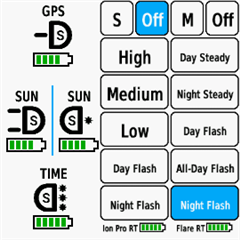
Smart Bike Lights features:
- Automatic light control (Smart mode) based on the configured filters (sunset, sunlight, speed, ...)
- Manual light control (only for Edge devices with a touch screen or devices with CIQ 3.2 and more than 32KB memory)
- Records lights modes that are displayed in Garmin Connect

Bike Lights Control features:
- Manual light control (available to all devices)

Both applications can be installed on the same device, which can be useful for low end devices (e.g. Edge 520) where "Bike Lights Control" can be used to change light modes manually and "Smart Bike Lights" for automatic light control.

Currently registered ANT+ lights:
- Bontrager Ion Pro RT
- Bontrager Ion 200 RT
- Bontrager Flare RT
- Garmin Varia RTL500
- Garmin Varia RTL510
- Garmin Varia RTL515
- Garmin Varia HL500
- Garmin Varia UT800

in case your ANT+ light is not on the list you can help by doing the following:

1. Install Bike Lights Control
2. Pair your bike light with your Garmin device
3. Open the widget:
- Edge with a touch screen: post which numbers are displayed on the buttons and what mode each button represents when pressed
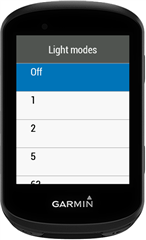
- Other devices: Select the "Light modes" menu and post which numbers are displayed in the menu and what mode each menu item represents when selected

Example for Bontrager Ion Pro RT:
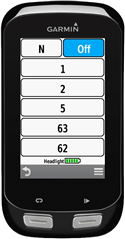

1 -> High steady beam
2 -> Medium steady beam
5 -> Low steady beam
63 -> Day flash
62 -> Night flash

There are some features that could be possible to add in the future, but would require Garmin to add them to the CIQ api. In case you are interested in any of the below features, consider upvoting their feature request thread:

1. Control lights based on the ambient light sensor available on some devices:
https://forums.garmin.com/developer/connect-iq/i/bug-reports/ambient-light-sensor-api-access 

Known issues:

1. Unable to use Tempe Visualizer or TyreWiz Data Field alongside Smart Bike Lights:
https://forums.garmin.com/developer/connect-iq/i/bug-reports/lightnetworklistener-onbikelightupdate-not-called-when-certain-data-fields-are-installed

  • maca88

    Thanks for doing the conversion for me.

  • Hi maca88,

    I contacted Ravemen directly to clarify the ANT+ behavior of the FR300 ANT+, and I got a response from their product development team (Bob).
    Here is a quick summary of what they told me:

    • The light did pass ANT+ certification, but they admit they did not follow the full ANT+ Lights specification, especially the parts related to reporting the current mode, physical-button updates, and extended mode mapping.

    • They implemented only the functions needed for the Garmin built-in Light Control page, claiming that this is their “main concern” because most users control the light via the Garmin page.

    • They did not test Smart Bike Lights or Bike Lights Control apps at all.

    • They confirm that the light does not send mode updates when switching modes via the physical button — and they consider this “expected”, because they didn’t implement the full spec.

    • They are not sure if a stricter implementation of the official ANT+ profile would still work with Garmin the way they want.

    • The FR300 ANT+ cannot receive firmware updates, so any fixes are unlikely.

    Given all this, it looks like the FR300 ANT+ implementation is basically incomplete, and Ravemen doesn’t plan to change anything.

    With that in mind, would it be possible on your side to support the FR300 ANT+ as it currently works, so that Smart Bike Lights doesn’t have to rely on Individual Light Network for basic control?
    Even just a minimal compatibility mode would be super helpful for users of this light.

    Thanks again for all your work — without your apps, I wouldn’t have even discovered how broken the ANT+ implementation was.

  • The FR300 ANT+ cannot receive firmware updates, so any fixes are unlikely.

    That is sad :/

    With that in mind, would it be possible on your side to support the FR300 ANT+ as it currently works, so that Smart Bike Lights doesn’t have to rely on Individual Light Network for basic control?

    Unfortunately, that isn’t possible. When using the native light network, the only available method for changing the light mode is the setMode function from the CIQ SDK. If setMode works only for turning the light off and not for other modes, there’s nothing I can do to fix that. Since the CIQ SDK is closed source, I can’t investigate why it behaves that way.

  • Thanks for the clarification.

    But just to confirm one thing — shouldn’t setMode at least work for the four modes that do function through the Garmin’s native Light Control page?
    (2 = steady 75%, 4 = steady 50%, 6 = flash, 7 = fast variable flash)

    Earlier in our testing, these four modes behaved consistently when triggered from Garmin’s own widget, so I assumed setMode() would be able to switch between them as well, even if the rest of the ANT+ implementation is broken.

    Is there something about the FR300’s ANT+ behavior that prevents setMode from working even with the modes that are recognized by Garmin?

  • shouldn’t setMode at least work for the four modes that do function through the Garmin’s native Light Control page?

    I would also assume the same, but for an unknown reason it does not work. I had the same issue in the past with See.Sense ICON2 light, where I was able to change the light mode with the Garmin widget, but not with the setMode function. That was the main reason why I created the Individual Light Network. 

    Earlier in our testing, these four modes behaved consistently when triggered from Garmin’s own widget, so I assumed setMode() would be able to switch between them as well, even if the rest of the ANT+ implementation is broken.

    Garmin light widget most likely does not use the CIQ SDK to control the light modes.

    Is there something about the FR300’s ANT+ behavior that prevents setMode from working even with the modes that are recognized by Garmin?

    I am not able to give a definitive answer because I don’t know where the issue lies, and I have no way to verify it. It’s possible that setMode isn’t sending the 34-data page (the command used to change the light mode) to the light, or that the light is rejecting the command. My guess is that the command is never actually sent, but that’s only speculation. Ravemen would be the ones who can confirm this.

  • Hi everyone,
    could you please help me? I’m just a regular user and not very technical. I have a Magene AT1200 smart light and a Garmin Edge 1030.
    I would like to set it up so that the Edge can control the light and use the automatic modes (day/night, etc.). I have read through the posts here, but I am still confused about how to set it up correctly.
    Could someone explain the steps or share a link to a guide or tutorial?
    Thank you very much!
  • Hi! Thank you for your great work! By far the best lights datafield and controller.

    I just have a (or few) question or proposal:

    - Is there a way of adding a filed or button per light where that shows the battery that appears in the bottom? I'm afraid it shows very small I can't realy read it (thinks I'm getting old)

    And the below would be just awesome if it was feasable:

    - Adding the option of a field showing battery in %

    And this one below is just the Master Degree for the app:

    - Showing the calculated battery remaining in hour:minutes  for the selected light mode (this data would change to the remaining battery time each time you change light mode).

    Again, thank you!

  • Hi,

    1. Install Smart Bike Lights using Garmin Express or Garmin Mobile: https://apps.garmin.com/en-US/apps/0d9fd828-c932-4470-9c37-fd2828881888 

    2. Create a configuration by using the Lights Configurator: https://maca88.github.io/SmartBikeLights/ 

    3. Set "Lights Configurator" app setting of Smart Bike Lights by using Garmin Express or Garmin Mobile

    4. Add Smart Bike Lights data field on the desired data screen of your activity. Usually CIQ data fields are located in the "CIQ Connect" category 

    Check the following post for how to set the configuration with Garmin Express: https://github.com/maca88/SmartBikeLights/discussions/62#discussioncomment-9375545

  • Hi maca88,

    I also want to thank you for your work.
    What _slash_ wrote about Ravemens FR300 ANT+ is what I already thought. By the way, if you use the hardware button once on the light, it will not be controllable by Garmin’s light widget.
    I really appreciate that they communicate so open, but they should have gone the whole way and implement it proper.

    What I did: I was allowed to not send back the replaced unit when I got my replacement. I sold it for half the price with open communication that it will not work with ANT+ to a coworker. We now paid half price for an FR300 and consider it a light without ANT+ and are happy.


  • One more question came to mind regarding this whole situation:

    Would it be possible to run two instances of Smart Bike Lights side-by-side
    one instance using Individual Light Network just for the Ravemen FR300 ANT+,
    and the other instance running in the normal ANT+ Light Network mode for my Garmin Varia radar?

    In other words:

    • Smart Bike Lights #1 → Individual Light Network → Ravemen FR300

    • Smart Bike Lights #2 → Standard Light Network → Garmin Varia

    Is something like this even technically feasible within CIQ, or would the two instances conflict with each other?
    I’m not sure if it’s possible at all, but I wanted to ask before I completely give up on having both devices controlled properly.

    Would this setup make sense, or is it impossible due to how the apps or light networks are handled?

    Thanks again for your help.