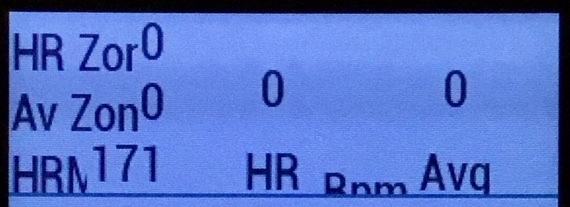
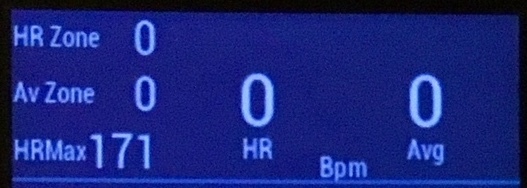
I'm not sure if this is expected or not, but there seems to be a difference between Gfx.FONT_xxxx and Gfx.FONT_SYSTEM_xxxx on Edge 1030 devices. I don't see the issue on Edge520 and Edge1000. Basically, the System fonts on the 1030 appear to have a larger "XTINY" font compared to the .FONT_XTINY version. As per the example images, attached. Something to be aware of if you're positioning text (with drawText) on the screen. community.garmin.com/.../1274870.jpgcommunity.garmin.com/.../1274871.jpg
yes, on some devices, FONT_* and FONT_SYSTEM_* can be different. The Sim should reflect how the look on the the device.
A tip for positioning with drawText, is dc.getFontHeight() and dc.getTextWidthInPixels() can come in handy, especially if you are supporting multiple devices. The way I do it is in onLayout I set the different x/y's I need, and then in onUpdate, just use those values. You can also use resource overrides to set x/y based on the device
The images I attached are of an actual device. The simulator does not show the problem, it looks perfect in the simulator (that's the frustrating part).
I have another issue with differences between the simulator and layout on Edge520 devices (I'll create a new post on this later once I have some pics), but basically, again, the simulator layout is perfect but on the actual 520 device I have to add 3 pixels to The Y coordinates and 2 pixels to the X coords of any drawText() function for it to match what's shown in the simulator.
I met the problem the same, but only with localized settings. Using English will be most of the time match the actual device, but use localized language such as Chinese, emmmm...
Also, indeed there is some pixel difference between SIM font height and actual device. I met the problem on 1000/520 the same.