


I've got a user complaint telling me that one of 2 icons is not being displayed on my datafield on his fenix 7X Solar, neither in black or white background mode:
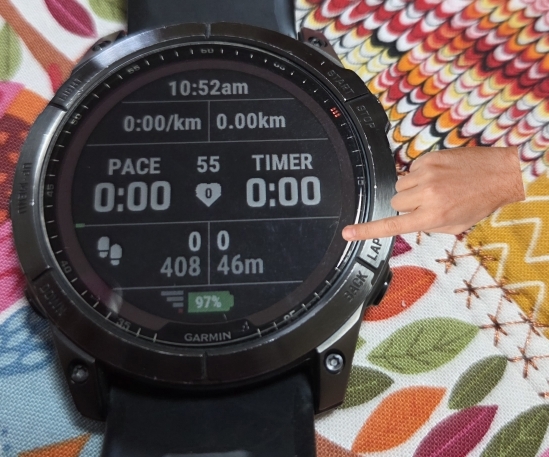
It should look like this, with the elevation (mountain) icon on the right side:

Interestingly the steps icon on the left side is there.
I looked at the svg files, and while there were slight differences, changing the mountain icon to be more like the steps didn't solve the problem.
Anyone seen such thing, that some bitmaps are not displayed?
Both icons have 2 versions:
	<bitmap id="ie" filename="mountain.svg" dithering="none" scaleX="40" scaleY="40">
		<palette disableTransparency="false">
			<color>000000</color>
		</palette>
	</bitmap>
	<bitmap id="ied" filename="mountain.svg" dithering="none" scaleX="40" scaleY="40">
		<palette disableTransparency="false">
			<color>FFFFFF</color>
		</palette>
	</bitmap>
And I use the black for white background and the white for black background. The bitmaps are drawn directly to dc in onUpdate. All this is common with the other icon that works.
It works in the simulator, and many other real devices.
There is 1 small difference:
dc.drawBitmap(bottomRowIconX, bottomRowIconY, stepsIcon);
dc.drawBitmap(dc.getWidth() - bottomRowIconX - elevationIcon.getWidth(), bottomRowIconY, elevationIcon);
