What can cause 1 icon not being displayed?

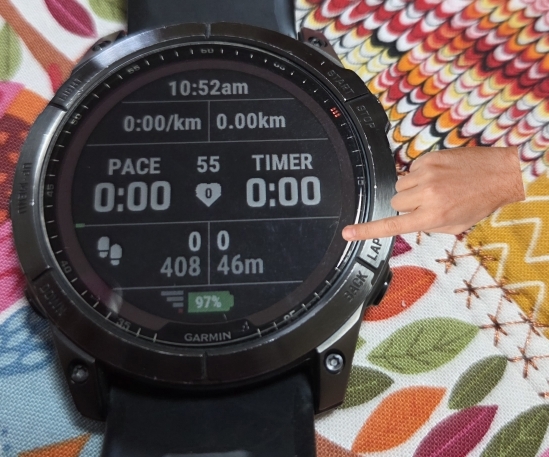
I've got a user complaint telling me that one of 2 icons is not being displayed on my datafield on his fenix 7X Solar, neither in black or white background mode:
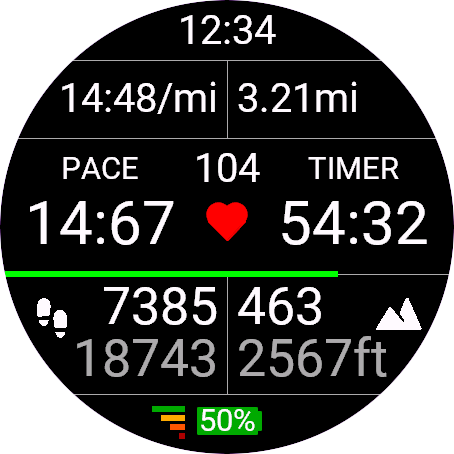
It should look like this, with the elevation (mountain) icon on the right side:
Interestingly the steps icon on the left side is there.

I looked at the svg files, and while there were slight differences, changing the mountain icon to be more like the steps didn't solve the problem.

Anyone seen such thing, that some bitmaps are not displayed?

Both icons have 2 versions:

	<bitmap id="ie" filename="mountain.svg" dithering="none" scaleX="40" scaleY="40">
		<palette disableTransparency="false">
			<color>000000</color>
		</palette>
	</bitmap>
	<bitmap id="ied" filename="mountain.svg" dithering="none" scaleX="40" scaleY="40">
		<palette disableTransparency="false">
			<color>FFFFFF</color>
		</palette>
	</bitmap>

And I use the black for white background and the white for black background. The bitmaps are drawn directly to dc in onUpdate. All this is common with the other icon that works.

It works in the simulator, and many other real devices.

There is 1 small difference:

const bottomRowIconX = 25;
const bottomRowIconY = 184;

dc.
drawBitmap(bottomRowIconX, bottomRowIconY, stepsIcon);
dc.drawBitmap(dc.getWidth() - bottomRowIconX - elevationIcon.getWidth(), bottomRowIconY, elevationIcon);
I use the same constants, but to calculate the position of the right icon I use elevationIcon.getWidth(). Is it possible that BitmapResource.getWidth() returns a wrong value in fenix 7X Solar?
  • You might want to calculate the exact x position like for example:

    var rad = width/2

    var offset = 150 * Math.PI / 180; // position icon on 150 degrees

    var margin = 4 *(width/454); // max margin based on screenwidth of 454pixels

    var offsetX = (isRectangle) ? rad : rad + rad * Math.sin(offset);
    var x = offsetX - elevationIcon.getWidth() - margin;
  • that's not my problem. The icon is displayed in the correct place on all devices in the sim and most real devices. I don't even know if this problem is general to fenix7 or only this one user has it.

  • Calculating the exact position for the used device and it's settings might solve your problem as the simulator is not the real device.

  • You don't understand the problem. Your solution does a calculation in runtime and uses elevationIcon.getWidth(). I already have all those calculations in constants in build time. So your solution has 3 disadvantages:

    1. doesn't solve the problem, because it still uses elevationIcon.getWidth()

    2. it's slow in runtime

    3. it uses the same position for all devices with the same screen size, while I already have pixel perfect positions in constants for all devices (because the fonts are different on some devices with the same screen size)

    We don't know what is the problem, but it works on other devices, it works in the simulator. The code that displays the image is the same for all. The svg is the same for all, with different size in the drawable (compile time), the only difference left is elevationIcon.getWidth() IMHO.

  • This is a brain-tickler. Would you be willing to share the mountain SVG source?

    Initially I wondered about palette problems; I noticed that the coloured bars near the battery in the simulator don't match the grayscale bars on the device photo, and wondered why. Probably totally unrelated.

  • Of course I expect you to put the repetitive calculations in onLayout, it's just a sample to show how you'd be not depending on what you see in the simulator.

    So if you think the problem is in elevation.getWidth() why don't you use a constant for it's value? If it's resized during compilation I'd go for the exact calculation, but that's just my opinion.

  • You might also want to try to break up your calculation, sometimes it messes up when it get's a bit complicated.

  • steps:

    mountain:

    The bars indicate the GPS quality, so the difference is because the user was indoors.

  • Maybe I'll give it a shot and add another constant for the ELEVATION_ICON_WIDTH and see if that fixes the problem.

  • The only vaguely suspicious differences to me are that mountain is explicitly marked version="1.1" and has a viewbox involving negative coordinates. I doubt the compiler would have problems with these aspects.

    Does anyone know anything about the intermediate form that the compiler makes of a <bitmap> resource? It'd be great if you could inspect how it interpreted it for a given device.

    I otherwise can't think of why it would work on most other physical devices and also the simulator for the problematic device, but not the device itself.

    I know it's a slow debug cycle for you since you need user feedback. You could try outrageous things like swap the sides of the steps and elevation and see what that does.