I'm not able to log in since the log in pop up window always hangs.
This is on Mac OS Tahoe 26.3
Anyone else?
I'm forced to use the previous SDK version to view crash reports.
I'm not able to log in since the log in pop up window always hangs.
This is on Mac OS Tahoe 26.3
Anyone else?
I'm forced to use the previous SDK version to view crash reports.
With 8.4.1 on a WIN 10 PC, the ERA program does not start at all. After clicking on the relevant line in the drop-down list, nothing happens. I will stay with 8.3.0 for now.
I had the same issue and was able to solve it.
Try running ERA from the command line by starting era.bat. You can find it here:
C:\Users\<YourUserName>\AppData\Roaming\Garmin\ConnectIQ\Sdks\connectiq-sdk-win-8.4.1-2026-02-03-e9f77eeaa\bin\era.bat
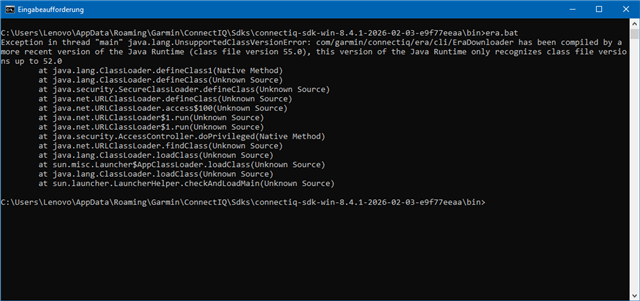
In my case, this returned the following error:
Exception in thread "main" java.lang.UnsupportedClassVersionError:
com/garmin/connectiq/era/cli/EraDownloader has been compiled by a more recent version
of the Java Runtime (class file version 55.0), this version of the Java Runtime
only recognizes class file versions up to 52.0
I then downloaded and installed the latest Oracle JDK 25.0.2. After that, ERA worked correctly.
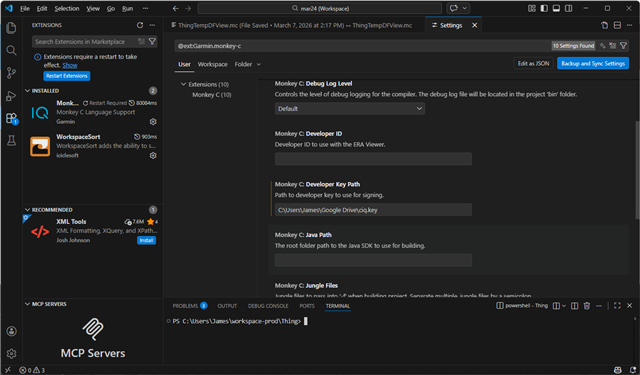
However, the Monkey C compiler inside VS Code did not work with that Java version. I had to keep the Java path in the Monkey C extension settings set to JRE 1.8.0_481.
I did not investigate further why the compiler failed with the newer Java version. I was just happy to get everything working again and continue coding.
I'm on Java 1.8.0_361 wich works fine with Monkey C and VS Code.
When I run era.bat, a DOS window appears for a moment and then immediately disappears again. I can't see if anything is displayed there - and nothing happens.
PS: I'm not very firm in setup PCs and things like that. I don't want to destroy my running Monkey C by downloading other Javas...
When I run era.bat, a DOS window appears for a moment and then immediately disappears again. I can't see if anything is displayed there - and nothing happens.
If you open a Command Prompt first and run era.bat from there, the window will remain open and you will be able to see the error message.
Yes, this situation can be a bit tricky. Installing a newer Java version may modify your environment variables, which can cause other applications to start using that version as well. In VS Code, you can explicitly configure the Java runtime to use. For ERA, you could also adjust era.bat to point to a specific Java installation, although this may still have unintended side effects.
Unfortunately, I am not aware of a cleaner solution. I do not know the full background, but it appears that Garmin has moved ERA to a newer Java version, which now makes an update necessary on the user side. And even the latest Java 8 does not seem to work, it needs to be a newer major version.
ok, thank you.

I'm slowly losing interest in developing IQ apps.
With every update, they destroy something.
Since SDK 8, for example, “Manage (ANT) devices” no longer works for me in the simulator. To pair ANT devices in the simulator, I have to work with an old device with SDK 7. It works there. (I mean pairing sensors in the simulator, not connecting to a generic channel.)
I'm slowly losing interest in developing IQ apps.
Yes, you definitely need a high pain tolerance.
At the moment, roughly two thirds of my attempts to start the app in the simulator fail. Sometimes the entire code tree lights up like a Christmas tree and I get a flood of compiler errors that mysteriously disappear on the next build. Sometimes I hit a critical compiler error. Other times, the simulator crashes with a timeout when I try to open the app from a glance. And occasionally, none of this happens and I can actually test my app.