I'm not able to log in since the log in pop up window always hangs.
This is on Mac OS Tahoe 26.3
Anyone else?
I'm forced to use the previous SDK version to view crash reports.
I'm not able to log in since the log in pop up window always hangs.
This is on Mac OS Tahoe 26.3
Anyone else?
I'm forced to use the previous SDK version to view crash reports.
With 8.4.1 on a WIN 10 PC, the ERA program does not start at all. After clicking on the relevant line in the drop-down list, nothing happens. I will stay with 8.3.0 for now.
I had the same issue and was able to solve it.
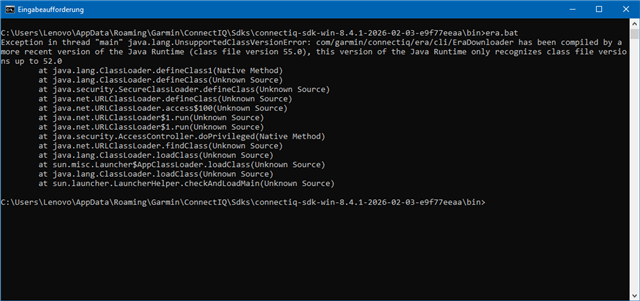
Try running ERA from the command line by starting era.bat. You can find it here:
C:\Users\<YourUserName>\AppData\Roaming\Garmin\ConnectIQ\Sdks\connectiq-sdk-win-8.4.1-2026-02-03-e9f77eeaa\bin\era.bat
In my case, this returned the following error:
Exception in thread "main" java.lang.UnsupportedClassVersionError:
com/garmin/connectiq/era/cli/EraDownloader has been compiled by a more recent version
of the Java Runtime (class file version 55.0), this version of the Java Runtime
only recognizes class file versions up to 52.0
I then downloaded and installed the latest Oracle JDK 25.0.2. After that, ERA worked correctly.
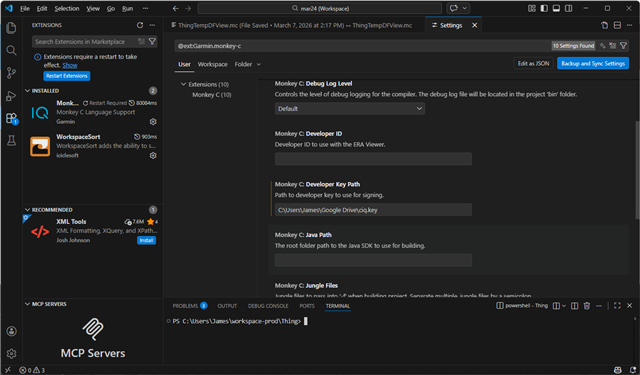
However, the Monkey C compiler inside VS Code did not work with that Java version. I had to keep the Java path in the Monkey C extension settings set to JRE 1.8.0_481.
I did not investigate further why the compiler failed with the newer Java version. I was just happy to get everything working again and continue coding.