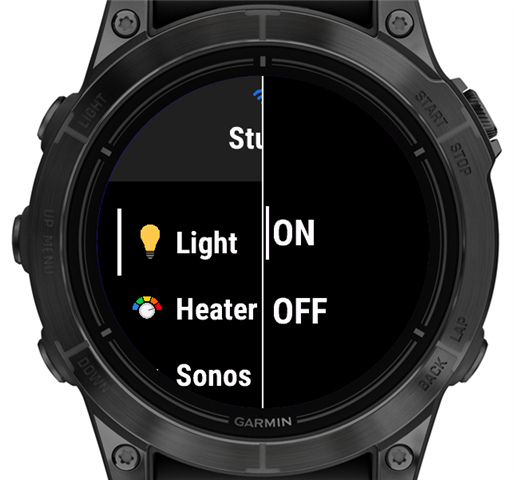
Layer not rendering when added to a View

Hi,

I’d like to use a layer to display a visual indicator in my app. The indicator should be a circle along the edge of the screen in a specific color, or a rectangle, depending on the screen shape. I want this indicator to appear not only on my own View implementations, but also on top of CustomMenu implementations, which is why I’m trying to use a layer.

I tried following the example in the documentation (https://developer.garmin.com/connect-iq/core-topics/user-interface/), but my layer never shows up.

Since posting code here often fails, I’m linking directly to the relevant files.

Layer implementation:
https://github.com/openhab/openhab-garmin/blob/main/source/connectivity/WifiIndicatorLayer.mc

I’ve confirmed the constructor code runs. A Dc is returned and drawing calls execute.

For testing, I added the layer to one of my views in the view constructor:
https://github.com/openhab/openhab-garmin/blob/main/source/user-interface/loading-views/WifiCheckView.mc

Is there anything else I need to do to get the layer to display?

Also, is my understanding correct that the layer is drawn on top of the view’s base Dc?

  • But isn't it supposed to be the other way around? Usually the users do have the connection with the phone in most of the time, but have only sometimes WiFi.

    In my app, functionality is reduced when using Wi-Fi. With BLE, I can continuously poll device states in the background and display them. For example, I can tell whether a light switch is on or off.

    When using Wi-Fi, this is not possible. Device states cannot be polled in the background, so no state is shown, and the app cannot rely on knowing the current state when deciding which command to send. For example, in the case of a switch, the user therefore has to explicitly choose whether they want to send an “on” or “off” command.

    In practice, the Wi-Fi connection is mainly used when users are at home but do not have their phone with them.

  • But if there's no connection then even the command you try to send won't get to the server. And if there is connection then in theory it should work no matter if over ble or wifi. The only difference if I understand correctly is that starting a web request when there is already a wifi connection goes through the wifi but it doesn't keep the connection open, while via ble it does wait until the connection finishes. So maybe set up some way to detect if this might have happened and retry?

  • But if there's no connection then even the command you try to send won't get to the server. And if there is connection then in theory it should work no matter if over ble or wifi.

    He's not talking about whether a command will fail or not, he's talking about the ability to know the current state of the device and the ability to automatically determine which command should be sent.

    BLE: App can continuously poll device state, so the current state of the device is shown (e.g. OFF), and the command to be sent will be the opposite of the current state (e.g. ON).

    Wi-Fi: App cannot continuously poll device state, so the state of the device isn't shown, and user has to select the command to be sent (e.g. OFF or ON).

    Given the premise that BLE allows network requests to be continuously made in the background, and Wi-Fi doesn't, then it makes sense.

    Real-world analogy - it's the difference between:

    - (BLE) a mechanical rocker light switch with 2 physical states that reflect the state of the light bulb (on or off), and where pressing on the switch (in a way that changes its physical state) always toggles it to the other state (off or on). The switch "knows" the state of the light, and changing its physical state always changes the state of the light.

    - (Wi-Fi) an electronic rocker light switch (e.g. the wireless kind) whose physical state is always neutral (neither on nor off), and where there's always 2 ways to press it: one way will try to turn the light on, the other way will try to turn the light off. The switch doesn't know the state of the light, the switch itself is stateless, and you have to choose the desired new state for the light. 

    I realize it's an imperfect analogy since with a mechanical rocker switch, neither of the 2 physical states unambiguously maps to the light being off or on, especially if you can't see the light, and if there's another mechanical rocker switch which also controls the light (as is often the case for hallway lights).

    Maybe a better analogy would be the hardware power switch found on older, larger, or industrial-use electronics (or desktop PC power supplies) vs the software power button found on most small consumer electronics. (Actually this analogy is worse, since the software power button is a toggle.)

  • If wi-fi mode has reduced functionality compared to BLE, it seems like it would be confusing that the visual difference between the 2 modes is only the wi-fi indicator (if I'm understanding correctly). My understanding is that wi-fi mode would show the wi-fi indicator and bluetooth mode would not.

    It seems like this would be confusing to users - if they didn't read the manual, they might think the presence of a wi-fi icon is a good thing and its absence is a bad thing.

    How about something like this:

    - Wi-Fi mode: Wi-Fi icon, crossed-out bluetooth icon, and red exclamation mark (or yellow info icon)

    - Bluetooth mode:  Bluetooth icon and green checkbox

  • What does it mean that wifi doesn't enable continuous polling? We're not talking about "long-polling", are we? It's some web request that is being sent and some json returns (if the connection is still alive, etc) I'm not sure I understand what is the difference between: internet available, via BLE vs internet available via Wifi. But anyway there is a 3rd state: internet is not available. And maybe a 4th: internet was available when the web request was initialized but it's no more, so there won't be a successful result.

    So why can't you send a web request, and "detect" if it's dead (i.e using a timer) and then retry?

    Is there a difference between the state when wifi connection is gone during the web request vs when internet via ble connection is gone (BTW there can be more than one reasons for that, maybe the connection to the phone was closed but maybe it's still there but the phone lost internet connection, and probably more)

  • He's not talking about whether a command will fail or not, he's talking about the ability to know the current state of the device and the ability to automatically determine which command should be sent.

    Yes, exactly. When in BLE mode, a switch behaves like a simple toggle, similar to the one you may know from Menu2.

    There are other examples as well, such as a dimmer or sound volume. When using BLE, a kind of number picker can be opened at the current value, and a command is sent to the server with every click. This gives the user immediate physical feedback on each adjustment. When using Wi-Fi, the picker starts in the middle of the range, the user selects a new value, and a single command is sent once the selection is confirmed.

  • But why? Isn't it working this way:

    1. require current state via a web request
    2. display current state
    3. when user changes state via the UI send command to change the state accordingly?

    Why can't the 1st step be done via wifi?

  • What does it mean that wifi doesn't enable continuous polling? We're not talking about "long-polling", are we?

    No, it is not long polling. The app uses a timer-based polling loop with a configurable interval. The default interval is 3 seconds, but users can set it to any value, including 0, which means the next request is started immediately after the previous response has been processed.

    On Wi-Fi, however, the app cannot enter sync mode every few seconds, because that would interrupt user interaction.

    When the app starts, it begins polling right away. Before each poll, it checks connectionInfo to see whether a phone connection is available, and it also evaluates the response code of the previous request. If no phone is available, the app checks whether Wi-Fi is available. If it is, the app switches to Wi-Fi mode. If not, it switches to a full-screen offline error view.

    Polling continues in all cases, so the app can switch dynamically between the three modes: BLE, Wi-Fi, and Offline.

    Initially, Wi-Fi availability was checked on every poll while in Wi-Fi mode. However, since checking Wi-Fi availability blocks sync operations, this check is now performed only when entering Wi-Fi mode.

    I considered also two alternative approaches::

    • Enter sync mode once at startup and push the normal app view on top of the sync UI. This works in the simulator, but it may not behave the same way on real devices. It also relies on behavior that appears unintended by Garmin.

    • Poll the state once on startup and assume it does not change while the app is running. This is not reliable because commands sent from the app can trigger server-side logic that changes the state of other items in ways the app cannot predict.

  • How about something like this:

    - Wi-Fi mode: Wi-Fi icon, crossed-out bluetooth icon, and red exclamation mark (or yellow info icon)

    - Bluetooth mode:  Bluetooth icon and green checkbox

    Yes, you’re right. My intention was to keep the view uncluttered for most users most of the time, when the phone is connected. However, I can see that this is not very obvious, so I will reconsider the icons.

  • On Wi-Fi, however, the app cannot enter sync mode every few seconds, because that would interrupt user interaction.

    I guess this means that Garmin shows a full-screen wi-fi sync status page, like what you see with Spotify.

    I bet this is on purpose:

    - obviously so users can see the status of long-running wi-fi syncs

    - but also to prevent devs from constantly using wi-fi in a way that would kill the battery