How can I find the current background/foreground color?

It seems strange that there is not a specific get function to determine the current background color of a device.  How can this be accomplished when creating a widget and widget glance.  Specifically I have multiple devices with different glance backgrounds.  If I want to stay consistent with the overall look and feel I need to know what current is.  I'm not talking about night mode, I'm asking about simple standard displays.  Fenix 6 glances are black background with white lettering not to mention title in caps, Edge 1050 is white background with black lettering in lower case.  This really seems fundamental to me!  I am not able to find where I could find the current background color or for that matter even the device the widget is running on. Thanks for your help in advance.

  • you do override getGlanceView similar to how you override getInitialView

  • you do override getGlanceView similar to how you override getInitialView

    Sorry, I mistyped. I meant getGlanceTheme(), which @bram.d referred to in his post.  I’ve corrected my original post.

    On Edge if you set the GLANCE_THEME_XXX by implementing getGlanceTheme() in your AppBase subclass then
  • Hmm, I think it needs to be tested, and then according to what we see it really does a "bug report" could be made to improve the documentation. When I read the docs I 1st thought it's like the getGlanceView: the app can tell the system which theme it wants to be displayed with. But I read it again now and I can also read it the way you did. For sure a clarification would be needed.

  • When I read the docs I 1st thought it's like the getGlanceView: the app can tell the system which theme it wants to be displayed with. But I read it again now and I can also read it the way you did. For sure a clarification would be needed.

    Yes, the documentation on this is quite limited. I tested it and overriding does work.

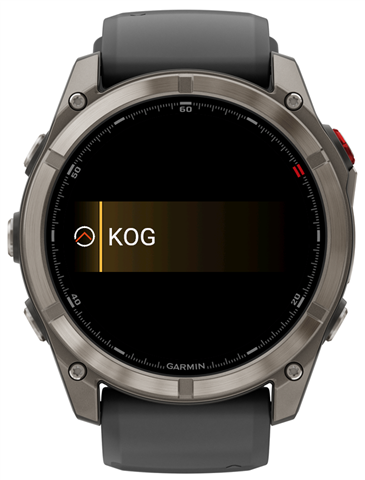
    At first I tried it in the simulator with the Edge 850, but it seems this is not implemented there. However, when using the Fenix 8 Pro in the simulator, the glance is rendered differently. Below is GLANCE_THEME_GOLD:

  • Sorry I was busy with other things. Yes you can override getGlanceTheme(), I don't recall where I read that. Garmin's documentation quality is abysmal to my standards (40 yrs professional SE). I include a boilerplate code for a Glance.  It also includes handling of day/night mode and a link to the documentation for that. As to fonts, you are right - the system glance font is not italics and indeed many glances provided by Garmin apply italics. Personally I don't mind but if you insist to have italics you will need to make custom fonts.

    import Toybox.Application;
    import Toybox.Lang;
    import Toybox.WatchUi;
    import Rez.Styles;
    
    
    (:glance)
    class MyApp extends Application.AppBase {
    
        private function setTheme() {
            // Test for night mode
            if (Styles.device_info.hasNightMode
            &&  System.DeviceSettings has :isNightModeEnabled) {
                _theme = System.getDeviceSettings().isNightModeEnabled ? :nighttime : :daytime;
            } else {
                _theme = :daytime;
            }
        }
    
    
        function initialize() {
            AppBase.initialize();
            
            setTheme();
    
        }
    
        // onStart() is called on application start up
        function onStart(state as Dictionary?) as Void {
        }
    
        // onStop() is called when your application is exiting
        function onStop(state as Dictionary?) as Void {
        }
    
        // Return the glance theme to set
        function getGlanceTheme(){
            return GLANCE_THEME_RED;
        }
    
        // Return the glance view
        function getGlanceView() {
            return [ new MyGlanceView() ];
        }
    
        // Return the initial view of your application here
        function getInitialView() {
            return [ new MyView(), new MyViewDelegate() ];
        }
    
        // Application handler for changes in day/night mode
        function onNightModeChanged() {
            setTheme();
            WatchUi.requestUpdate();
        }
    
        // Mode accessor
        function getTheme() as Theme {
            return _theme;
        }
    
        // Return night mode state as boolean
        function isNightModeEnabled() as Boolean {
            return (_theme == :nighttime);
        }
    
    }
    
    (:glance)
    function getApp() as MyApp {
        return Application.getApp() as MyApp;
    }

    import Toybox.Graphics;
    import Toybox.Lang;
    import Toybox.WatchUi;
    import Rez.Styles;
    
    (:glance)
    class MyGlanceView extends GlanceView {
    
        hidden var _glanceText = "Hello, World";
    
        
        //! constructor
        function initialize(){
            GlanceView.initialize();
    //        _glancetext = MyData.getGlanceString(); // returns the content for the Glance
        }
    
        //! onLayout
        function onLayout(dc as Dc) as Void {
            // set layout here
        }
    
        //! onUpdate
        function onUpdate(dc as Dc) as Void {
            // For understanding the following refer to:
            // https://developer.garmin.com/connect-iq/personality-library/colors/
            // Full coding example given in that link
            // Set foreground color
            if ($.getApp().isNightModeEnabled()) {      // We're in night mode
                dc.setColor(system_color_dark__text.color, system_color_dark__text.background);
            } else {                                    // We're in daylight mode
                dc.setColor(system_color_light__text.color, system_color_light__text.background);
            }
    
            // Update your content here
    //        _glanceText = MyData.getGlanceString();
    
            // Draw foreground
            dc.drawText(
                0,
                dc.getHeight()/2,
                Graphics.FONT_SMALL, 
                _glanceText,
                Graphics.TEXT_JUSTIFY_LEFT|Graphics.TEXT_JUSTIFY_VCENTER
            );
        }
        
    }

  • After reviewing your code, I have one suggestion:

    For the background color, I recommend using Graphics.COLOR_TRANSPARENT instead of the system color. Do that if you want the gradient background that some devices have to work properly. You can see this in the Fenix 8 Pro screenshot I posted above.

  • Also interesting: when using these styles in a glance with the strictest type checking level (3), the project does not compile. The compiler reports that they are not available “in all function scopes.”

    To make it compile, you need to disable the scope check by adding the (:typecheck(disableGlanceCheck)) annotation to the function where you want to use them.

  • Thanks for all the responses.  I couldn't let it go so continued to test and finally figured out how to utilize the default background color in glances.  I was making the mistake of clearing which overrode the default colors on the Edge device which in day mode is an off-white/bluish background and at nigh a gray.  I also testing the getTheme method thinking maybe that would help me but it doesn't.  The problem with the getTheme method is it always returns default, unless you modify the theme.  Of course if you are modifying the theme, you already know what it is so the method in my use case does not help me.  I also what to call out that Garmin is overloading the use of theme in their methods and personality documentation.  In the personality documentation they are simply setting a cached value to day or night mode and calling it a theme.  Not really a theme in that context but showing the concept of caching.  I am not caching day or night mode because it can change while you are viewing.  Granted a very restricted use case, but that's my reasoning at the moment.  I may ultimately cache and go with a counter to refresh the cache after every 10 entries to minimize the overhead a bit.  I am also not using any Styles since they did not allow me to render the glance in the way I wanted for consistency.  I'm also giving up on the Italics, at least for now.  Here is my current code snippet for setting foreground and background colors that mirror the glance backgrounds and text colors for Fenix 6, Fenix 8, Venu 3, Venu 4, and Edge 1050.  I suspect it would work on most devices to match background and foreground glance patterns.

        private function setupDisplay(dc) {
            var isEdge = isEdgeDevice();
            var isNight = isNightModeEnabled();
             
             var textColor;
             if (isEdge) {
                if (isNight) {
                    textColor = Graphics.COLOR_WHITE;
                } else {
                    textColor = Graphics.COLOR_BLACK;
                }
            } else {
                if (isNight) {
                    textColor = Graphics.COLOR_BLACK;
                } else {
                    textColor = Graphics.COLOR_WHITE;
                }
            }
            
            dc.setColor(textColor, Graphics.COLOR_TRANSPARENT);
        }

  • Thanks for your responses.

    I had put a lengthy reply together  with a code snippet on how I resolved background consistency, but it was flagged as spam.  

  • I approved it. This spam filter is a very advenced software. I think it's a lot like AI: nobody really knows why it does what it does (and it did it even before ChatGPT ;)