Help with ERA errors

Hi,

I've got the errors like "Invalid Value" and "System Error" on the code with simple arithmetic operations. What could be causing this?

Source code is here.

Reports:

Error Name: Invalid Value
Occurrences: 2
First Occurrence: 2026-01-17
Last Occurrence: 2026-01-18
Devices:
Venu® Sq 2: 2.69
 epix Pro (Gen 2) 51mm / D2 Mach 1 Pro / tactix® 7 – AMOLED Edition: 23.48
App Versions: 2.0
Languages: eng, ita
Backtrace:
IV22LView.onLayout:91

Error Name: System Error
Occurrences: 2
First Occurrence: 2026-01-16
Last Occurrence: 2026-01-19
Devices:
Venu® Sq 2 Music: 2.69
vívoactive® 5: 17.01
App Versions: 2.0
Languages: eng, por
Backtrace:
IV22LView.onLayout:92

Error Name: Invalid Value
Occurrences: 1
First Occurrence: 2026-01-16
Last Occurrence: 2026-01-16
Devices:
fēnix® 8 47mm / 51mm / tactix® 8 47mm / 51mm / quatix® 8 47mm / 51mm: 20.24
App Versions: 2.0
Languages: eng
Backtrace:
IV22LView.onLayout:93

Error Name: System Error
Occurrences: 2
First Occurrence: 2026-01-16
Last Occurrence: 2026-01-18
Devices:
vívoactive® 5: 17.01
Forerunner® 970: 16.14
App Versions: 2.0
Languages: eng
Backtrace:
IV22LView.onLayout:93

  • I also thought about splitting them to separate lines, but then I didn't post it, because who knows what the optimizer does, and whether you would be able to really see in which line the error occurs, or still only roughly. If you really want to separate them for ERA purposes I'd do a bit more of a hack: separate them to functions. So to each function you'll need to pass their input, and they'll return the output, but the arithmetics is done in these small functions:

    function plus(a as Number, b as Number) as Number { return a + b;}
    ...

    sa_heightB = plus(dig_height, dy);
    ...

    This way you'll be able to tell exactly which arithmetic function causes the error, because you'll see in the stack trace the name of the last 3 functions (of the stack).

  • I once had a similar problem with a data field.

    I found out that dc.getWidth() and dc.getHeight() had no value in the first second, but were only filled in correctly in the second second. I moved them to onUpdate(dc), which is called every second on Edge devices.

    I also posted about this, but unfortunately I can't find it quickly...

  • ChatGPT suggests that dc.getWidth() or dc.getHeight() can return 0 in onLayout(). Is this true?

    So, yes. That‘s what happened to me!

    PS: happened only on real device - never in simulator!

  • The whole point of onLayout is to do things like calculations based on size. So we definitely need to open a bug about this.

    Though obviously we also need to move similar code to onIpdate (optimistically: until Garmin will fix it ;)

  • For me, these types of non-sensical errors are happening during an app version update which is very unreliable on most modern devices (since F6).  Often, the stack track also doesn't make sense (as a clue it was during an update)

  • So as a thought experiment, what could be the scenario?

    Old version runs while the user installs the new version? In theory the old version continues to run at least until the user stops it. Except maybe if it's a datafield and the user does Resume later. But then the new version starts when they resume, and?  Old data in the store? Or in the dictionary that I start gets? What would cause a crash? And why would the lines make no sense? 

  • And why would the lines make no sense? 

    I think the implication is that the old version crashed but the debug info for the new version was used to create the human-readable stack trace (including looking up line numbers), or vice-versa.

  • Ah, so maybe in case of these nonsense stack traces we should look at older version(s?!)

    It's not even enough to look at the previous version maybe because the user may have skipped 5 updates...

    However this theory then begs one other question: until now we all believed that we only see errors from the latest app version, but maybe the bug is that some errors are being reported with wrong version (probably because something to do with app updates)? Maybe this is worth a quick check in Garmin!   can this be checked?

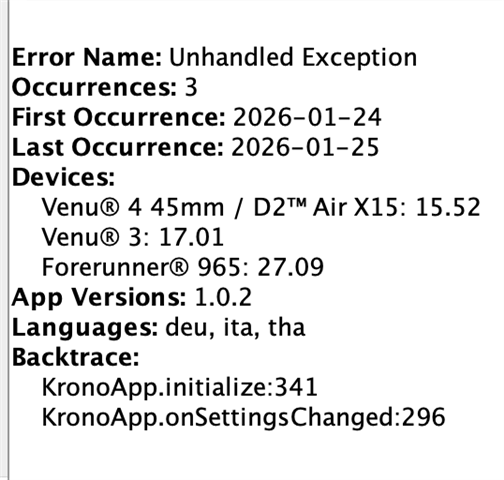
  • I recently posted an app update and here is an example of nonsensical stack trace:

    Line 296 in onSettingsChanged is "WatchUi.requestUpdate();"

    I see these invalid crashes for all post F6 generation watches.

    I'm not as bothered by the crash reports being wrong as I am about the poor user experience people have and that it looks poorly on our CIQ apps!