I use tracking which is great, but how do I find a time of day for each point on the route, rather than elapsed time? [email protected]

I use tracking on my Garmin Inspire 2 tactical, but the downloaded version on Garmin Connect only shows the elapsed time since I started. Is it possible to get time-of-day for the mapping to show where I was and when? I'm sure that data must be in there somewhere!

  • This is the wrong forum (it's the forum for discussing 3rd-party app development), but anyway:

    There's a way to do this but it's not ideal.

    - In the Garmin Connect website, click on the gear (upper right hand corner) and select "Export File". This will download a ZIP containing the original activity FIT file

    - Open https://www.fitfileviewer.com

    - Click Open FIT File and select the ZIP file that was downloaded

    - Click on Chart

    - Select 1 or 2 fields of interest (e.g. Distance and Heart Rate)

    You'll be able to roll over the graph and see:

    - activity time (not elapsed time, as activity time excludes pauses *). (the activity time that you see on almost any platform, including Connect and Strava, will exclude pauses.)

    - time of day

    - whatever fields you selected

    (*) Speaking of pauses, if you want to see detailed information about your pauses (time/length and HR drops), you can use the free site https:/www.runalyze.com which syncs with your Connect account.

    Yeah none of this stuff is user-friendly.

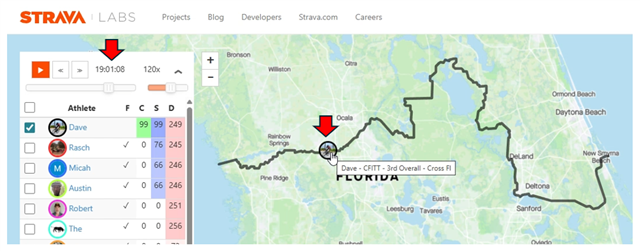
  • I had to do this. This works really well. Using the Strava FLYBY feature. This shows I passed this location at 7:01pm. I can zoom in and use the slider to zero in exactly to certain locations along the route.

  • To make this thread slightly less off-topic, there's also a CIQ datafield that records the clock time to a fit field: apps.garmin.com/.../cbc0f152-ebd1-4a63-b4e6-3b69648d82db

  • Yes, the time-of-day data is definitely in there! Garmin Connect records detailed data points for activities, including timestamps. While the initial summary might show elapsed time, you can usually dive deeper to see the actual time of day for different parts of your activity.

  • I had to do this. This works really well. Using the Strava FLYBY feature

    You realize the OP is from August 2024, and before you replied, the newest reply was also from August 2024? It's now December 2025, and it's not like there was a lively 16-month long discussion about this topic or anything. OP never even replied once.

    Anyway, Using sTrAvA's FLYBY fEATURE isn't a BAD idea at ALL, except:

    - Strava is another Big Data service to sync with that promises to use your data for whatever purposes they can get away with

    - to use flyby at all, you have to make your activity public to all other Strava members (not just your followers)

    - it's only available on the strava website and not in the app. (you can use it on the website on mobile tho, unlike some of the other website-only features, like the analysis graph.)

    I use Strava and I use flyby, but I wouldn't be surprised if others don't want to. After all, flyby itself is disabled by default for a reason.

    I guess one compromise could be to temporarily change your activity visibility to public just to use flyby, then switch it back to followers only / private when you're done.

    It's too bad that none of these services / sites show time of day when you roll over the various "default" activity graphs. Whenever time of day for a given point is available at all, it's always in some inconvenient secondary mode