Hey, I followed jim_m_58 great idea for AOD display-
in the Venu series and I believe I might have taken it step ahead:
I used my Photoshop knowledge to create a pattern with 2 white pixels for every black pixel and it looks like this (this is a 6x6 pixels screen and everything besides the big black squares is empty)
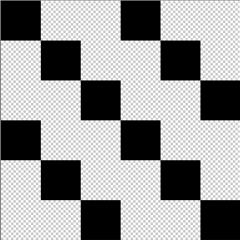
Then I used this pattern for 360x360 pixels screen (Venu 2s), 390x390 pixels screen (Venu 1) and 416x416 pixels screen (Venu 2).
Here are their PNGs and I hope those will be useful for you:
https://drive.google.com/drive/folders/1yc3bj-8G3ygPCDUCdY4VA55uJ753fZhP?usp=sharing
Here is how to use it (most of this code is jim_m_58's code and I just added mine
class MyView extends WatchUi.WatchFace {

	var inLowPower=false;
	var canBurnIn=false;
	var AOD;

    function initialize() {
        WatchFace.initialize();

        if(Sys.getDeviceSettings() has :requiresBurnInProtection) {
        	canBurnIn=Sys.getDeviceSettings().requiresBurnInProtection;
        }
    }

    function onUpdate(dc) {
        if(inLowPower && canBurnIn) {
            //do AOD display (<10%. 3 minutes max)
            dc.setColor(0, 0);
		var y=clockTime.min%3;
		AOD= WatchUi.loadResource(Rez.Drawables.AOD);
		dc.drawBitmap(0, y, AOD);
        } else {
            // regular display
        }
    }

    function onExitSleep() {
    	inLowPower=false;
    	WatchUi.requestUpdate();
    }

    function onEnterSleep() {
    	inLowPower=true;
    	WatchUi.requestUpdate();
    }
}
I hope I can be helpful for this forum after so much help I got here.
BTW: I know it takes a bit of memory for this but since it's Venu series I believe that memory isn't the problem.