Acknowledged

Touch events delivered to apps even when touchscreen is disabled

Hi Garmin Connect IQ Team,

Currently, there is no reliable way for an app to detect whether the device’s touchscreen is disabled (for example when the user has turned touch off in settings or enabled touch lock during an activity). The existing System.getDeviceSettings() properties like isTouchScreen and isTouchScreenActive only indicate hardware capability and not whether touch input is enabled or locked. As a result, even when the user has disabled touch, the app continues to receive and respond to touch events, which can lead to unintended interactions in sport/activity contexts.

This affects apps that rely on buttons and should respect the user’s preference or device lock during activities.

For example, for my app "Hyrox Smash", in a sweaty condition, it's quite risky to have the touch screen enabled. 

If there’s already a recommended approach I’ve missed, I’d be happy to hear about it. Otherwise, I’d appreciate you considering this enhancement for future SDK versions.

Thanks for your time and support.

Cheers,

Saeed from Multipassionate
  • Hi  ,
    You're absolutely right.  isTouchScreenActive is not valid. 

    I was pretty desperate [still the same haha] so I was trying everything, even when they didn't exist in the documentation. Sorry, it shouldn't have made it to the forum, but by the time I noticed, it was not possible to edit anymore. 

    If forum admins see this, please remove it from my comment :)

  • @multipassionate

    This code is interesting:

    function isTouchAllowed() as Boolean{
    var settings = System.getDeviceSettings();
       if (settings has :isTouchScreen) { return settings.isTouchScreen; }

       if (settings has :isTouchScreenActive) { return settings.isTouchScreenActive; }
       ...
    }

    There is no such field as isTouchScreenActive in DeviceSettings or anywhere else in the CIQ API. I'm guessing this was written by AI? 

  • @flocsy you are contradicting yourself and the docs.

    First you state:

    If you want your app to honor the user preference then why is it not enough to check DeviceSettings?

    This clearly implies that you think that *something* in DeviceSettings should reflect the user touch preference.

    Because isTouchScreen tells you about the capability of your device, and if the device has touch then you continue.

    With this you imply that DeviceSettings.isTouchScreen is only about capabilities, not settings (user preference) despite what the docs say.

    But what else is there in DeviceSettings which applies to the touch screen? There actually is no such thing as "isTouchScreenActive" in DeviceSettings, so it's just isTouchScreen.

    Therefore even without looking at the docs, the only thing in DeviceSettings that could possibly reflect the user touch preference must be isTouchScreen.

    Please state what you think is the bug

    They said what they think the bug is. It's literally in the title:

    Touch events delivered to apps even when touchscreen is disabled

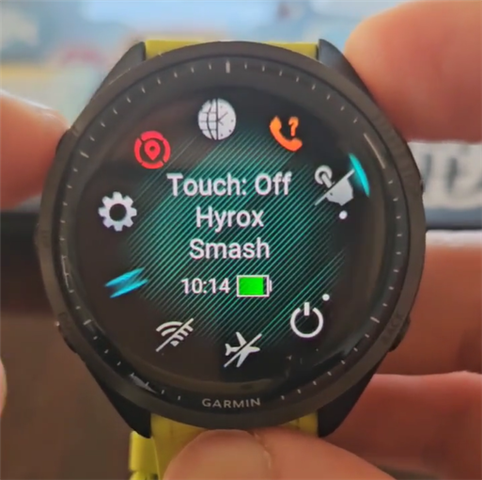
    According to the screenshot in the OP, the watch clearly shows that touch is currently off for their app.

    "Touch: Off
    Hyrox Smash"

    Any reasonable user would have the same interpretation. It is exactly analogous to the behaviour for touch settings on a per-activity basis. e.g. if you currently have the Run activity open, and you disable touch via the controls menu, the watch will display:

    "Touch: Off
    Run"

    And furthermore, touch will actually be disabled for the duration of the run activity. (Once you exit the run activity, then the "global" touch setting will apply.)

    Regardless of how DeviceSettings.isTouchScreen is supposed to work or is documented to work, and regardless of what Richard.ConnectIQ posted, it seems that this is indeed a bug from the user's and dev's POV.

    If the touchscreen off setting does not / should not apply to CIQ device apps, then the watch firmware / UI should reflect that reality.

    idk why you think this isn't a bug / bug report.

    I will also say that isTouchScreen was known in the past to reflect the user's touch preference for CIQ data fields in a native activity, and that touch would actually be disabled for the data field if it was disabled for the activity. At some point this behaviour may have changed (iirc there was some discussion about this for FR965).

    It does seem that isTouchScreen doesn't (and probably never did) apply to device apps, hence the new-for API 5.2.0 functions posted by Richard.ConnectIQ.

  • Hi Richard,

    Such a hero! Thanks for your help. It's very much appreciated. Disabling or enabling all the touch events works like a charm. 

    I put this as a trial option, and it works:

    if (WatchUi has :configureTouchEvents) {

                WatchUi.configureTouchEvents({

                    :enabled => false

                });

                //System.println("Touch has been programmatically disabled.");

            }

    However, the WatchUi.getTouchEventsConfiguration(); seems always to return true, regardless of the touch screen settings on the watch. The watch always shows CONF: Enabled, unless I change it via the option above.

    var touchStatusText = "Config: Unsupported";

    if (WatchUi has :getTouchEventsConfiguration) {
           var config = WatchUi.getTouchEventsConfiguration();

           if (config != null && config.hasKey(:enabled)) {
                  var isEnabled = config[:enabled];

                  touchStatusText = (isEnabled == true) ? "CONF: ENABLED" : "CONF: DISABLED";
           } else {
                 touchStatusText = "Config: Key Missing";
           }
    }

    I've got a Forerunner 965, and it runs on the latest firmware.

  • Please refer to the following API for how to check the current touch event configuration and how to set the touch event setting inside of a CIQ app. 

    https://developer.garmin.com/connect-iq/api-docs/Toybox/WatchUi.html#getTouchEventsConfiguration-instance_function

    https://developer.garmin.com/connect-iq/api-docs/Toybox/WatchUi.html#configureTouchEvents-instance_function

    Here is some sample code to toggle touch events.