[Watch face] Nautic — vintage diver style, full AOD

https://apps.garmin.com/apps/5679089a-e5fd-4ee1-b9c2-211539102d34

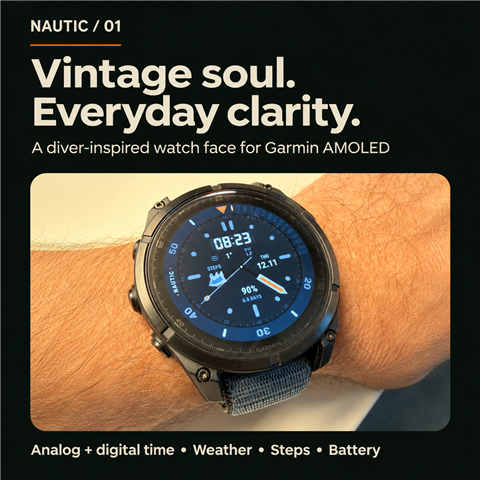
 I made Nautic for my own Fenix 8, combining the look of a vintage dive watch with the everyday information I want at a glance.

After wearing it daily, I’ve refined the dial, improved AOD readability, and made wake-up noticeably faster on my Fenix 8 with the latest update, 1.0.1.

A few highlights:

  • Analog hands and an inset digital clock
  • Weather, steps, date, and battery information
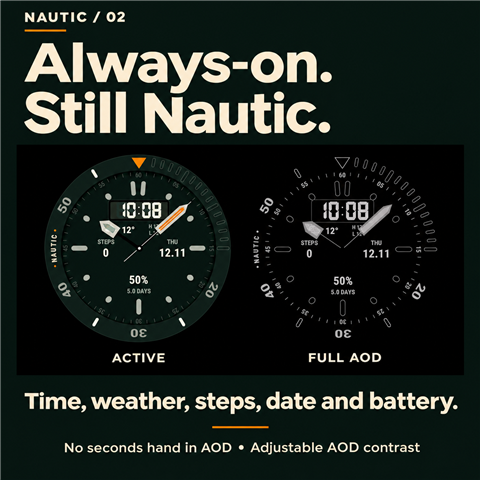
  • Full monochrome AOD that keeps the essential data visible
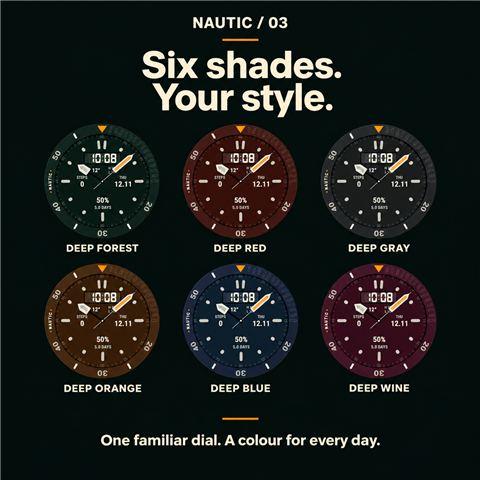
  • Six dark colour themes
  • Customisable bezel progress scale

The photos show it on my actual watch, alongside screenshots of AOD and the different themes. Currently available for compatible Garmin AMOLED watches.

I’m the developer. Nautic has a 24-hour free trial, followed by a one-time $2.99 purchase through KiezelPay — no subscription.

For this community, the first 20 users to redeem GARMIN can unlock 50% discount:

  1. Install Nautic from Connect IQ.

  2. When the activation code appears on your watch, enter it at kzl.io/code.

  3. Apply GARMIN as the discount code at checkout.

Connect IQ:
https://apps.garmin.com/apps/5679089a-e5fd-4ee1-b9c2-211539102d34

What do you think of the AOD? I wanted it to feel like the same watch, with the everyday information still there.

Feedback is simply welcome!

  • A little sneak peek at what I’m working on for Nautic 1.1:

    • Support for MIP displays

    • Customisable data fields, configurable directly on the watch

    • More colour options

    • Further readability and performance improvements

    • No release date yet — I want to test everything properly before rolling it out.

    If you use a MIP watch, which model would you like to see supported?

  • Based on the device, remember that some MIP devices only have 2, 8. or 16 colors, and not 64.

  • Sure, thanks for the information!

  • Nautic 1.1.0 — MIP support, Black/White backgrounds and Solar Charging

    An update to the MIP preview I shared earlier: Nautic 1.1.0 adds a dedicated design for modern Garmin MIP watches, now tested on my own Fenix 8 Solar 47 mm.

    What’s new on MIP

    • Black background by default, with an optional White background.

    • Contrasting text and skeleton-style hands that keep the underlying data visible.

    • An unfilled bezel for a cleaner reflective display.

    • Seconds hand settings: After gesture, Always or Off.

    • Optional Solar Charging bezel scale with a numeric reading.

    • MIP background, seconds and gauge settings available directly on the watch.

    Solar Charging uses Garmin’s solar-intensity value from 0–100. It does not represent battery charge percentage or watts; availability and refresh depend on the watch.

    Added device support

    Fenix 7/7S/7X and Pro variants, Enduro 2/3/4, Fenix 8 Solar 47/51 mm, Fenix 9 Pro Solar 47/51 mm and Forerunner 955/Solar, plus compatible models grouped by Garmin. Please check the listing for exact compatibility.

    This release targets modern colour MIP devices. It does not add support for older monochrome or limited-colour MIP models.

    Existing AMOLED users

    The AMOLED appearance, six colour themes, full monochrome AOD, settings and fast wake-up rendering are preserved.

    Fenix 8 Solar 47 mm has been tested on a real watch. All selected device profiles passed simulator tests, but feedback from other physical devices is very welcome.

    This update focuses on MIP support; customisable data fields and additional colour themes mentioned in the earlier preview are still planned.

    Nautic has a 24-hour free trial, followed by a one-time $2.99 purchase through KiezelPay. No subscription.

    Download Nautic from Connect IQ

    If you try it, please share your watch model and whether you prefer Black or White. Photos in daylight would be especially useful!

  • Nautic 1.2 — weekly step charts and on-watch customisation

    Hey everyone! I’m the developer of Nautic, a vintage diver-style watch face I originally made for my own Fenix 8. Thanks to everyone who asked for larger text and more control over what’s on the dial. I’ve been testing those changes on my Fenix 8 AMOLED and Solar, and they’re now in 1.2.

    • The Top Panel can show a 7-day step chart, 24-hour heart-rate history, or Garmin Weather. You can also turn it off. On supported Fenix 8 models, you can change it right on the watch under Customize → Top Panel.

    • There are more data fields and 21 bezel accent colours in the built-in editor on supported Fenix 8 models. You can also hide individual readouts and the bezel gauge in Connect IQ settings.

    • Larger readouts are available for both AMOLED and MIP. The white MIP dial has stronger contrast and a choice of skeleton or filled hands. AMOLED AOD shows a compact summary when a chart is selected.

    The photos show how the weekly step chart looks on both of my watches. That’s the panel I’ve been keeping on mine.

    Nautic has a 24-hour free trial, followed by a one-time US$2.99 unlock through KiezelPay.

    I’d love to see what you end up putting in the top panel. If you try it, let me know which Garmin you’re using and whether the larger readouts are easier to read at a glance.

    Nautic on Garmin Connect IQ