Stopping watch faces — TRAIL Gold & Classic | Updates & Support

Hi everyone! We’re Stopping, an independent watch-face developer. I make distinctive designs with clear time displays and customizable data. This topic is a place for updates, questions and your feedback.

Our goal with TRAIL is to combine distinctive design with clear, readable information on every supported Garmin watch. Screen sizes and personal preferences vary, so you can choose the data you need and fine-tune text size, label size, block width and colors directly on your watch.

Highlighted blocks and a live preview help you see exactly what you’re changing.

Meet TRAIL — now available on Connect IQ

TRAIL combines an instrument-style layout with topographic contours, a large clock and a progress gauge. Choose the warm Gold style or the silver-and-blue Classic look.

Get TRAIL on Connect IQ: Download TRAIL · Gold & Classic
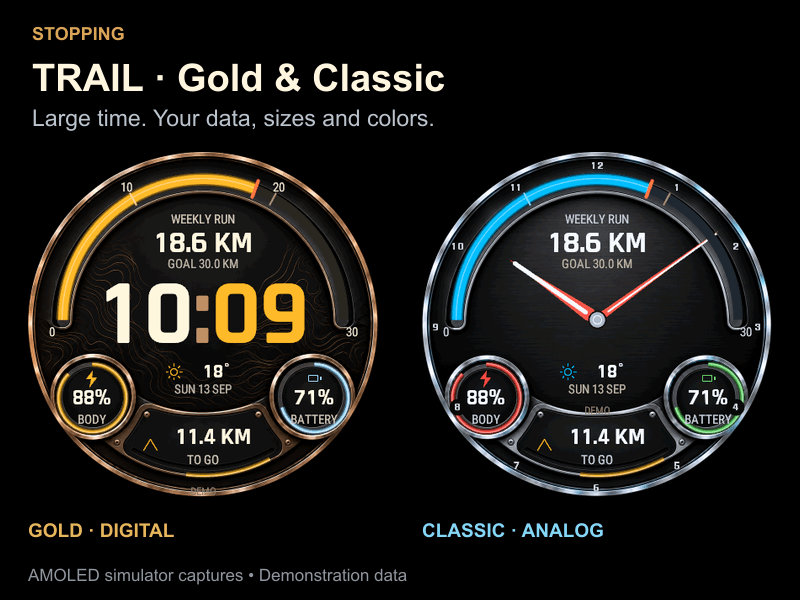
TRAIL Gold with digital time and Classic with hour and minute hands. Actual AMOLED simulator captures with demonstration data.

Make it yours

  • Digital or analog: use large digital time or hour and minute hands with small hour markers.
  • Your data: customize five data areas with heart rate, steps, Body Battery, oxygen saturation, watch battery and more. Use the main gauge for a weekly running goal or another supported metric.
  • Readable at a glance: scale all text together or select a highlighted block to adjust its value size, label size and width.
  • Your colors: choose from 12 presets plus the theme default, or set a custom RGB color. Adjust individual blocks and preview changes before saving. Your block styles stay in place when you change the metric.

On supported AMOLED watches, always-on mode keeps the time and dim topographic contours visible. MIP watches use clean native-color graphics adapted to their screens. The image above shows the AMOLED appearance.

Check the store listing for compatible watches. Available data and controls vary by device. The watch interface supports English and Russian.

More from Stopping

KINETIC · STRATA · MERIDIAN

What would make TRAIL work better for you? Share your watch model and the change you’d like to see. For a problem, please include the watch-face version and the steps to reproduce it.

  • Hi everyone! We’ve released two new Stopping watch faces: GYRO and SAPPHIRE HAZE. Both are free in their initial release.

    Our aim is to combine sculpted design with readability on supported watches. If the default text size or choice of data doesn’t suit you, you can adjust individual blocks to your needs.

    GYRO is an analog face with a sculpted metallic dial and distinctive hour and minute hands. On AMOLED, the parts of the hands crossing data become translucent to keep the values visible.

    GYRO analog watch face — actual AMOLED capture with demonstration data

    GYRO on Connect IQ

    SAPPHIRE HAZE pairs flowing smoky artwork with a glass-inspired dial. Analog time is the default; you can choose digital time in settings. Four coordinated palettes are available: blue/gold, turquoise/rose gold, purple/amber and silver monochrome.

    SAPPHIRE HAZE analog watch face — actual AMOLED capture with demonstration data

    SAPPHIRE HAZE four color palettes — AMOLED examples with demonstration data

    SAPPHIRE HAZE on Connect IQ

    What you can customize in both faces:

    • Five data fields, with options such as heart rate, steps, Body Battery, SpO₂, watch battery and sunrise/sunset. Availability depends on the watch and Garmin data.
    • Global text scale and individual value and label sizes.
    • Block width within the layout, plus text, panel and accent colors.
    • Preset color swatches or your own custom RGB color.

    How to customize: open Edit Blocks on the watch and tap a highlighted block, or select it through Block List. Its parameter menu opens directly. You can preview changes, then save, cancel or reset them.

    GYRO Edit Blocks and font size controls — AMOLED editor examples with demonstration data

    SAPPHIRE HAZE block selection, size and RGB settings — AMOLED editor examples with demonstration data

    An always-on view is available on supported AMOLED watches. MIP versions are adapted to their 64-color screens, so they differ from the AMOLED examples here. Please check the compatible-device list and the images for your display type on each store page.

    If you try either face, tell us your watch model and what you would like to improve: readability, data placement or settings. Feedback from different watches is especially helpful.