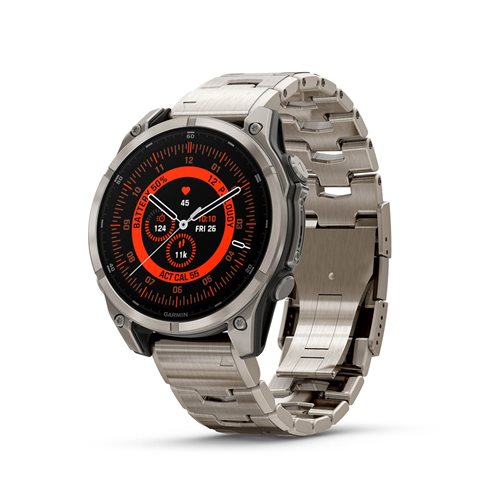
Portal Hybrid watch face – one of the most efficient watch faces

Hey everyone! Fresh developer here with the first project wrapping its active phase: https://apps.garmin.com/apps/0b7cce1f-e530-48cd-b22a-be89873e1a4a
Please check it out, would love to hear your feedback. Would also appreciate any good reviews in case you like it, of course Raising hand tone2‍️Pray tone2


The core principles of this watch face are good design, meaningful configurability, and best-in-class efficiency.

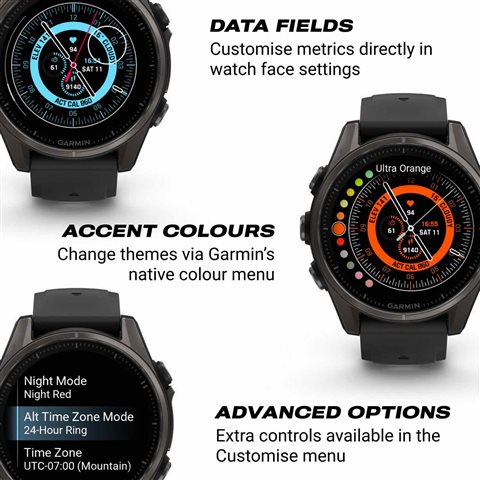
Portal Hybrid is one of the first third-party watch faces built using Garmin’s latest Connect IQ SDK, enabling full on-device configuration, including colour themes and data fields, through the same native interface used in Garmin’s own faces. This allows for deeper customisation while maintaining complete visual and functional consistency with the original system design.

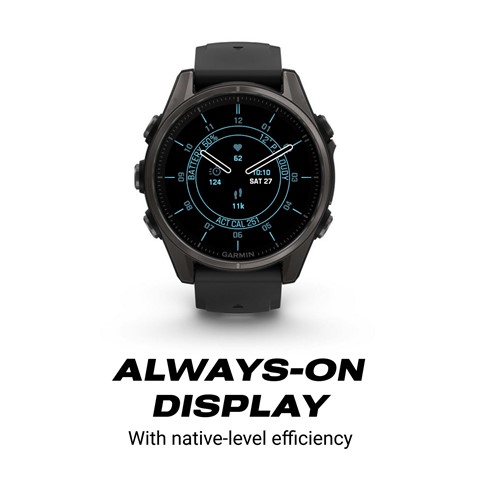
The watch face is engineered with an emphasis on efficiency: it operates with minimal CPU and power consumption, comparable to Garmin’s native options. This optimisation ensures smooth interaction, reduced system load, and extended battery life, allowing the watch to perform effortlessly while maintaining visual precision.

Portal Hybrid watch face organises analogue and digital elements through a strict radial geometry. Strict contrasts, calibrated line weights, and restrained typographic hierarchy prioritise legibility over ornament. Time is expressed through traditional hands, while secondary metrics are integrated concentrically to preserve balance. The result continues Garmin’s functional philosophy, framed through an architectural logic of clarity and precision. As the first release by Stash Digitale, it stands as the studio’s original statement on design.

Complications:
• Heart Rate
• Intensity Minutes
• Steps
• Floors Climbed
• Calories
• Active Calories
• VO₂ Max Run
• VO₂ Max Bike
• Body Battery
• Stress
• Pulse OX
• Respiration Rate
• Recovery Time
• Move Bar (!on newer devices, shown under “10k Race Predictor” metric name!)
• Current Weather
• Temperature High/Low
• Humidity (!on newer devices, shown under “Forecast Weather 3-day” metric name!)
• Pressure (Sea-Level)
• Wind Speed / Direction (!on newer devices, shown under “Current Temperature” metric name!)
• UV Index (!on newer devices, shown under “Forecast Weather 1-day” metric name!)
• Precipitation (!on newer devices, shown under “Forecast Weather 2-day” metric name!)
• Solar Input
• Tide (!on newer devices, shown under “5k Race Predictor” metric name!)
• Moon Phase (!on newer devices, shown under “Sunset” metric name!)
• Date / Date + Battery / Date + Digital Time
• Week Number (!on newer devices, shown under “Weekday/Monthday” metric name!)
• Sunrise / Sunset
• Calendar Events
• Time Zones (DST-aware)
• Notification Count
• Battery Level
• Training Status
• Weekly Run Distance
• Weekly Bike Distance
• Phone Connection Lost Indicator

  • Since efficiency is key, consider adding an optional, small "CPU Load Indicator" data field that shows the correlation level.
    [url=https://leveldevil-game.io/][color=white]level devil[/color][/url]

  • Hi, I have a few questions to help users who may choose to buy this expensive watch face:

    best-in-class efficiency - please explain what class and who has awarded you this?

    first third-party watch faces built using Garmin’s latest Connect IQ SDK - not sure on the relevance of this, please explain especially as ALL watch faces since July 2025 must use SDK 8.1.0 as a minimum or they will not be accepted by the Store, and the latest SDK (at the time of writing - 8.3.0) is the same architecture as 8.1.0. As this was months before your watch face was launched please justify your statement.

    through the same native interface used in Garmin’s own faces - but your above statement states you use the Connect IQ SDK, which is NOT what Garmin use for their native watch faces, please explain this irregularity (being diplomatic there with choice of word).

    it operates with minimal CPU and power consumption - this does not mean it is battery friendly though and could mean the battery only lasts 5 days for example, it just means it is good for its complexity. Please explain / provide data to back up / clarify your statement.

    The result continues Garmin’s functional philosophy - which is what exactly and how have you achieved this?

    You then go on to list data options that are available, which is a good list that is also available on 100s of other watch faces, yet you call them "complications", why is this? Do you understand the difference between data and complications that use data? - I don't pretend to fully know the difference, but I do know that they are NOT all complications.

  • Hello, 

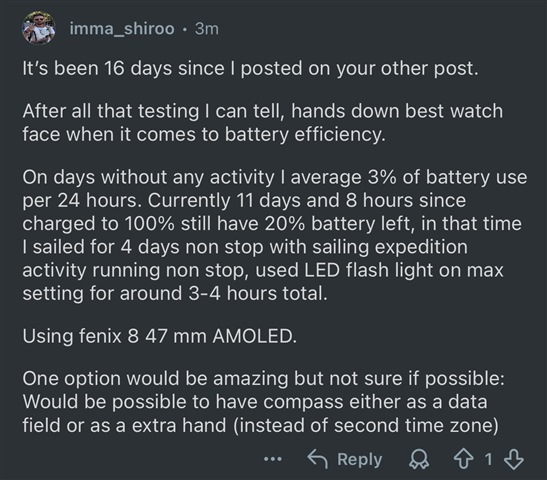
    1) best-in-class efficiency – we have started this project because we ourselves are active Garmin ecosystem users and, unfortunately, we have always struggled to find an efficient third-party watch face. We own 200+ watch faces and have tried each one of them long-term over the years. Yes, some are better than the others, but only a few of them match the native level of battery efficiency. We have created the Portal Hybrid watch face to match the native level of battery efficiency and are happy to report that on our current F8 and T8 47mm, Venu 4 and Forerunner 265 watches, this watch face shows battery efficiency 1:1 to pre-installed watch faces. In case this is not enough, here is a review from one of our users: 

    *we also have other messages and reviews confirming this. However, to be fair, there is one line of watches (Marq 2), where we do have one review that Portal Hybrid shows performance of 12hrs less than pre-installed alternatives. Given the fact that it is just one feedback of such sort, we haven't yet investigated further, given the fact that it is still very much efficient for the rest of the users. 

    2) first third-party watch faces built using Garmin’s latest Connect IQ SDK – technically, you are correct. There is some room for improvement in communicating this. What we were trying to say is that you can configure everything on the device in the same fashion as pre-installed watch faces on the latest watches (8 series, Venu 4, etc.) and get a native level efficiency. I will think of other ways of delivering this message. Thanks for pointing this out.

    3) through the same native interface used in Garmin’s own faces – replied to this above. Try it for yourself and compare to how you edit data in other watch faces. This is only relevant for any 8 series device and Venu 4 devices. For other watches, we have a neatly organised Customisation menu which is closer to what some other developers offer, but still with some good exceptions e.g. colour preview directly in Garmin's native customisation flow. I wish more developers would support a proper on-device customisation opportunity without leaving this strictly to the Connect IQ app menu or, even worse, coming up with some proprietary navigation for this.

    4) it operates with minimal CPU and power consumption – for minimal, we have taken the smaller model of watches, such as Descent mk3i or Forerunner 265, for example, as a benchmark. And we are happy to report that the watch face shows good performance on these devices, which is not exactly easy to achieve given the number of complications that can be configured to run at the same time. Technically, this phrasing can be improved if phrased as "balanced", I agree. I guess what helped us to stay balanced is the fact that we have deliberately avoided any .svg files and are committed to the on-device renderings.

    5) the result continues Garmin’s functional philosophy – the watch face was designed with a strong focus on Garmin's vector, rotating typography, attention to Garmin's nuances of on-device rendering and care for their proprietary metrics (formed in the shape of available watch face complications). + a native level of on-device configuration (even for the latest and greatest way of configuring pre-installed watch face). This results in a watch face that naturally continues the landscape of Garmin's ecosystem.

    6) question on "Complications" title – in traditional horology, a complication is anything on a watch that goes beyond showing the basic time, for example, a date window, moon phase, power-reserve indicator, tide chart, or any kind of additional information that requires its own visual structure. We use the same terminology in Portal Hybrid because the elements you see on the face are not just raw data fields from the Garmin SDK. Every metric is formatted, styled, and visually integrated into the watch face in a way that makes sense to the users within the overall design. These complications were tailored based on the user feedback: some have progress arcs, some have icons, some have multi-value layouts, and many require custom logic to present the information clearly. So rather than simply placing “data fields” on the screen, Portal Hybrid treats each one like a small watchmaking feature, something with its own visual language and purpose. That’s why I refer to them as complications: they behave much closer to horological complications than generic data fields.

    Now, if I may: Where are you based? I am trying to understand for which region a one-time payment of roughly $5 is an "expensive" purchase. This might help me tailor pricing for my next projects. So far, the current pricing is literally a median across the whole Connect IQ store offering.

  • Hey there! So far, we don't see value in visualising this to our users, but it's nice to know there is such an option, thanks!

  • Thank you for replying, and actually answering my questions. This helps users and shows you are not shy at answering which is a good thing.

    I agree the use of the word complication is accurate as you use it, so I apologize as i was stuck in developer mode not user mode.

    I did not say it was an expensive purchase, but an expensive watch face. I base this on a lot of them being circa $3.

    But as an anecdote and off topic, $5 would feed a family for at least a day in many many parts of the world.

    I wish you success with your watch face and future ones, maybe the next one could include some older ciq 3.1.x watches

    EDIT: Would you like me to remove the complication part of my original post?

    And one further question: why in your keywords do you use Disney, Crystal (the most downloaded watch face !!) and timefy - not sure what this is?

  • Sure, no worries.

    Interestingly, by using Garmin Pay as our only payment option, we have made this watch face unavailable to parts of the world where $5 can feed a family for a week...

    Why delete the complication question? It's a legit question, like other questions you asked.

    Keywords help with the discoverability of the watch face, and this is, unfortunately, one of the few Connect IQ optimisation tactics available.

  • keywords: But why use the ones I have asked about, seems a bit unethical to me?

  • I have added those just this week, and have not yet formed my opinion about them. May be unethical. 
    Just seeking some opportunities to make the watch face visible for more people out there.