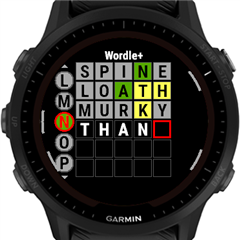
# Wordle Plus
The classic Wordle game.
## Features
- You get 4 games in 1 app: Word length: 3, 4, 5 or 6.
- Hard mode (PRO).
- Faster typing by allowing "long key press" for ᐃ ᐁ buttons.
- Tap any of the keys in the on-screen keyboard or any letter in the previous lines to type the letter.
- Keyboard shows the color of the letters already discovered.
- Starting words (PRO) - Add up to 3 words that you frequently use as first guesses. You can type these words by using the shortcuts ①, ②, ③ in the keyboard.
- Wordle Solver (PRO) - At any time in the game you can open the Menu ≫ Solver to give you relevant hints. It'll open a webpage in your phone (needs internet).
Note: the PRO features are free in this version but might need a one time payment in the future.
Supports most watches, Edge and GPS devices with color screen.
## Configuration
In the app: Long press the Menu button (on 5 button watches the Up button) to open the menu then select Settings.
In Connect IQ phone app or Garmin Express enter the settings.
- Board size - Select the preferred word length (only available in Wordle Plus English: 3x6, 4x6, 5x6, 6x6).
- Distinct letters - When enabled the word you need to guess will not repeat any letters. When disabled you'll also get puzzles like: FOOLS, ROBOT, BOBBY or MIMIC.
- Hard mode (PRO) - When enabled any revealed hints (green/yellow letters) must be used in subsequent guesses.
- Starting words (PRO) - Add up to 3 words (separated by space) that you frequently use as first guesses.
- Auto submit - When enabled each guess will be automatically submitted when the last letter is typed in. If disabled you'll need to submit each guess by clicking the ᐳ key or  ⏎ icon.
⏎ icon. - Long key press - Enable it on devices with physical ᐃ ᐁ button so you can type faster by holding up/down button. On devices where the menu button is the same as the up button the menu will open only when the keyboard is closed (by the back button).
- Sound & vibration - When enabled you'll get notifications on invalid words, hard mode errors and when you solve the puzzle.
- Color blind mode - When enabled different colors will be used that have more contrast for color blind people.
## Support
Contact me if you're interested in other word length or other languages (Use Contact Developer and include your email address so I can contact you).
If you like the app you can thank me by sending a beer: https://paypal.me/GavrielF or buymeacoffee.com/flocsy or at least write a positive review with 5 stars  .
.
.## Changelog
1.2 (2024-05-05)
- added black/white background setting
- fixed Array Out Of Bounds Error
1.1 (2024-04-16)
- added hard mode setting
- added silent setting
- added color blind mode setting
- fixed bug when tapping below the board
- fixed bug when pressing up/down key after the game finished
1.0 (2024-04-12)
- initial release
## Screenshots