EDGE All in One

IQ Store Link                                                        IQ Store Link

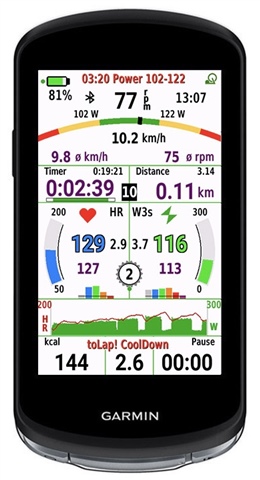
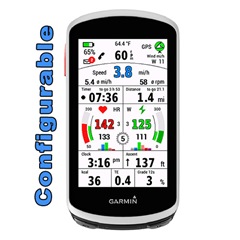
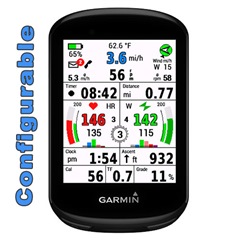
EDGE All in One is a single data field.

One for Edge 1030, 1040 and 1050, the other for Edge 530 and 830, 540, 840 and Explore2

It displays many values for cycling - around the most important values: speed, cadence, heart rate and power.

A detailed description can be found here:

EDGE 1030 + 1040 + 1050 (English and Deutsch and French):  
mcinner.at/.../GuideAllinOne_E.pdf  
mcinner.at/.../GuideAllinOne_D.pdf
http://mcinner.at/files/GuideAllinOne_F.pdf

EDGE 530, 830, 540, 840 and Explore2:
mcinner.at/.../GuideAllinOne58.pdf

This datafield is free of charge, but if you like it and use it, it would be nice to be invited to a beer: paypal.me/AndreasWirth

I have tested the datafield intensively with my devices Edge 1030 and 1030 PLUS, 1040 and 530.

Download and install EdgeAllinOne as single datafield following these steps on your device:

Activity profile - Data Screens - Add New - Custom Data - Choose single layout
In the ConnectIQ collection select EdgeAllinOne1.

After installing this datafield on your device, various settings can be made. This is best done with Garmin Express or Garmin Connect Mobile. Instructions for this can be found here:

support.garmin.com/.../

To use the power section, a power meter must be connected to the device and the values of the individual power zones must be stored in the settings.

For the heartrate graphs the heartrate zones are taken from your profile. It is therefore necessary that the zones are set in your device!

For the display of wind bearing and wind force, as well as the outdoor temperature, the data of a nearby weather station must be available via Garmin Connect Mobile. The app must therefore be loaded on the phone (but it can work in the background).

If you have questions or requests please write here and tell for which device!

  • The new colour works fine Thumbsup

    Maybe I found another bug:

    With the GX it works like it should, on my Apex it crashed after checking the components (the shifter are not visible at the batterycheck)

  • Please send me a PM, so we can try to get a solution.

  • The "Edge AllinOne 1" datafield enables now ANT battery monitoring for Gears and Power.

    For more ANT battery monitoring please install the new datafield "Bike AllinOne 2"!
    apps.garmin.com/.../bce89479-689d-478d-b775-7d46f3c13e5c

    A note about the new Garmin Radar Rearview 820: This sensor connects to Edge devices via Bluetooth by default. However, this means that no radar data will be transferred to CIQ data fields. This is only possible if you connect the radar via ANT+ (which is possible with the 820 radar), but then you won't get the advanced lateral features on your Edge!
    And even you connect via ANT: there is nomore radar speed transmitted.
    So, if you use this new radar, forget the radar features in my datafields!

    Sorry – but that's just how GARMIN is!

  • Hi  , if you are still here, thank you for your datafields! I'm experimenting with different datafields and found yours to be very useful. I'm using All In One Part 1 with Multifields and 6fields for now, as they are more configurable than All In One/ All In One Part 2. And I use All In one Workout, but I do have issues with it. Can I take a look at the code of any datafield just to find out if I can correct these issues for myself? I guess it will be unpleasant for you to hear any criticism about your work, so maybe I could just try to make corrections and ask you to review them?

  • so maybe I could just try to make corrections and ask you to review them?

    You can describe your problems to me, and I will check them in my code.

  • 1) Target and Next target are red with a small font, so it's often hard to read them in a dark room, or outdoors. Maybe there could be some place for them? Maybe only Next target should be shown?

    2) Pause is always zero for me, maybe it is a good place for Next target?

    3) The graph is too small and green on black is not the most contrast color variant, side legend is too small and useless, heart pictogram above is red, and power pictogram is green just above the graph. It's impossible to check if you are hitting the target with the graph.

    4) This gauge never fills, maybe it should be removed? So those speed numbers could be a bit bigger and readable. Maybe big speed number on the left and a big RPM number on the right, dividing the screen as other widget parts do?

    5) Gauge coloring is totally ok, but maybe power and heartrate numbers should be more contrast and bigger? It's the main target, so the eye should catch them easily

    6) Repeats left/total is very useful for me. I often do multiple repeats, like 12, or 20, so this number is crucial.

  • What is your current step: 24:00  1177-1187  ?

    Will you share your workout fit file, so I can check?

    The gauge #4 is the main thing for keeping the goal and works for me for power, heartrate, speed…

  • All workouts are coming from intervals.icu, and the step was 177-187. It is working correctly for Garmin goal window.

  • It seems intervals.icu is interpreted correctly by Garmin native workout, but not interpreted correctly by Garmin CIQ API. At least „Power“ should appear in text for current and next step. But it seems CIQ does not even know that it is a power step.

    Without the possibility to try on my simulator or Edge 1050 using a workout file/data from intervals.icu I cannot help. (And I don't want to sign up at itervals.icu just for testing purposes.)

    Sorry…

  •  
    If you are willing to find a solution, please pm me giving your email, and I will send you a small test program for sideloading to find out.