Smart Bike Lights (Data Field) / Bike Lights Control (Widget)

I've made two open source CIQ applications to control ANT+ lights:

- Smart Bike Lights (data field): https://apps.garmin.com/en-US/apps/0d9fd828-c932-4470-9c37-fd2828881888 

      Configurator: https://maca88.github.io/SmartBikeLights/ 

- Bike Lights Control (widget): https://apps.garmin.com/en-US/apps/fa3c2332-76e3-4ba1-8528-32a0fd617ab1 

     Configurator: https://maca88.github.io/BikeLightsControl/ 
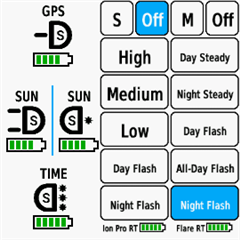
Smart Bike Lights features:
- Automatic light control (Smart mode) based on the configured filters (sunset, sunlight, speed, ...)
- Manual light control (only for Edge devices with a touch screen or devices with CIQ 3.2 and more than 32KB memory)
- Records lights modes that are displayed in Garmin Connect

Bike Lights Control features:
- Manual light control (available to all devices)

Both applications can be installed on the same device, which can be useful for low end devices (e.g. Edge 520) where "Bike Lights Control" can be used to change light modes manually and "Smart Bike Lights" for automatic light control.

Currently registered ANT+ lights:
- Bontrager Ion Pro RT
- Bontrager Ion 200 RT
- Bontrager Flare RT
- Garmin Varia RTL500
- Garmin Varia RTL510
- Garmin Varia RTL515
- Garmin Varia HL500
- Garmin Varia UT800

in case your ANT+ light is not on the list you can help by doing the following:

1. Install Bike Lights Control
2. Pair your bike light with your Garmin device
3. Open the widget:
- Edge with a touch screen: post which numbers are displayed on the buttons and what mode each button represents when pressed
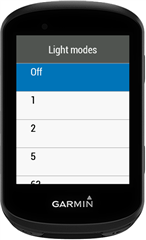
- Other devices: Select the "Light modes" menu and post which numbers are displayed in the menu and what mode each menu item represents when selected

Example for Bontrager Ion Pro RT:
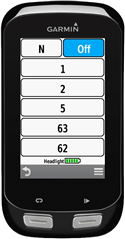

1 -> High steady beam
2 -> Medium steady beam
5 -> Low steady beam
63 -> Day flash
62 -> Night flash

There are some features that could be possible to add in the future, but would require Garmin to add them to the CIQ api. In case you are interested in any of the below features, consider upvoting their feature request thread:

1. Control lights based on the ambient light sensor available on some devices:
https://forums.garmin.com/developer/connect-iq/i/bug-reports/ambient-light-sensor-api-access 

Known issues:

1. Unable to use Tempe Visualizer or TyreWiz Data Field alongside Smart Bike Lights:
https://forums.garmin.com/developer/connect-iq/i/bug-reports/lightnetworklistener-onbikelightupdate-not-called-when-certain-data-fields-are-installed

  • Hey, thanks for the fast reply, I appreciate it.

    Bear with me, I am (obviously) not familiar with or much good at this.

    1. Use the first data field to configure Varia 515 by turning on the light only when a vehicle is approaching:

    I'm added my 515's serial number (3602469494) using your calculator, which changed it to (1454985846 for what I understand): ###0,73535488:1,1454985846:1:###6,5:Varia 515:0:16777215 etc.

    Is that normal?

    2. Use the second data field (Smart Bike Lights #2) to configure Flare RT to turn on the light at sunset:

    If I'd like to run my Flare RT (serial number 1311590289) as a running light (at the moment if an activity starts, it's goes to night flash mode - this is I'd like to keep as is, do I need to add this code or to the data field?

    I also have two other questions:

    1.) Do I understand that I need to add these data field(s) to each profile on Garmin 1040?

    2.) I will need to control the lights from the data field(s) right, like shown here and not from Garmin's own built in controller? https://github.com/maca88/SmartBikeLights?tab=readme-ov-file#control-modes 

    Thank you.

  • I have an issue where my Magene 1600 light turns off at the same section of downhill road soon after starting my ride. It occurs even when on manual mode. Do you know what may be the cause?

    The configuration you provided does not include any filters that would turn off the light. If the issue also occurs in manual mode, then the light mode is most likely being changed by the light itself.

    I’m not sure why this would happen, but I would suggest unpairing or disabling the light from the Garmin Sensors menu and testing whether it still turns off. If it does, you can be confident that the issue is not related to Garmin.

    If Garmin is not the cause, I recommend checking the Magene mobile app for any relevant settings. If you don’t find anything, try performing a factory reset. If the issue persists, you should contact Magene support for further assistance.

  • 1,1454985846

    Yes, that is normal. Serial numbers that are larger than 2147483647 are splitted into two number, in your case 1 and 1454985846.

    If I'd like to run my Flare RT (serial number 1311590289) as a running light (at the moment if an activity starts, it's goes to night flash mode - this is I'd like to keep as is, do I need to add this code or to the data field?

    If that is the case then you could use this configuration for Flare RT:

    1,1!:1H]0###6291461,1409482753:0,1311590289:1:#1,1!:1:63:0:0D=1##7,6:Flare RT:0:16777215:-1!2,:-1,Off:0!1,Day Steady:1!1,Night Steady:5!1,Day Flash:7!1,All-Day Flash:8!1,Night Flash:63#0::#0:1#123!:123!#0#0#B3843##1#0#0

    When in Smart mode, the light will turn on (Night Flash) when the activity is started and turn off when the activity is completed. You can also use the N (Network) mode instead of S (Smart) mode in order to leave the light control to Garmin native behavior (HiVis, Auto, Trail). If the Garmin native behavior is fine for you, then use this configuration

    ###6291461,1409482753:0,1311590289:1:###7,6:Flare RT:0:16777215:-1!2,:-1,Off:0!1,Day Steady:1!1,Night Steady:5!1,Day Flash:7!1,All-Day Flash:8!1,Night Flash:63#0::#0:0#123!:123!#0#0#B3843##1#0#0

    With this, you need to make sure to use the N (Network) mode, not M (Manual).

    1.) Do I understand that I need to add these data field(s) to each profile on Garmin 1040?

    You need to add these data field to the profiles where you need to control the lights.

    I will need to control the lights from the data field(s) right, like shown here and not from Garmin's own built in controller?

    Yes, if you want to manually change the light mode then you should do this via the data field. By doing this, the control mode will automatically switch to M (Manual). If you then want to resume back to the Garmin native behavior, you will need to manually switch the mode to N (Network).

  • I unpaired the light from the Garmin and the light did not turn off mid-ride at the location it does when paired with the Garmin. So the problem only occurs when the Magene light is paired to the Garmin. Any suggestions as to why this is happening?

  • I have a Varia 820. The radar works over BLE and the lights over ANT+. In smart mode, the lights work, but the screen remains OFF. The backlight doesn't change when various conditions are met.

  • Hello. Can I please set up the Garmin 530 and Varia RTR 515 so that it behaves. Radar is off, when a car drives by it flashes. Otherwise it is off. Thank you very much

  • Hi,

    I have a Edge 1040 Solar and a RearVue 820 (both with latest SW/FW)

    Sensor is connected via BLE and Light Network is via ANT+ open.

    The config I have created is:

    ###0,73535488::1:#5,5!CAR:1:4:0:0I[100]0!NIGHT:1:5:0:0Es-1800,r1800!TUNNEL:1:5:5:0G[3!FAST:1:6:2:0C]19.44444!:1:0:0:0D=1##6,5:Varia 820:0:16777215:-1!2,:-1,Off:0!1,Solid:4!1,Peloton:5!1,Day Flash:7!1,Night Flash:6#0::#0:1#123!:123!#0#0#B3843##24#0#0

    The Datapage Screen looks like expected on the Garmin and Batterie Status is displayed, but the light doesn't turn on when a car is detected.

    Is anything wron with my Config?

    BR, Peter

  • Sorry for the late reply — things got a bit busy and I kind of forgot to follow up.

    I’ve now tested it again with the latest version, and it kind of works Slight smile
    It’s not 100% perfect, but I’d say it behaves correctly in about 9 out of 10 cases, which is already a big improvement.

    The light mode button does highlight when tapped, so manual tracking seems to be working as intended.

    The cycling season has started, so I’ll be testing it regularly during rides and will report back if I notice any consistent issues or patterns.

    Thanks again for your work on this Thumbsup

  • Why don't the modes in Edge highlight when running in smart mode? The Varia 820 radar is on. Smart mode is always on, Varia is running, but nothing happens on the screen.

    I found the answer.

    github.com/.../114

  • ok, at least good to hear that this seems to be a systematical problem and not just us being not able to set it up in the right way.