Smart Bike Lights (Data Field) / Bike Lights Control (Widget)

I've made two open source CIQ applications to control ANT+ lights:

- Smart Bike Lights (data field): https://apps.garmin.com/en-US/apps/0d9fd828-c932-4470-9c37-fd2828881888 

      Configurator: https://maca88.github.io/SmartBikeLights/ 

- Bike Lights Control (widget): https://apps.garmin.com/en-US/apps/fa3c2332-76e3-4ba1-8528-32a0fd617ab1 

     Configurator: https://maca88.github.io/BikeLightsControl/ 
Smart Bike Lights features:
- Automatic light control (Smart mode) based on the configured filters (sunset, sunlight, speed, ...)
- Manual light control (only for Edge devices with a touch screen or devices with CIQ 3.2 and more than 32KB memory)
- Records lights modes that are displayed in Garmin Connect

Bike Lights Control features:
- Manual light control (available to all devices)

Both applications can be installed on the same device, which can be useful for low end devices (e.g. Edge 520) where "Bike Lights Control" can be used to change light modes manually and "Smart Bike Lights" for automatic light control.

Currently registered ANT+ lights:
- Bontrager Ion Pro RT
- Bontrager Ion 200 RT
- Bontrager Flare RT
- Garmin Varia RTL500
- Garmin Varia RTL510
- Garmin Varia RTL515
- Garmin Varia HL500
- Garmin Varia UT800

in case your ANT+ light is not on the list you can help by doing the following:

1. Install Bike Lights Control
2. Pair your bike light with your Garmin device
3. Open the widget:
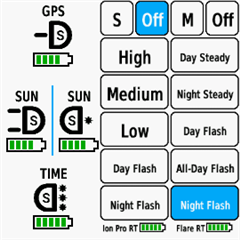
- Edge with a touch screen: post which numbers are displayed on the buttons and what mode each button represents when pressed
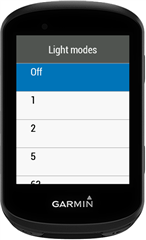
- Other devices: Select the "Light modes" menu and post which numbers are displayed in the menu and what mode each menu item represents when selected

Example for Bontrager Ion Pro RT:
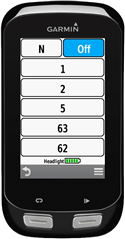

1 -> High steady beam
2 -> Medium steady beam
5 -> Low steady beam
63 -> Day flash
62 -> Night flash

There are some features that could be possible to add in the future, but would require Garmin to add them to the CIQ api. In case you are interested in any of the below features, consider upvoting their feature request thread:

1. Control lights based on the ambient light sensor available on some devices:
https://forums.garmin.com/developer/connect-iq/i/bug-reports/ambient-light-sensor-api-access 

Known issues:

1. Unable to use Tempe Visualizer or TyreWiz Data Field alongside Smart Bike Lights:
https://forums.garmin.com/developer/connect-iq/i/bug-reports/lightnetworklistener-onbikelightupdate-not-called-when-certain-data-fields-are-installed

  • Hi Maca. I'm adding some filters to my configuration and was wondering if there was any way to display the name of the filter group on the data field that's triggering the current light mode as it would be quite handy to check if the filter was working 


  • Hi Maca,

    I'd like to ask you, if there are a new "Vehicle threat" levels than the current available in the configuration application: None, Medium, High for new radar Garmin RearVue 820. I'm not able to setup do not flash in case you ride bike with a friend who is keeping same distance after me. The Garmin Edge shows it as a green point upper and ikon of bike. The flash is annoying in such case and I would like to have radar light off in such use case. I attached my current setup adopted from 515 to 820:

    #4587520,196641:0,943733581:1:#15,8!Tunnel:2:62:1:0G[2H]1!Night1:3:1:1:0B[3C]9.72222Es2700,r-2700!Night2:3:2:60:0B[4C]5.55556Es900,r-900!Night3:2:5:1:0C]1.38889Es0,r0!Night4:1:62:1:0Es0,r0!Day1:2:63:1:0Er0,s0H]2!Day2:1:0:1:0Er0,s0!:1:0:0:0D=1#0,73535488::1:#8,5!Tunnel:2:6:1:0G[2H]1!Night:1:6:1:0Es-900,r0!Day1:3:7:1:0Er0,s0H]1I]-1}1!Day2:1:0:1:0Er0,s0!:1:0:0:0D=1#7,6:Ion Pro RT:0:16777215:-1!2,:-1,Off:0!1,High:1!1,Medium:2!1,Low:5!1,Day Flash:63!1,Night Flash:62#6,5:RearVue 820:0:16777215:-1!2,:-1,Off:0!1,Solid:4!1,Peloton:5!1,Day Flash:7!1,Night Flash:6#0::#1:1#123!:123!#0#0#B4062#1#24#0#0

  • Hi,

    sorry for the late reply.

    the screen goes black

    The whole screen or just the are where the data field is placed?

    What happens if you turn on FR300 again, does the screen re-appear? 

    What could be causing this?

    I am not sure yet, it could be that Smart Bike Lights crashed, but if that would be the case, you should see an "IQ" icon in the middle of the area where you placed the data field. 

  • Hi, sorry for the late reply. 

    Yes, it is possible to show the current group name. If you have Smart Bike Lights set on a 1 Field Layout, then you can set the following:
     
    If you are using any other layout, you need to put it in a place where there is enough space in order the group to be displayed. 

  • if there are a new "Vehicle threat" levels than the current available in the configuration application

    No, the additional vehicle data is only available via BLE, which is not supported by Smart Bike Lights. The BLE connection for the Varia 820 uses a private protocol that is accessible only for companies that do request access via:
    https://developer.garmin.com/radar-data-ble/overview/

    There is a dedicated thread related to this:
    Garmin Varia Rearvue 820 Radar development

  • Thanks for the replay, but it doesn't sound Garmin will enable you to add this nice functions. I need to check it again, but I assume that my radar is connected via ANT+. My Edge 840 shows types of vehicles and their position Left/Right. It could be changes by a recent update of RearVue.   

  • Excellent Cheers   I'll give it a whirl

  • My mate uses a Wahoo head unit with a Varia RTL515. The interesting part that the light was off, only blinked for 5-10 seconds, when a car was detected. As I find RTL515 light way too strong I use it i radar only mode and run a Bontrager Flare RT Rear instead. They are in a light network.
    I spent some time researching this but found no solution for this (doing the same with my 1040).

    Is there any solution (data field/widget) to force RTL515 to be in radar mode only but blink when something detected and running Bontrager Flare RT Rear in night flash mode, while being in a light network? This would be a great solution for me, thanks in advance.

  • Yes, you can achieve what you want by using two Smart Bike Lights data fields.

    1. Use the first data field to configure Varia 515 by turning on the light only when a vehicle is approaching:

    ###0,73535488:0,11111:1:#2,2!RADAR:1:7:0:0I]-1]0!:1:0:0:0D=1##6,5:Varia 515:0:16777215:-1!2,:-1,Off:0!1,Solid:4!1,Peloton:5!1,Day Flash:7!1,Night Flash:6#0::#0:1#123!:123!#0#0#B3843##3#0#0

    You need to edit this configuration by setting the serial number of your Varia 515

    2. Use the second data field (Smart Bike Lights #2) to configure Flare RT to turn on the light at sunset:

    ###6291461,1409482753:0,22222:1:#2,2!NIGHT:1:63:0:0Es0,r0!:1:0:0:0D=1##7,6:Flare RT:0:16777215:-1!2,:-1,Off:0!1,Day Steady:1!1,Night Steady:5!1,Day Flash:7!1,All-Day Flash:8!1,Night Flash:63#0::#0:1#123!:123!#0#0#B3843##1#0#0

    You need to edit this configuration by setting the serial number of your Flare RT

    Bonus: If you want to turn on Flare RT instead of Varia 515 when a vehicle is approaching:

    Configuration for the first data field:

    ###0,73535488:0,11111:1:#1,1!:1:0:0:0D=1##6,5:Varia 515:0:16777215:-1!2,:-1,Off:0!1,Solid:4!1,Peloton:5!1,Day Flash:7!1,Night Flash:6#0::#0:1#123!:123!#0#0#B3843##3#0#0

    Configuration for the second data field:

    ###6291461,1409482753:0,22222:1:#3,3!NIGHT:1:63:0:0Es0,r0!RADAR:1:7:0:0I]-1]0!:1:0:0:0D=1##7,6:Flare RT:0:16777215:-1!2,:-1,Off:0!1,Day Steady:1!1,Night Steady:5!1,Day Flash:7!1,All-Day Flash:8!1,Night Flash:63#0::#0:1#123!:123!#0#0#B3843##1#0#0

    In order to preventing the Varia 515 to turn on when a vehicle is approaching you will need to use the Varia mobile app to disable the "Flash Behavior when Vehicle Approaches":
    https://www8.garmin.com/manuals/webhelp/GUID-C41F445D-457F-447D-88C8-FE286BF157E9/EN-US/GUID-4587F7D3-DEE0-422D-9450-D125E15C4EA0.html 

  • Firstly, thanks for maca for your excellent smart light control app. I have an issue where my Magene 1600 light turns off at the same section of downhill road soon after starting my ride. It occurs even when on manual mode. Do you know what may be the cause?

    #1074,358879792::1:267911168,0#1,1!:1:52:0:0D=1#0,73535488::1:#1,1!:1:7:0:0D=1#9,8:AT 1600:0:16777215:-1!2,:-1,Off:0!1,Low:51!1,Medium:52!1,High:53!1,Day Flash:54!1,Night Flash:55!1,Breathing:56!1,Custom 1:57#6,5:Varia 515:0:16777215:-1!2,:-1,Off:0!1,Solid:4!1,Peloton:5!1,Day Flash:7!1,Night Flash:6#0::#0:0#23!:23!#0#0#B3843#14#3#0#0