Smart Bike Lights (Data Field) / Bike Lights Control (Widget)

I've made two open source CIQ applications to control ANT+ lights:

- Smart Bike Lights (data field): https://apps.garmin.com/en-US/apps/0d9fd828-c932-4470-9c37-fd2828881888 

      Configurator: https://maca88.github.io/SmartBikeLights/ 

- Bike Lights Control (widget): https://apps.garmin.com/en-US/apps/fa3c2332-76e3-4ba1-8528-32a0fd617ab1 

     Configurator: https://maca88.github.io/BikeLightsControl/ 
Smart Bike Lights features:
- Automatic light control (Smart mode) based on the configured filters (sunset, sunlight, speed, ...)
- Manual light control (only for Edge devices with a touch screen or devices with CIQ 3.2 and more than 32KB memory)
- Records lights modes that are displayed in Garmin Connect

Bike Lights Control features:
- Manual light control (available to all devices)

Both applications can be installed on the same device, which can be useful for low end devices (e.g. Edge 520) where "Bike Lights Control" can be used to change light modes manually and "Smart Bike Lights" for automatic light control.

Currently registered ANT+ lights:
- Bontrager Ion Pro RT
- Bontrager Ion 200 RT
- Bontrager Flare RT
- Garmin Varia RTL500
- Garmin Varia RTL510
- Garmin Varia RTL515
- Garmin Varia HL500
- Garmin Varia UT800

in case your ANT+ light is not on the list you can help by doing the following:

1. Install Bike Lights Control
2. Pair your bike light with your Garmin device
3. Open the widget:
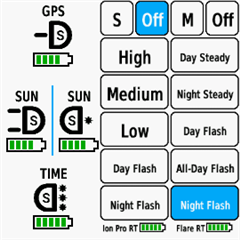
- Edge with a touch screen: post which numbers are displayed on the buttons and what mode each button represents when pressed
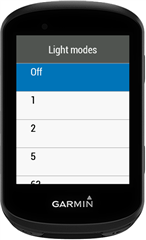
- Other devices: Select the "Light modes" menu and post which numbers are displayed in the menu and what mode each menu item represents when selected

Example for Bontrager Ion Pro RT:
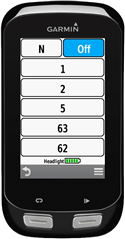

1 -> High steady beam
2 -> Medium steady beam
5 -> Low steady beam
63 -> Day flash
62 -> Night flash

There are some features that could be possible to add in the future, but would require Garmin to add them to the CIQ api. In case you are interested in any of the below features, consider upvoting their feature request thread:

1. Control lights based on the ambient light sensor available on some devices:
https://forums.garmin.com/developer/connect-iq/i/bug-reports/ambient-light-sensor-api-access 

Known issues:

1. Unable to use Tempe Visualizer or TyreWiz Data Field alongside Smart Bike Lights:
https://forums.garmin.com/developer/connect-iq/i/bug-reports/lightnetworklistener-onbikelightupdate-not-called-when-certain-data-fields-are-installed

  • Hello, I just purchased the new RearVue 820 from Garmin, do you plan on adding that to the configuration? (Is there the need for it or can I use another light for the config?)

  • Here is the configuration:
    ###0,73404416::1:#2,2!CAR:1:7:0:0I]-1]0!:1:0:0:0D=1##5,4:Varia 510:0:16777215:-1!2,:-1,Off:0!1,Solid:4!1,Day Flash:7!1,Night Flash:6#0::#0:0#123!:123!#0#0#B3570##2#0#0

  • I would need the light mode mappings in order to add the light in the Lights Configurator.
    If you have a touchscreen Edge device you can provide the mappings by:

    1. Install Smart Bike Lights data field
    2. Put the data field to a 1 Field Layout data screen
    3. Make sure that the light is paired
    4. Tap on each button with a number and write down which mode each number represents

    Example:

    1 -> High
    2 -> Medium
    ...

  • So I just checked and, also according to page 8 of the RearVue820 user manual, the light modes provided by default are actually the same to the ones in the RTL515 (which I had previously): Solid (solid high brightness), Pelotong (solid low brightness), Night Flash, Day Flash, Off.

    By using my configuration that was made for the RTL515, all the control works, so I guess the mappings are the same, which also means a short-notice update is definitely not needed to use the new light.

    BTW, if I make a configuration with "Taillight: unknown" and try to create the various buttons, i get "Error 3" on the screen.

  • The light is now available in the Lights Configurator.

    BTW, if I make a configuration with "Taillight: unknown" and try to create the various buttons, i get "Error 3" on the screen.

    When using the "Unknown" light you need to choose only modes that are available by the light. In case of RTL515/RearVue820 there are:

    Steady beam 21-40% intensity - 4
    Steady beam 0-20% intensity - 5
    Fast flash mode - 7
    Slow flash mode - 6

    if you add any other mode you will get error 3, which means that one or more configured light modes are not supported.
  • Hello,

    I tested the new radar with your app.
    Unfortunately, the app does not activate the desired function as I configured it in the configurator.

    The light switches from off to daytime flash mode. But this isn't controlled by the app, but by the lamp itself. 
    As a result, the delay is not used as set in the configurator.


    my config:

    ###0,73535488::1:#7,5!Tunnel:1:7:15:0G{0!LichtT:2:7:5:0I[200]0Er0,s0!LichtN:2:6:5:0I[200]0Es0,r0!Nacht:1:5:0:0Es0,r0!:1:0:0:0D=1##4,3:Varia 515:0:16777215:-1!2,:-1,Off:0!1,Solid:4!1,Day Flash:7#0::#0:1#123!:13!0,7,4#0#0#B3843##24#0#0

    Here's a video:

    youtube.com/.../9gsV1kUvWbo

  • Hello,

    a few months ago my Garmin Watch lost the Data Field "IQ Smart Bike Lights", probably after an update. I tried restarting/reinstalling the app and so on, but the data field still doesn't appearI am using a Forerunner 955 and RTL515. I liked this feature very much and I really miss the smart mode now.

    Do you have any tips on how to fix it?

    Current configuration: ###0,73535488::1:#4,3!Noc:1:7:0:0Es1200,r0!Den:2:7:0:0Er0,s1200I]-1]0!:1:0:0:0D=1##5:Varia 515!Off:0!Solid:4!Peloton:5!Day Flash:7!Night Flash:6#0::#0:0#0#0#B4024##3#0#0

  • Hi,

    Based on the video it looks like that the Smart mode does not work at all. The light does change to daytime flash mode because of the predefined behavior of Varia lights, same as for RTL515 (Flash Behavior when Vehicle Approaches):
    https://www8.garmin.com/manuals/webhelp/GUID-C41F445D-457F-447D-88C8-FE286BF157E9/EN-US/GUID-4587F7D3-DEE0-422D-9450-D125E15C4EA0.html  

    Do you have any other CIQ applications installed alongside Smart Bike Lights and if yes, which one? There is a bug where certain apps can interfere with the API for ANT lights:
    LightNetworkListener.onBikeLightUpdate not called when certain data fields are installed

    I am not able to reproduce this, so I am assuming that one of the installed apps does break Smart Bike Lights

  • Hi,

    You should see the Smart Bike Lights data field under the “Connect IQ” category when selecting a data field for a data screen. Do you even have the “Connect IQ” category in the data field selection menu?