Smart Bike Lights (Data Field) / Bike Lights Control (Widget)

I've made two open source CIQ applications to control ANT+ lights:

- Smart Bike Lights (data field): https://apps.garmin.com/en-US/apps/0d9fd828-c932-4470-9c37-fd2828881888 

      Configurator: https://maca88.github.io/SmartBikeLights/ 

- Bike Lights Control (widget): https://apps.garmin.com/en-US/apps/fa3c2332-76e3-4ba1-8528-32a0fd617ab1 

     Configurator: https://maca88.github.io/BikeLightsControl/ 
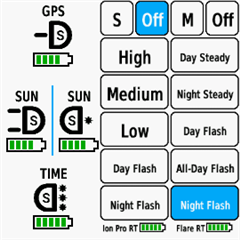
Smart Bike Lights features:
- Automatic light control (Smart mode) based on the configured filters (sunset, sunlight, speed, ...)
- Manual light control (only for Edge devices with a touch screen or devices with CIQ 3.2 and more than 32KB memory)
- Records lights modes that are displayed in Garmin Connect

Bike Lights Control features:
- Manual light control (available to all devices)

Both applications can be installed on the same device, which can be useful for low end devices (e.g. Edge 520) where "Bike Lights Control" can be used to change light modes manually and "Smart Bike Lights" for automatic light control.

Currently registered ANT+ lights:
- Bontrager Ion Pro RT
- Bontrager Ion 200 RT
- Bontrager Flare RT
- Garmin Varia RTL500
- Garmin Varia RTL510
- Garmin Varia RTL515
- Garmin Varia HL500
- Garmin Varia UT800

in case your ANT+ light is not on the list you can help by doing the following:

1. Install Bike Lights Control
2. Pair your bike light with your Garmin device
3. Open the widget:
- Edge with a touch screen: post which numbers are displayed on the buttons and what mode each button represents when pressed
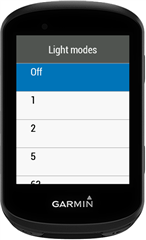
- Other devices: Select the "Light modes" menu and post which numbers are displayed in the menu and what mode each menu item represents when selected

Example for Bontrager Ion Pro RT:
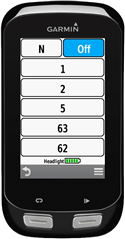

1 -> High steady beam
2 -> Medium steady beam
5 -> Low steady beam
63 -> Day flash
62 -> Night flash

There are some features that could be possible to add in the future, but would require Garmin to add them to the CIQ api. In case you are interested in any of the below features, consider upvoting their feature request thread:

1. Control lights based on the ambient light sensor available on some devices:
https://forums.garmin.com/developer/connect-iq/i/bug-reports/ambient-light-sensor-api-access 

Known issues:

1. Unable to use Tempe Visualizer or TyreWiz Data Field alongside Smart Bike Lights:
https://forums.garmin.com/developer/connect-iq/i/bug-reports/lightnetworklistener-onbikelightupdate-not-called-when-certain-data-fields-are-installed

  • I verified the code changes done for version 0.31.0 and tested them again. Everything works the same way as it did in the test build.
    With version 0.31.0, does the light mode button highlight when tapped?
    If so, this means the code is working as intended using manual mode tracking (same as in the test build)
    Your configuration is also fine, I see that the manual tracking is enabled: 23553!1 (1 means enabled)

  • In order to get the light mode numbers/values you need to install Smart Bike Lights data field and put it on a 1 Field Layout, where you will see multiple buttons with numbers on it, one for each light mode (you should see two buttons with a number in it). After that, you need to press on each button and write down what light mode is activated for that number.

    Where did you get the mappings: High -> 2, Low -> 3? Are these the numbers displayed by Smart Bike Lights?


  • Where did you get the mappings: High -> 2, Low -> 3? Are these the numbers displayed by Smart Bike Lights?

    Yes, I put Smart Bike Lights in a 1 field layout and got 2 buttons with a number (below of the S/N/M- and the OFF-Button). The button labeled with the number 2 activates the High mode and the button with the number 3 the Low mode.

  • Hi mi setup, Magene not good
    Magene AT1600 
    #1074,358879792::1:267911168,0#3,3!Noc:1:3:1:0Es-1200,r900!Den:1:6:1:0Es-1200,r900!:1:0:0:0D=1###11:AT 1600!Off:0!Preset 1:51!Preset 2:52!Preset 3:53!Preset 4:54!Preset 5:55!Preset 6:56!Preset 7:57!Preset 8:58!Preset 9:59!Preset 10:60##0::#0:0#0#0#B4061#14##0#0
     
     
    Radar RTL 515
    ###0,73535488::1:#3,3!NOC:1:6:1:0Es-1200,r900!RADAR:1:7:1:0I]-1]0!:1:0:0:0D=1##4:Varia 515!Off:0!Solid:4!Day Flash:7!Night Flash:6#0::#0:0#0#0#B4061##3#0#0
  • Great, thanks for the mappings. The light is now available in the Lights Configurator. 

  • Hi,

    the issue with the Magene configuration is that "Den" group has the same filter than "Noc". You need to update "Den" to be "Timespan from Sunrise+15 min to Sunset-20 min":

    #1074,358879792::1:267911168,0#3,3!Noc:1:3:1:0Es-1200,r900!Den:1:6:1:0Er900,s-1200!:1:0:0:0D=1###11:AT 1600!Off:0!Preset 1:51!Preset 2:52!Preset 3:53!Preset 4:54!Preset 5:55!Preset 6:56!Preset 7:57!Preset 8:58!Preset 9:59!Preset 10:60##0::#0:0#0#0#B4061#14##0#0

  • Hello  

    Hardware:
    Garmin Fenix 7 Pro Saphire Solar
    Headlight: Magene AT1200
     
    I have an issue with datafield, don't know why but it shows incorrect light icons.


    Here is configuration from Lights Configurator
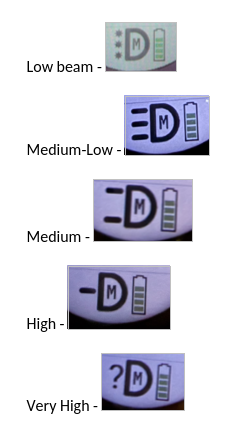
    #1074,358879792::1:267911168,0####6:AT 1200!Off:0!Low:5!Medium-Low:4!Medium:3!High:2!Very High:1##0::#0:0#0#0#B4375#11##0#0

    Why it can be ?

  • Bonjour je

    J'ai le Garmin 930 plus et un seul feu le varia RTL510.

    Je voudrais que le flash jour clignote uniquement à la détection des véhicules ; après plusieurs configurations, j'ai toujours erreur 4. Merci de me communiquer le bon code à insérer.

  • Hi,

    J'ai le Garmin 930 plus

    Le Garmin 930 Plus est-il une montre ou un compteur de vélo (Edge) ? Vouliez-vous dire Edge 530 Plus ?

  • I made a mistake, it's the Garmin 1030 Plus with the Varia RTL 510 radar. I installed the Smart Bike Lights app, and I'd like the flashing light to activate only when approaching vehicles. I can't seem to configure it for this. Thank you for providing the code to enter into the app. Sincerely,