Smart Bike Lights (Data Field) / Bike Lights Control (Widget)

I've made two open source CIQ applications to control ANT+ lights:

- Smart Bike Lights (data field): https://apps.garmin.com/en-US/apps/0d9fd828-c932-4470-9c37-fd2828881888 

      Configurator: https://maca88.github.io/SmartBikeLights/ 

- Bike Lights Control (widget): https://apps.garmin.com/en-US/apps/fa3c2332-76e3-4ba1-8528-32a0fd617ab1 

     Configurator: https://maca88.github.io/BikeLightsControl/ 
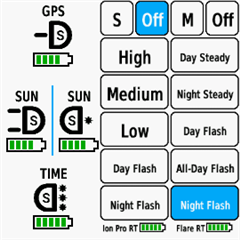
Smart Bike Lights features:
- Automatic light control (Smart mode) based on the configured filters (sunset, sunlight, speed, ...)
- Manual light control (only for Edge devices with a touch screen or devices with CIQ 3.2 and more than 32KB memory)
- Records lights modes that are displayed in Garmin Connect

Bike Lights Control features:
- Manual light control (available to all devices)

Both applications can be installed on the same device, which can be useful for low end devices (e.g. Edge 520) where "Bike Lights Control" can be used to change light modes manually and "Smart Bike Lights" for automatic light control.

Currently registered ANT+ lights:
- Bontrager Ion Pro RT
- Bontrager Ion 200 RT
- Bontrager Flare RT
- Garmin Varia RTL500
- Garmin Varia RTL510
- Garmin Varia RTL515
- Garmin Varia HL500
- Garmin Varia UT800

in case your ANT+ light is not on the list you can help by doing the following:

1. Install Bike Lights Control
2. Pair your bike light with your Garmin device
3. Open the widget:
- Edge with a touch screen: post which numbers are displayed on the buttons and what mode each button represents when pressed
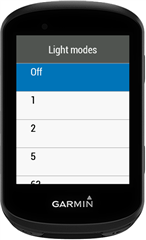
- Other devices: Select the "Light modes" menu and post which numbers are displayed in the menu and what mode each menu item represents when selected

Example for Bontrager Ion Pro RT:
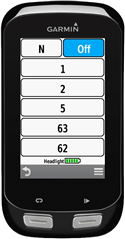

1 -> High steady beam
2 -> Medium steady beam
5 -> Low steady beam
63 -> Day flash
62 -> Night flash

There are some features that could be possible to add in the future, but would require Garmin to add them to the CIQ api. In case you are interested in any of the below features, consider upvoting their feature request thread:

1. Control lights based on the ambient light sensor available on some devices:
https://forums.garmin.com/developer/connect-iq/i/bug-reports/ambient-light-sensor-api-access 

Known issues:

1. Unable to use Tempe Visualizer or TyreWiz Data Field alongside Smart Bike Lights:
https://forums.garmin.com/developer/connect-iq/i/bug-reports/lightnetworklistener-onbikelightupdate-not-called-when-certain-data-fields-are-installed

  • If you consider it reasonable, would it be possible to make this internal-state workaround available in some form as a side / experimental version (or optional mode)?

    I extended the configuration and added support for FR300 in the latest version 0.31.0. The manual mode tracking is automatically applied for the light, you just need to select the light in the configurator. The light is only selectable with Individual Light Network enabled.

  • Is it possible to use the „FR300“ mod with a Varia? 
    Could I install it 2 times? Once for the FR300 and once for the Varia?

    With the latest version it is possible. You need to install also "Smart Bike Lights #2" data field, so that with one data field you configure only the Varia and with the other only the FR300 with Individual Light Network.

    Wich modes can now be accessed through the SmartBikeLights on the FR300?

    There are four modes: High, Low, Flashing and Rapid Flashing.

  • Hi  , I have a question that might be a bit off-topic. I’ve been using the Trek/Bontrager Flare RT lights for a short while now. I connected them as an ANT+ sensor like any other accessory. The issue is that while they work fine, they randomly disconnect and reconnect throughout the ride—sometimes just a bit, other times constantly.
    Trek claims it's a Garmin issue ever since they removed their Connect IQ control app, while Garmin says it's a Trek problem.
    Does using this app make the connection more stable, or will these pre-existing issues persist regardless?
    Thanks a lot!

  • Hi,

    I had a similar issue when I was using Bontrager lights, specifically the Ion RT Pro and Flare RT. I noticed that for some reason, the Flare RT was almost always promoted to be the main light in the ANT light network.

    For context, the main light is the only light that connects directly to the Garmin device (Edge/watch). Other lights, called secondary lights, communicate with the Garmin device through the main light. In my case, this meant that messages and commands sent to the headlight had to travel from the front of the bike (Garmin Edge location) to the back of the bike (Flare RT) and then back to the front (Ion RT Pro).

    This is a Garmin issue. The logic used to determine which light is promoted to the main light during network creation seems to select the farther light instead of the closest one. I also suspect, though I was not able to verify this, that the Ion 200 and Flare RT lights either have a weaker antenna or use lower transmit power. This would result in a weaker signal and make them more prone to disconnects.

    For me, this issue went away when I replaced the Flare RT with a Varia RTL515. The Varia RTL515 was still promoted as the main light, but the connection was stable. I assume this is due to a better antenna.

    If you want to experiment, you could try using the Individual Light Network feature of Smart Bike Lights, which establishes a separate ANT connection to each light. For me, this improved connection stability but did not entirely solve the problem. The Flare RT would still disconnect from time to time, but reconnection was much faster, and the headlight remained connected in the meantime because it had a separate connection.

  • Ahoj nedaří se mi spojení Radaru Varia RTL515 a Předního světla Magene AT1600. 

    Chtěl bych to mít asi takto:

    přdení světlo: přes den pulzní blikání a na noc svícení. 

    Pokud to tak nahraji přes konfigurátor přední světlo mi jen svítí. 

    Díky za pomoc  

  • Sorry for the late response — I somehow missed your reply and only noticed it today.

    I’ve now tried version 0.31.0 with the configurator and FR300 selected via Individual Light Network, but unfortunately the behavior seems a bit odd again and quite similar to the issues we discussed earlier (modes not switching correctly, light state and UI getting out of sync, etc.).

    My current configuration is:

    #0,88092688::1:#5,3!Day:2:7:0:0H]2Er0,s0!Night:2:2:0:0H]2Es0,r0!:1:0:0:0D=1###6,5:FR300:0:16777215:-1!2,:-1,Off:0!1,High:2!1,Low:4!1,Flashing:6!1,Rapid Flashing:7##1:23553!1:#0:0#13!:123!#0#0#B4062#16##0#0

    For comparison, the test build you shared earlier, where mode 1 was removed from the hardcoded configuration, worked very well for me:

    “I removed mode 1 from the hardcoded configuration and re-build the application. You can get the new prg from the following link:
    https://github.com/maca88/SmartBikeLights/blob/test/internal-mode-state/Build/Edge%20840/SmartBikeLights.prg”

    With that version, everything behaved as expected:

    • Smart mode worked reliably with activity start / pause / resume

    • Manual mode switching behaved correctly

    • Switching from Manual back to Smart consistently applied the expected mode

    • No noticeable desynchronization between UI and the actual light state

    So it seems that something about the current configurator-based setup is reintroducing the problem.

    If it helps, I can do more testing or try different configurations — just let me know what would be most useful.

    Thanks again for all the work you’re putting into this, I really appreciate it Pray

  • Přepnu do češtiny, ať nedojde k nedorozumění. Vytvořil jsem si dvě konfigurace, jednu pro zadní radar a druhou pro světlo FR300 ant+. Chová se to sice nevysvětlitelně, ale většinou se při zapnutí garmin edge 850 nastaví korektně, občas fr300 trvá dýl, než začne respektovat nastavení.Rád bych sdílel konkrétní nastavení jak pro fr300+, tak i pro garmin varia

  • Thank you very much for the thorough response and explanation! It’s very interesting, and I’m going to review it in detail. I have the same feeling regarding the signal intensity; I’ve tried leaving it next to the device for many hours at home and it didn't show a single error message. I'll keep looking into it. Thanks again, and best regards!