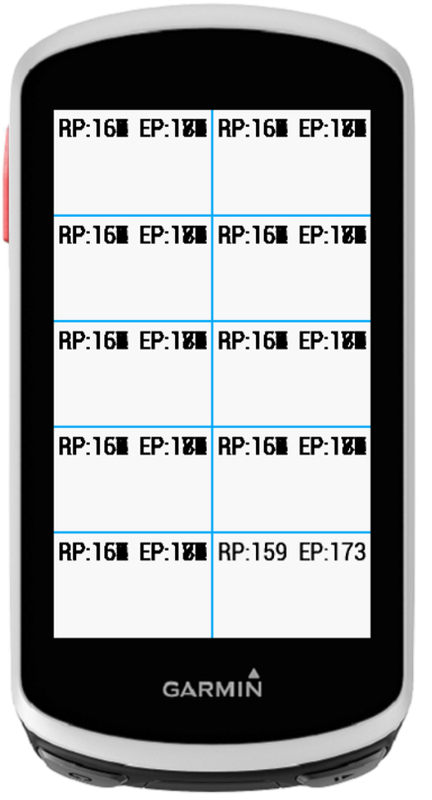
Strange - testing the font size for a very simple data field that displays two metrics (real and estimated power), when I set the display to 10 fields on an Edge 1030, the display updates overwrite the prior values without clearing the display in the simulator. When testing it under the normal conditions of a single field, it works as expected. Not sure if this is a bug, but never noticed this behavior before. I'm running the very latest SDK (3.0.9). However the Eclipse plugin is still 3.0.8.
Complex Data field with "simple" data. Sorry for the overloaded term.
Strangely, it works perfectly fine on actual devices. And it works perfectly fine in the simulator when displaying a single field. And works perfectly find in the simulator in the LAST of the multiple fields when displaying a multi-field layout (be that 2 or more fields).
So it SEEMS to me this is a simulator bug. I don't call dc.clear() and don't need to on actual devices or in the simulator in single field layout.
It looks (based on the image, not on our source code) that the dc for each of the fields is not being cleared by the simulator but is for the device. I'm not absolutely certain what the expected behavior is, but it would make sense to me that the developer should clear the dc if they want to ensure it is clear.
The way I understand how things work, is that dc.clear() should not be needed. What's happening on a real devices, is the display is cleared, the separator lines are drawn (if it's multi-field), then each DF is drawn, be it a native or CIQ DF.
I first ran into this with my Chart DF, which does a whole bunch of draws for the breadcrumb map, and I figured I'd add code so that every other time onUpdate was called, it be ignored to help with battery usage (just a return at the start of onUpdate half the time). What happened was I ended up with a flashing DF, as every other time onUpdate was called, the DF would be blank. I think it was Brian that mentioned the clear the display/draw lines/update each DF sequence at the time - this was on a fr 23x in early-mid 2016.
Yeah - this seems to be a strange consequence of running the SAME data field in more than one field in the simulator. Something you'd really never do on a real device. I ran into the same flashing issue attempting a battery save technique as well.
I fixed it by running the onUpdate() every cycle, but only running my complex compute logic every other cycle. Except my own power calculation, which I want to run each time.
function compute(info) { if (loopNum >= 2) { loopNum = 1; } else { getPowerStress.calcPower(); loopNum++; return; } // run compute every 2nd time