Changing Language causes simulator partial crash

Former Member
Former Member
Trying to add multi language support to my datafield and have run into this strange behavior in eclipse on Windows 10. It happens in any of my apps and in the sample apps as well.

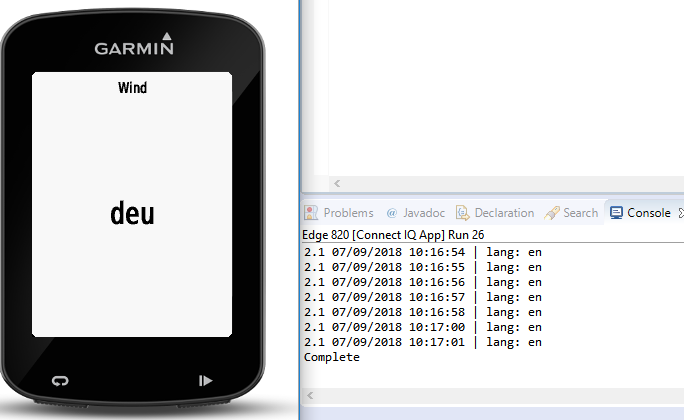
I use the console to print out debug strings. When i change the language, the console stops working. It prints "Complete" (not from any of my logging code) and completely stops.

The app meanwhile, continues working. I can show the new language strings onto the simulator screen. But I can't get the console back at all. Here is a screenshot. The console stopped as soon as I changed the language from the default of english. But you can see the "deu" representing german in screen, verifying the datafield is still running and picking up the updated resource.

I'm using the newest 2.4.8 SDK but also tried going back to 2.4.6, but same issue. community.garmin.com/.../1373359.png
  • I'm pretty sure that this is by design, but I don't know the specifics. Let me see what I can find out.

    UPDATE: Yes, this is intentional, and is not a crash. In order to load the new strings, we have to relaunch the app, which detaches it from the console. I can file a ticket to see if we can improve this experience, but it's consistent with the way apps have behaved on devices (it used to be you couldn't change the language on a device while an app was running, but this may have changed with newer devices).
  • Former Member
    Former Member
    cool, thanks for the reply. i can work around it since i really don't need the console logging just for this one function, and can still debug fine if i leave it as english.
  • Former Member
    Former Member
    I think you should be able to change the simulator language and then re-run your application without closing the simulator and it will reestablish the connection without reverting the language back to english.