Some misunderstandings with dc.getTextDimensions

Former Member
Former Member
Hi! I have some problem to get height of the string.
On a FR230 i tried to call:

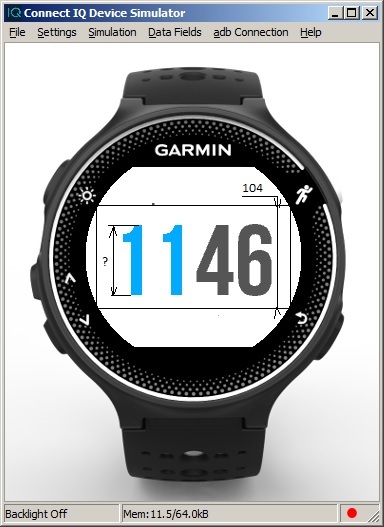
var textdim = mDc.getTextDimensions("1146", Gfx.FONT_NUMBER_THAI_HOT);

It give me textdim[1] = 104;

This height with top and bottom fields?
How can i get a realy height of a painting string? community.garmin.com/.../1323787.jpg
  • The simple answer, is you really can't, as in this case the font height (which you can also get with dc.getFontHeight() ) is 104. On some watches and some fonts, there is white space above/below the things displayed.

    One thing you can do is determine the device you are on and do something like

    charHeight=dc.getFontHeight(Gfx.FONT_NUMBER_THAI_HOT) -X;

    where "X" you determine in the sim. In the case of the 235, it's going to be the same for that font on the 230,630, and 735 (all the semi-rounds), so you can just use screenShape in getDeviceSettings() and see if it's a semi-round, and the same "X" would work for them all.