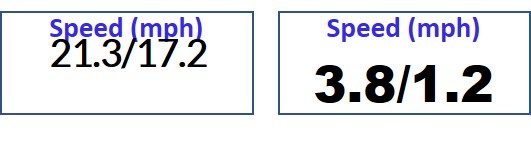
On the Edge devices, for some reason, the Value String's vertical position changes with the font!! That doesn't happen in the simulator or on my VivoActive HR watch. I use a loop to determine the largest font that will fit in the field (useFont varies from 0 to 8).
There is no BOTTOM_JUSTIFY. What is the best way to ensure the bottom of the font is, say, 3 pixels from the bottom of the data field? I know the field height and the string height, and I've tried to play with the locY parameter, but either my math is wrong or there is just a weird bug in the Edge devices.
The attached screen shots show how changing the font (this was probably font 6 and 8) vary the vertical position. On the VAHR device, the fonts all are bottom justified as expected..
Thanks for any tips!
valueView.setFont(useFont);
valueView.setColor(valueColor);
valueView.setText(valueStr); community.garmin.com/.../1259279.jpg