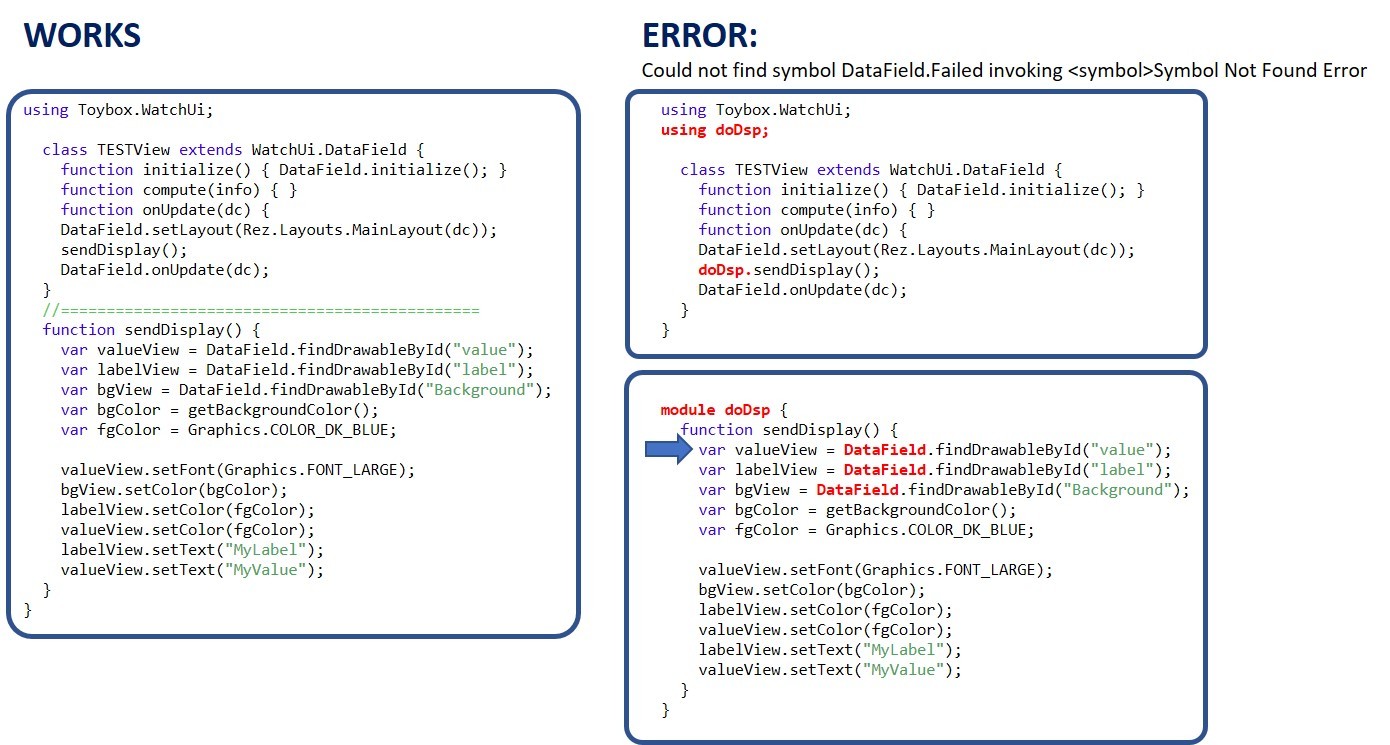
If you can see the attached JPG - I can't seem to resolve this symbol error. I created a small test case to illustrate my error. The left side works great in this simple test case. The right side, I simply moved one function into a Module that I include with a "using". I do this a lot with utility functions and it works fine. But in this case, it can't find DataField (which is extended from WatchUI). Any ideas on why or what I need to do so this function can be put into another file inside a module? THANKS!! community.garmin.com/.../1253652.jpg
Former Member
Hey,
If you add a using statement for WatchUi.DataField to your module it should work. The module is self contained so it doesn't have access to the extension of WatchUi.DataField in your TESTView class. When you call doDSP.sendDisplay() and you hit the Datafield.findDrawableById() call, we can't find the symbol because it has not been pulled into the module.
If you add a using statement for WatchUi.DataField to your module it should work. The module is self contained so it doesn't have access to the extension of WatchUi.DataField in your TESTView class. When you call doDSP.sendDisplay() and you hit the Datafield.findDrawableById() call, we can't find the symbol because it has not been pulled into the module.
Thanks, -Coleman
Thanks Coleman.... Sorry for the dumb question. I've tried both of these and neither is recognized. Can you let me know the actual line I should add?
using WatchUI.DataField using Toybox.WatchUI.DataField
And I've tried just putting this in the module and that doesn't resolve the symbol
The runtime has well-defined rules for locating a name that is referenced. Have a look at the Scoping section of the Programmer's Guide for details.
Unfortunately your problem is different than what Coleman has suggested. Even if you add the appropriate using clause and update references to DataField, you won't get what you want.
In the original code, the call DataField.findDrawableById() is technically the same as calling the function findDrawableById() on self. Once you move that code outside of the class, you're trying to call the method on some class that you haven't yet told the compiler how to find.
If you add a using Toybox.WatchUi at global scope in that file, and then update the references to WatchUi.DataField you will have told the runtime which symbol you want it to find, but you'll uncover all sorts of other breakage that you've created.
If you want this to work, your best chance is to update sendDisplay() to take a reference to the view you want to call functions on (what used to be self in the old code). Once you do that, you will need to make a few small tweaks...
using Toybox.Graphics; // this isn't required by the compiler right now, but it really seems that it should be
module doDsp { function sendDisplay(var dataField) { var valueView = dataField.findDrawableById("value"); var labelView = dataField.findDrawableById("label"); var bgView = dataField.findDrawableById("Background"); var bgColor = dataField.getBackgroundColor(); var fgColor = Graphics.COLOR_DK_BLUE;
I'm not sure exactly why you've moved the view update code out of the view class, but it seems that you are trying to do some refactoring. I'm not seeing the motivation, but I'm only looking at a snippet of your code. That said, it seems to me that the view update code belongs in the view.
If you are trying to set yourself up for code reuse, it might be better to leave the view update code in your derived DataField class and lift the other part of your application out (the stuff that calculates the data). Something like this...
using Toybox.WatchUi as Ui; using Toybox.Graphics as Gfx;
class MyDataFieldImpl { function initialize() { }
function getLabelText() { return "MyLabel"; }
function getValueText() { return "MyValue"; } }
class MyDataField extends Ui.DataField { hidden var impl_;
function initialize(impl) { DataField.initialize(); impl_ = impl; }
function onLayout(dc) { // things that don't change after initialization be in here...
Hi Travis - I use that identical function in 6 different data fields, so my desire is to move that module into a shared module folder and link all my projects to use that shared module and function. My actual view function is a lot more sophisticated with font scaling based on string length, alerts conditionals with beep and vibration logic, etc. If I make a code change it is available to all my projects. Thanks for your suggestions!! I'll implement that today.
class MyDataField extends Ui.DataField { hidden var impl_;
function initialize(impl) { DataField.initialize(); impl_ = impl; } } [/code]
Travis - I'm getting an error related to the call to this function. The calling function doesn't pass an argument to match with the "impl" argument. Not sure what reference I use in the calling function. Thanks man. I'm learning a lot.
Nevermind. Wow - this is cool. Figured it out.
//! Return the initial view of your application here function getInitialView() { return [ new TESTView( new TESTViewImpl() ) ]; }
It looks like you figured it out. Now that you've got that, you can create a few impl classes; one for each of your six data fields. Then the only code that changes between your data fields is the type of the object passed to the MyDataField initialize function.