onSelect() doesn't seem to work

I'm building for a VivoactiveHR and experimenting with recognizing user input.
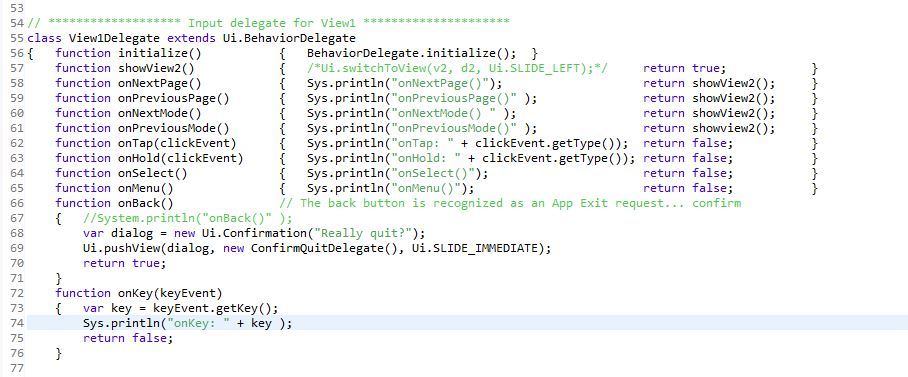
I have a BehaviorDelegate that calls Sys.println() for each type of user input that the BehaviorDelegate has methods for.
They all seem to work except onSelect() which is never called.
I've added onKey() to catch the key events, and it reports a key = 4 when I press the right button on the VivoactiveHR, but onSelect() is not called.
A screen capture of the code is attached.
Is this a bug, or is there something else that onSelect() requires to work, or should I not be using methods that the BehaviorDelegate provides ? community.garmin.com/.../1249294.jpg
  • Have you looked at the Input sample in the SDK? The SDK samples and the API doc are the first places to look first when you're trying to figure out something new.
  • Thanks Jim.
    I just built that sample, it works as expected, so I'll do some digging.
    onSelect() works now that I understand what action from the user that it indicates.
    onEnter() does not work at this point, though it does work in the sample.
  • I've added onKey() to catch the key events, and it reports a key = 4 when I press the right button on the VivoactiveHR, but onSelect() is not called.

    The onSelect() method should get called when you tap the screen of the vivoactive_hr. If onSelect returns false, then onTap should get called.

    onEnter() does not work at this point, though it does work in the sample.

    There is on onEnter() method in the InputDelegate or BehaviorDelegate classes.
  • The key issue here was / is that I cannot find any documentation describing how user input is interpreted on a given device.
    On Jim's suggestion I went to the Input sample app.
    There I was able to see how button presses are interpreted, and found that the right button on the VivoactiveHR has no behavior associated a click of that button.
    That seems quite odd to me given that there are only 2 buttons on the device.
    In the Input sample, pressing that button is recognized as a key, specifically KEY_ENTER, but there is no onEnter() behavior function, and I can't find on in the API documentation.

    So.... two questions.
    1) am I missing something... is there an onEnter() function that is supposed to catch KEY_ENTER presses ?
    2) is there documentation that describes how behaviors are mapped on each of the devices that ConnectIQ supports ?
  • The right button on the va-hr can be seen as KEY_ENTER in onKey in a behavior delegate. A long press of the right button can be seen as onMenu. Like Travis said, there is no onEnter(). if you use it, it will never be called.

    The left button, onBack. You won't see the long press of the left button in your app.

    Behavior delegates in watch-apps can be a bit "interesting" (it's all I use), as you also want to react like the native apps and what's in the UX Guide. (or as close as you can)