MapView in Data Field

I guess this is either a Documentation bug or an implementation bug... but did MapView ever work in a Data Field?
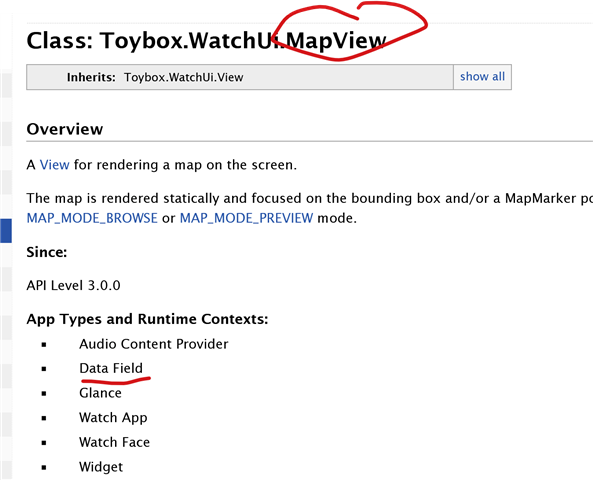
It's clearly listed in the documentation. But if you:

  • Take the SDK Samples App for Map View and copy the "MapSampleMapView.mc" file
  • Create a new DataField project and copy in the file above
  • Edit out the lines creating markers and resources to simplify the file
  • Edit the getInitialView() to try and load the MapSampleMapView
  • Run on SIM on device supporting maps
  • See CIQ! and console shows "Error: Unexpected Type Error"

Probably because MapSampleMapView extends from WatchUi.MapView

BUT MapView is not in [Views]

Can a MapView be used for a Data Field?

    //! Return the initial view of your application here
    function getInitialView() as [Views] or [Views, InputDelegates]
    {
        if (WatchUi has :MapTrackView)
        {
            var a = new MapSampleMapView();
            return [ a ];
        }
        else
        {
            return [ new MapDFView() ];
        }
    }
  • I've never heard of anyone that uses MapView or MapTrackView in a DF and never have tried it myself.  I can think of a few things that could be an issue, like trying to push another view.  These are both native views on devices.  Looks like an error in the doc to me. 

    I don't think either are used that much.  Part of that is there are many devices that don't even have native maps and that would limit the supported devices for an app. 

    In general these are both things you definitely need to test on real devices.  Things like orientation, pan, zoom, legends, etc aren't the same, and even the maps used aren't the same. And with MapTrackView, the track never shows in the sim. These are things I know were all reported when these two were first introduced.  I do most of my testing for them on real device and I skip the sim

  • Yes, the App demo from the SDK uses push view which is invalid in a DF, hence trying with getInitialView()

    It’s looking likely to be a documentation bug but would be nice to have for some use cases I have.

    You are either awake very early or late in AZ !

  • Especially in the summer, I always get up early when it's not so hot!  Before I retired, I was also working East Coast hours.

  • don't think either are used that much.  Part of that is there are many devices that don't even have native maps and that would limit the supported devices for an app. 

    There are other features that aren’t universal. So, this really shouldn’t matter.

    Seems like the issue is not enough screen space (generally) or that it would use too much resources for a datafield.

    (The UI would also be a mess.)

  • Being mainly an Edge user I had assumed the flexible map datafield was commonplace but it seems like it was introduced on the Edge only: https://the5krunner.com/2024/11/07/garmin-adds-map-data-field-compass/

    Seems there was an opportunity to create a map datafield and CIQ piggyback on that but it’s got forgotten and dusty

  • Interesting.

    "The main downside of using a MAP data field is that you cannot interact with it. Thus, you can’t pan with your finger or use Zoom for more or less detail. Instead, you have to change to the MAP page, change the zoom on the map page, and then return to the original page, which is not great. Perhaps one day Garmin will add some way to zoom in on a data field map with Di2 (IIRC you can do that with the MAP page)".'

    So, it takes some of the properties (like zoom) from the regular map screen.

    Looks like it's for the 1050. (Might not be so hot on the 850/550.)