Watch face silently removed ~1–2 min after selection on fenix 6 Pro — no error logged

I have a published analog watch face (Monkey C, minApiLevel 3.4.0, no layout — the whole dial is drawn programmatically in onUpdate).  One user on a fenix 6 Pro (Part 006-B3290-00, firmware 28.02) reports that the face installs and displays correctly, then disappears after about 1 minute; it can be re-selected, but the problem then recurs.  Four other Connect IQ faces on the same watch work fine.

Key details:

  • The on-device error log / ERA report is empty — no exception is recorded for the silent disappearance. (An earlier "File Not Found / Failed invoking <symbol>" error on first launch was fixed in a prior release; this is a separate, silent failure.)
  • My onUpdate is fully wrapped in try/catch with a minimal fallback render, so a Monkey C exception would keep the face alive and be logged — neither happens. This points to a native OS-level kill, not a caught exception.
  • I cannot reproduce in the simulator (fenix6pro): it survives the sleep/low-power transition with no error.
  • When the user sets all data fields to Off (which removes my per-update SensorHistory/Weather/Activity reads), the face survives ~2 minutes instead of ~1 — i.e. reducing per-update work roughly doubles time-to-death. That strongly suggests a cumulative memory/budget issue in the low-power update path rather than a one-shot crash.
  • On MIP, my low-power onUpdate currently redraws the full dial (12 numeral text draws + 4 data fields + hands). It's a non-burn-in (MIP) device, so I do not take the always-on minimal path.

Questions:

  1. Is a watch face being silently removed/disabled (no error logged) the known symptom of exceeding the watch-face memory or power budget in low-power mode on fenix 6–class devices?
  2. Is the fix simply to render a much lighter frame in low power (hands + minimal text only, no full dial), even on non-burn-in MIP devices?
  3. Is there any way to diagnose this without the physical device — e.g. force the simulator to enforce the low-power memory/power budget, or surface this class of removal in a log?

Any pointers appreciated — I don't have a fenix 6 Pro to test on, so I'm trying to confirm the cause before pushing another store update. Thanks!

  • There is a 30ma limit (avg) with onPartialUpdate on MIP devices.  If you exceed this for a minute, onPartialUpdate is no longer called.  In the sim with the f6, set display mode to always active and let it run for more than a minute.  "View Watchface diagnostices" will let you watch how things are going.

    Look at how you are setting the clip regions for onPartialUpdate.

  • Thanks — an update with data that narrows things down a lot.

    First, two things I've ruled out in the simulator (fenix 6 Pro):

    • Memory isn't it: usage sits at ~27 KB of 107 KB, peak 27.7 KB, with 0 new allocations per onUpdate.
    • My onPartialUpdate is empty — I draw nothing in it — so "View Watchface Diagnostics" reads all-zero (Total / Execution / Graphics / Display Time = 0).

    The symptom: the face renders correctly, then is silently removed after ~1 minute (no error logged), and the watch reverts. The user has since tested with data fields off and with the second hand off — each change makes the face survive longer (≈1 min → ≈2 min → "a few minutes") but it's still removed every time. It's now reproduced on two devices: fenix 6X Pro Solar and fenix 6 Sapphire. Other Connect IQ faces on those watches are fine.

    My face has no layout and no cached background — it redraws the full screen (dc.clear() + a programmatic dial of 12 numerals + hands) on every onUpdate. The second hand (Auto-on at this memory class) makes onUpdate run at 1 Hz in high power; with it off, onUpdate drops to ~1/min — and it still eventually disappears.

    The "reduce rendering work → survives longer, but never survives" pattern looks like a display power / pixels-changed budget rather than execution time or memory. Two questions:

    1. Is a sustained full-screen redraw in onUpdate (high-power 1 Hz, and even ~1/min) subject to an overall MIP display power budget that silently removes the face after a minute? If so, is the right fix to cache the dial in a BufferedBitmap and repaint only the moving hands via a clip region, instead of clearing/redrawing the whole screen each frame?
    2. On your clip-region tip: my onPartialUpdate is empty and never calls setClip. Does an onPartialUpdate with no clip region cause a full-screen refresh each second on real MIP hardware (and thus blow the budget), even though the simulator reports zero for it? If so, what's the correct minimal form — set a tiny/empty clip region, or not implement onPartialUpdate at all? (Omitting it previously caused a low-power crash on fr55, which is why it's currently a no-op stub.)

    Anything that distinguishes an "execution-time budget" from a "pixels-changed budget" here would help me build the fix to the actual constraint rather than guess. Thanks again.

  • Is it only happening on the f6?  What's the name of the WF?

  • I believe fenix 6 x pro solar and fenix 6 sapphire.

    WF name is Understated.

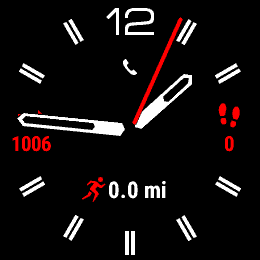
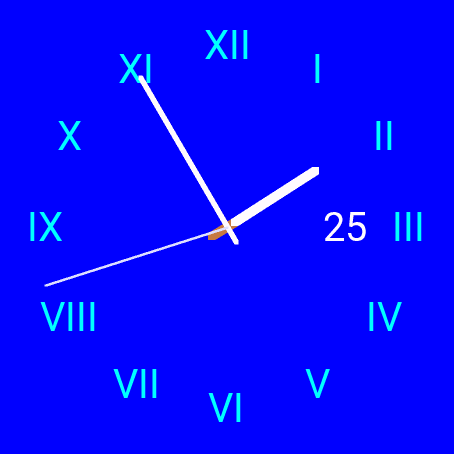
  • Ok, on an f6 solar, this watch face looks very different than on other devices as well as the screen shots in the app store. 

    Is this intended?

  • Oh, nice catch - thank you!  I'll post an update on that soon.  But I believe this is separate from the crash issue - would you concur?

  • Also, can you give me screenshots, please?  I'm not seeing something wildly different in my sim.  (I don't personally own those devices.)

  • f6

    fr570 and a couple more I tried - all AMOLED)

    You are clearly doing things very differently.  It's strange that if I go into the watch face selector on the f6, it looks correct.

  • That is so bizarre!  Thanks for sharing those.  I'm away until Monday, so I'll look at it then.  :)

  • I suspect it might be how you draw..  like do you draw the two wfs in the same call to onUpdate? Are you using requestUpdate()?  How are you handling onEnterSleep and onExitSleep?