VSC FIT PLAYBACK

I have a FIT file from a 4 hour ride. I'm trying to run it in VSC to recreate a data field issue they reported. I've never gotten this feature to work - but really haven't tried too hard before.

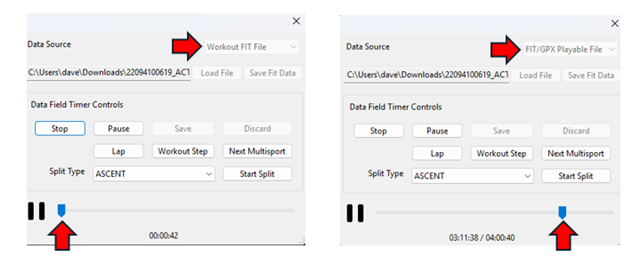
If I load the file as a "Workout FIT File" and hit START (left image), It seems to work in "real time", but if I slide the time slider to the right to move say an hour into the ride, it just hangs/spins and never comes back. So it appears I need to let this run for hours to get to the time they saw a problem?

If I load it as a "FIT Playable File" I can move the time slider to the right, but it doesn't do the right thing. For example, 3 hours into the ride, the field says I'm only 2 miles in, but really I should be over 50 miles in.

Does this work? Any way to fast forward to a particular place in the activity?
Top Replies

  • I have a FIT file from a 4 hour ride. I'm trying to run it in VSC

    1) You're not playing back the FIT file in "VSC" (VS Code), you're playing it in the simulator. VS Code is irrelevant…

All Replies

  • I have a FIT file from a 4 hour ride. I'm trying to run it in VSC

    1) You're not playing back the FIT file in "VSC" (VS Code), you're playing it in the simulator. VS Code is irrelevant here

    If I load the file as a "Workout FIT File" and hit START (left image), It seems to work in "real time"

    2) I would not expect this to work at all, as the "Workout FIT File" option is for structured workouts that you create in Connect (and which are delivered to Garmin devices in the form of FIT files). If this actually works to play back data from an activity FIT file, that would seem to be a bug.

    If I load it as a "FIT Playable File" I can move the time slider to the right, but it doesn't do the right thing. For example, 3 hours into the ride, the field says I'm only 2 miles in, but really I should be over 50 miles in.

    3) I think your best bet is to file a bug report.

    On other hand, maybe it's not a bug but it's actually by design? Maybe if you skip ahead 3 hours (for example), the sim just skips over all the distance (and time?) that was accumulated during that time on purpose, and continues playback at the new time. In other words, it's not literally recreating the activity as it happened, it just plays back the data that was recorded, and any distance/time that you skip over isn't counted.

    You could still file a bug report and verify whether it's by design or not.