


In a previous thread I asked about the CustomMenu focus indicator on the Edge 550 and 850.
I now have a physical device and believe I understand the intention behind the implementation. However, it seems that a bug on the real device prevents it from working correctly.
Has anyone successfully implemented a proper focus indicator in a CustomMenu on the Edge 550 or 850?
The issue is that implementing this properly requires CustomMenuItem.isFocused(), and that method appears to be faulty on the physical Edge 850 I am using for testing.
On these devices, the CustomMenu provides a native focus indicator. It is a frame with rounded inner corners. The frame uses the system background color, not the background color defined for the CustomMenu. Its color also changes automatically when switching between standard mode (white) and night mode (dark grey).
Looking at the native menus, the apparent intention is that the focused menu item should have a contrasting background color, resulting in a rounded focus indicator effect.
To achieve this, I rely on CustomMenuItem.isFocused(). In the simulator, this works correctly. On the real device, however, it does not work properly for the first two menu items. From the start, isFocused() is stuck on the third item and only begins reporting correctly once I scroll past it. When scrolling back up to the first or second item, isFocused() again remains stuck on the third.
Has anyone encountered this behavior or found a workaround?
I tried explicitly calling CustomMenu.setFocus(0) in the constructor of my CustomMenu, but that did not help.
To illustrate the issue, here are some screenshots:
In the Edge 550/850 simulator, with a black menu background, the native focus indicator shows as white frame.
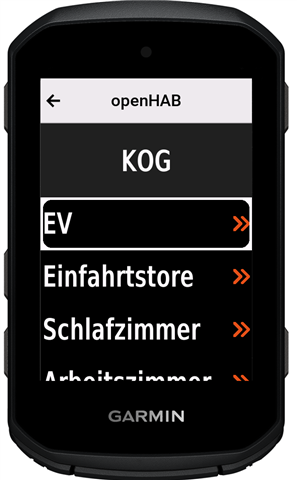
After switching my CustomMenu to a white background and adjusting the focused item color, it looks very similar to the native device menus.
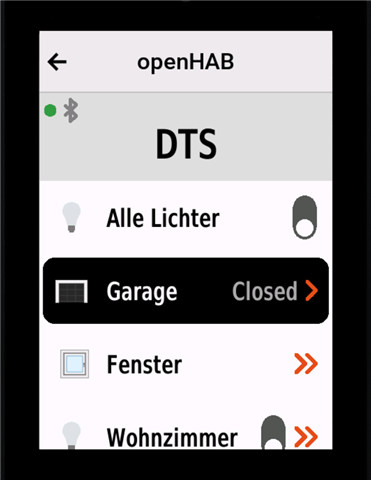
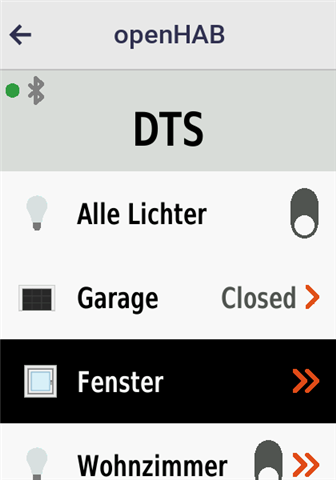
And here is the real device, again with the second item focused. The white rounded focus frame is most likely positioned above it, but it is not visible against the white background. Meanwhile, isFocused() returns true for the third element, which is therefore rendered in black, but without the rounded edges, since the native focus indicator is drawn elsewhere.
Any ideas would be greatly appreciated.

