CustomMenu focus indicator on Edge 550 / 850

Hi,

my app uses a CustomMenu. On Edge devices, the focused menu item is not always vertically centered, so a visual focus indicator is necessary.

On the Edge 540 and 840, the CustomMenu does not provide such an indicator, which required me to implement one manually using CustomMenuItem.isFocused().

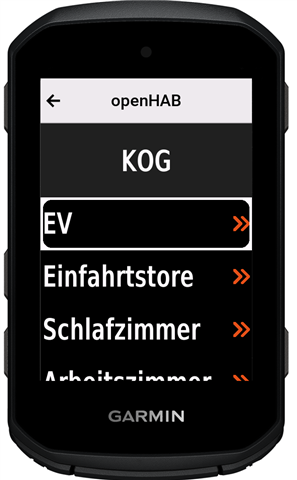
On the Edge 550 and 850, however, the simulator shows a built-in indicator in the form of a rectangle with rounded corners. This appears to match what can be seen in publicly available review photos of those devices.

Has anyone been able to confirm whether the CustomMenu on the Edge 550 or 850 provides a built-in focus indicator on the real devices?

Regards, Robert

  • Here a screenshot from the Edge 550 in the simulator, for some reason I could not post the original post with the screenshot in it.

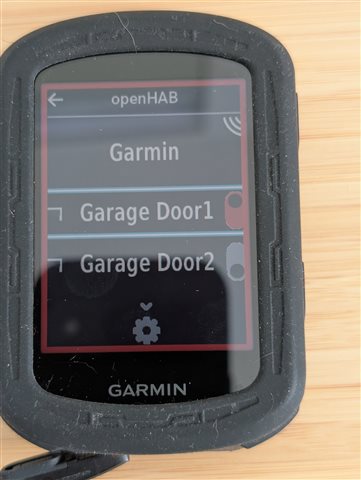
  • OK, I’ve now received feedback from an Edge 840 user, and the focus indicator is displayed correctly on the device. This means the missing indicator is just a simulator issue. I’ll therefore assume that this also works on the Edge 550 / 850.

    This is how it looks on that device. Does anyone know what the red frame indicates?

  • Isn't the red frame indicating that this is in the middle of an activity, that was stopped by the user?

  • He's talking about the heavier lines around "Garage Door1".

    The red boarder doesn't highlight a menu item.

  • He's talking about the heavier lines around "Garage Door1".

    The red boarder doesn't highlight a menu item.

    No, the-ninth asked:

    Does anyone know what the red frame indicates?

    And that's what flocsy was referring to. Both the question and the answer literally referred to "the red frame".

    I think it's clear that the heavier light blue lines around "Garage Door 1" are the focus indicator that is the main topic of this thread.

    Btw, at least on Garmin watches, when you stop the timer during an activity, a red border is indeed displayed along the inside of the bezel, and it continues to be displayed even if you switch back to the watchface (without ending the activity) and you launch a glance (whether native or CIQ).

    So it is entirely possible: 

    1) Edge also displays a red border around the entire screen when an activity is stopped. I wouldn't know for sure since I don't own an Edge

    2) That the user in fact launched the-ninth's app as a glance or widget (whichever is applicable for their Edge device) while an activity was stopped, which combined with 1) would explain the red frame in the picture.

    If 1) is wrong, then I guess there's some other explanation.

  • Doh.

    The red border does indicate the activity is stopped.

  • I was able to check in with the user, who confirmed that the red frame indicates a stopped activity.

    Btw, at least on Garmin watches, when you stop the timer during an activity, a red border is indeed displayed along the inside of the bezel, and it continues to be displayed even if you switch back to the watchface (without ending the activity) and you launch a glance (whether native or CIQ).

    It appears that some watches behave differently. On my Epix Pro Gen 2, the red frame disappears when I switch to the watch face (and then open a CIQ app), and it reappears when I return to the activity.