fenix 5 no longer listed in Garmin Connect on iPhone 11 Pro

[EDIT]

I have just seen the announcement on Garmin support site:

This is almost certainly my problem!

[/EDIT]

My regular Fenix 7 has broken so, while waiting for it to be fixed, I broke out my old Fenix 5, USB-linked it to Express on my Mac and updated my app (raceQs) to the current version. It runs  on the device but won't connect to my iPhone 11 Pro. 

After reinstalling Garmin Connect and doing a Network reset on my iPhone, I find the Fenix 5 is no longer listed in the Compatible Devices. 

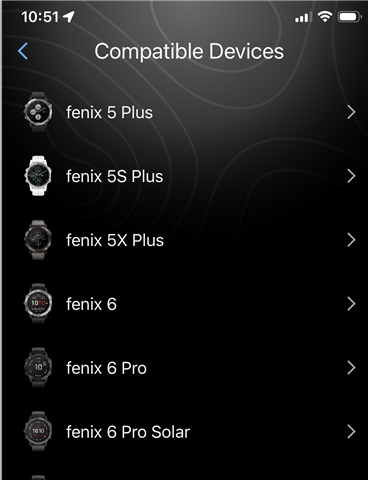
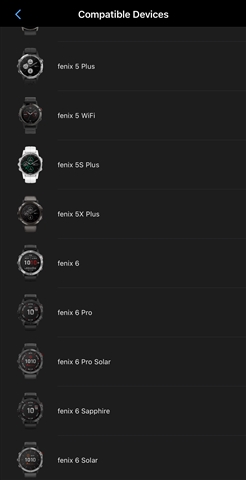
It has the 5 Plus, 5S Plus, 5X Plus and fenix 6, but no fenix 5.

(This screenshot is showing the top of the list - Garmin Connect Version 5.21.2.1)
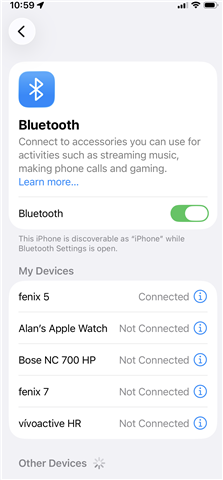
And yes, the Fenix 5 appears connected in the phone's Bluetooth connection list.
What happened - has Garmin silently dropped support for the older devices?

  • [EDIT]

    I have just seen the announcement on Garmin support site:

    This is almost certainly my problem!

    I don't understand why you think that a problem that prevents devices from pairing and connecting to Garmin Connect via Bluetooth would have anything to do with the compatible devices list for a Connect IQ app.

    The compatible devices list just shows you which devices are supported by the app, it doesn't try to connect to all of those devices in real time or something like that.

    fenix 5 no longer listed in Garmin Connect on iPhone 11 Pro

    After reinstalling Garmin Connect and doing a Network reset on my iPhone, I find the Fenix 5 is no longer listed in the Compatible Devices. 

    It has the 5 Plus, 5S Plus, 5X Plus and fenix 6, but no fenix 5.

    What are you talking about? Connect IQ apps haven't been managed in the Connect phone app for years, as far as I know. Connect IQ apps are managed in the Connect IQ phone app. And why do you think the model of your phone is an important factor here, to the point that you mentioned it in the post title, but you didn't even clarify that you're talking about the compatible devices list of a CIQ app?

    Maybe CIQ app settings are managed in Connect for some super-old devices, but I'm not sure about that (maybe that was true years ago, even when the Connect IQ phone app was first introduced, but I don't think it's true anymore). If that's what you meant, you kind of have to tell us that. 

    Maybe you are saying that you use the following workflow to look at your app details:

    - Open Garmin Connect on your phone

    - Click on device icon in upper-right hand corner

    - Select device (such as Fenix 5)

    - Select Activities & Apps

    - Select app (such as raceQs)

    - Select [app] Details (e.g. raceQs Details)

    I hate to tell you this, but when you do this, the Connect phone app is simply opening the Connect IQ phone app and jumping directly to the store page for your app. You're still seeing the app details inside the Connect IQ phone app.

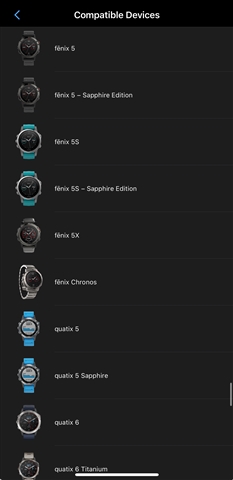
    Connect IQ apps are managed in the Connect IQ phone app, and when I look there, I see Fenix 5 under the Compatible Devices list for raceQs. I will point out that in the compatible devices list in the Connect IQ iOS app isn't in alphabetical order, which is a huge UX fail, but par for the course for Garmin.

    Indeed Fenix 5 Plus is the *first* device starting with "Fenix 5..." in the list, but I found that if I scroll down a bit, I also see Fenix 5.

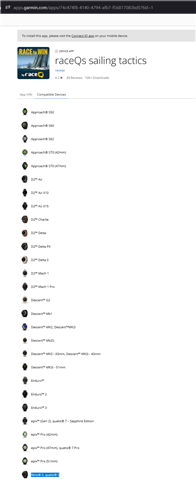
    I also see Fenix 5 in the Compatible Devices for raceQs on the web store page. Yes, I know it's hard to access the web store now, but it's still possible. I searched for your app using google, which returned the link to the apps.garmin.cn store, and I edited the URL to apps.garmin.com to get the link for regular store (not that there's anything wrong with the .cn store, but I don't want to muddy the waters in any way).

    https://apps.garmin.com/apps/74c474f8-4140-4794-afb7-f56817083bd5?tid=1

    (Click to enlarge)

    You also can access your own apps via the developer dashboard, and in fact you *should*, unless you plan on never updating your apps again)

    https://apps.garmin.com/developer/dashboard 

    It runs  on the device but won't connect to my iPhone 11 Pro. 

    What does "[raceQs] won't connect to [your] iPhone 11 Pro" mean? We can't read your mind.

    Do you mean that you can't manage the app settings with your iPhone 11 Pro? Do you mean that makeWebRequest doesn't work?

    Like most of your posts, you seem to assume the reader already knows what you are talking about, so you skip important details.

  • Offtopic: To open an apps webpage on Garmin you can hit the three dots in the top right corner in the Connect IQ app and select share to obtain the url.

  • I stopped reading at: "I don't understand why you think that a problem that prevents devices from pairing and connecting to Garmin Connect via Bluetooth would have anything to do with the compatible devices list for a Connect IQ app"

    It's the Garmin Connect app that won't connect to my watch!

    If Garmin Connect can't  connect to my device, my device won't be able to connect to my phone!

    Without that connection - an app on the watch is unable to interact with the internet or to upload activities!

  • It's the Garmin Connect app that won't connect to my watch!

    Yet in your post body, you implied that it's (only) the raceQs app which won't connect to your phone [without even explaining what you mean], as opposed to the watch in general not being able to connect to the phone:

    >  updated my app (raceQs) to the current version. It runs  on the device but won't connect to my iPhone 11 Pro. 

    And your post title (and body) complains that Fenix 5 is not listed in the app's compatible devices list, which:

    - is NOT true, as I showed with multiple screenshots and videos

    - is NOT relevant at all to the problem where your phone and watch won't connect to each other.

    So, actually, you are the one who is posting borderline nonsense in conflating 2 issues, and complaining that the response to your post doesn't make sense.

    I *kinda* get why you might think that if Garmin somehow dropped support for Fenix 5, it would both affect the compatible devices list and prevent your phone and watch from talking to each other, but again, it's not even true that Fenix 5 is not on the app's compatible devices list.

    It's the Garmin Connect app that won't connect to my watch!

    If Garmin Connect can't  connect to my device, my device won't be able to connect to my phone!

    Without that connection - an app on the watch is unable to interact with the internet or to upload activities!

    Thank you for finally explaining what your actual issue is. That's NOT AT ALL what you said in the original post. Your original post makes it sound like it's only the app (raceQs) which won't connect to your phone, and not the watch in general. 

    You are right that the stated problem with Connect is most likely the root cause.

    However, it has nothing to do with:

    - "fenix 5 no longer listed in Garmin Connect on iPhone 11 Pro" (literally the title of your post, and it's not even true)

    and

    - "I find the Fenix 5 is no longer listed in the Compatible Devices." (Same thing as the title. Still not relevant and not true.)

    If your post had instead been titled something like "Fenix 5 doesn't communicate with Garmin Connect on iPhone 11 Pro anymore", it would've made a lot more sense.

    I stopped reading at

    Yeah, well, as per usual, I made a massive effort to address some of the things you said (a large part of which were misconceptions, which is often the case with your posts), where most other people would've just ignored your post.

  • Offtopic: To open an apps webpage on Garmin you can hit the three dots in the top right corner in the Connect IQ app and select share to obtain the url.

    Yeah, I know that, but most normie users probably won't do that.

    I was just saying that for the vast majority of normie users, the web store is effectively gone. It seems that it's also dropping off of google search results, too, since a search for the app in the OP returns the .cn page instead of the .com page. 

    I will also point out that the method you mentioned obviously works best if you are going to open the webpage on your phone, as opposed to a computer.

    If you want to open the webpage on a computer, then you have to get the url from your phone to your computer somehow. Not hard to do (especially if you are on iOS/Mac), but it is an extra step.