Menu on eTrex Touch

Is there a standard menu operation on the new eTrex Touch.   One that causes the onMenu() function to be invoked.   Cannot seem to find it in the simulator.  Looking at the manual for eTrex Touch it often makes reference to a 3 bar Options Menu.   Is this something we have to add to our applications?

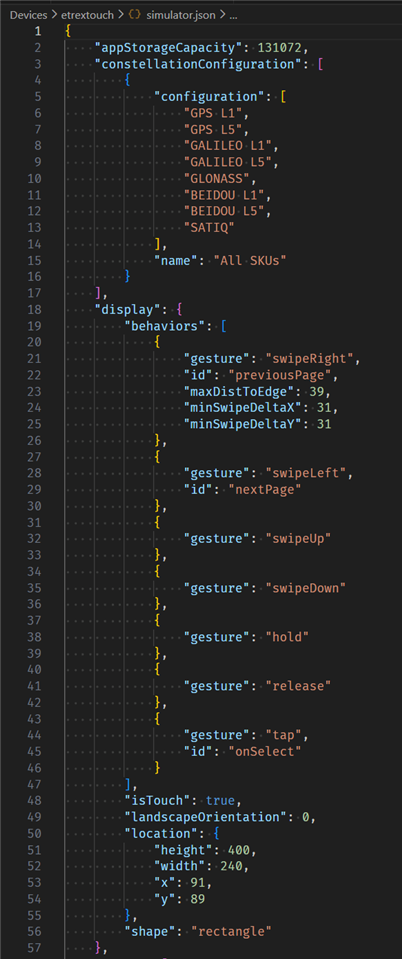
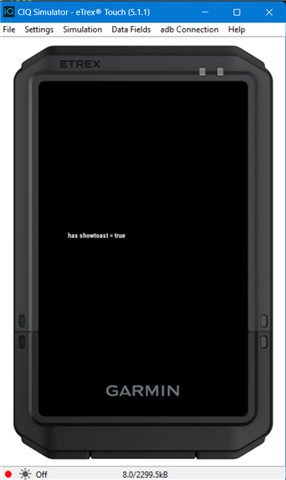
  • According to ConnectIQ/Devices/etrextouch/simulator.json [*], there is no touch gesture or button that invokes the onMenu behaviour. (In fact there are no buttons at all, which can be seen from the absence of a keys array in simulator.json.)

    So you will indeed have to implement your own on-screen menu button in your app, if you want a way to open a context-sensitive menu.

    (Unless it's a data field, in which case on-device settings should still be available via the built-in UI somehow.)

    [*] in the device folders, installed alongside the SDK, via the SDK manager.

    One way to open the Devices/ folder:

    1) Open VS Code

    2) Open the command palette: CTRL-SHIFT-P / CMD-SHIFT-P

    3) Select "Monkey C: Open Samples Folder"

    This will open a folder like .../Garmin//ConnectIQ/SDKs/[current SDK]/Samples/

    4) Navigate to the .../Garmin/ConnectIQ/ folder

    5) Under .../Garmin/ConnectIQ/, open the Devices/ folder

  • I think you're supposed to use showActionMenu and onActionMenu

  • flocsy, I was hoping that was it, like some of the other newer devices (VA6 or VenuX1), but View.setActionIndicator() is not available on this device (at least not in the simulator).    So cannot turn action menu on in order to get the onActionMenu() call. ?

  • This is like the Rino and the Oregon devices - no buttons and you need to have your own screen buttons.

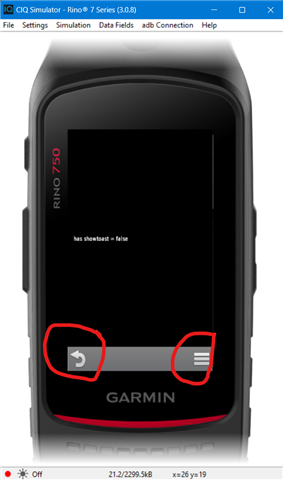
  • Thanks for the reply.  In my experience, both the Rino and Oregon have a bar across the bottom with a menu icon (3 vertically stacked bars) in the bottom right hand corner by default.   And tapping that menu icon results in onMenu() being called.  No additional work on my part as an app developer. 

    I support the majority of devices and to date I haven't encountered a device that doesn't have a native menu operation built in.  Most have some operation resulting in onMenu() or the newer behavior (like VA6 or VenuX1) where we turn on ActionMenu with View.setActionIndicator() and then get onActionMenu() call.

    Is this new behavior from Garmin to work like jim_m_58 says; i.e. we have to do our own button.  Since, as flowstate points out, it doesn't appear in the simulator there is a default menu operation.

  • With the oregon/rino you need to handle your own screen button for enter/start/select

  • I think you're supposed to use showActionMenu and onActionMenu

    As jrjackson pointed out, the CIQ action menu indicator is only available for the newer Venu / Vivoactive devices which no longer have a menu button shortcut - as seen via the availability of View.setActionMenuIndicator() and onActionMenu().

    - Just because a device doesn't have a menu button shortcut, doesn't mean it has the CIQ action menu indicator

    - Even if a device has a type of native action menu indicator in some cases (like FR955 / FR965 and others of the same gen), doesn't mean it has the *CIQ* action menu indicator

    Sure OP could still use showActionMenu() (if they want to display an action menu), but they need to provide their own UI to trigger it.

  • This is like the Rino and the Oregon devices - no buttons and you need to have your own screen buttons.

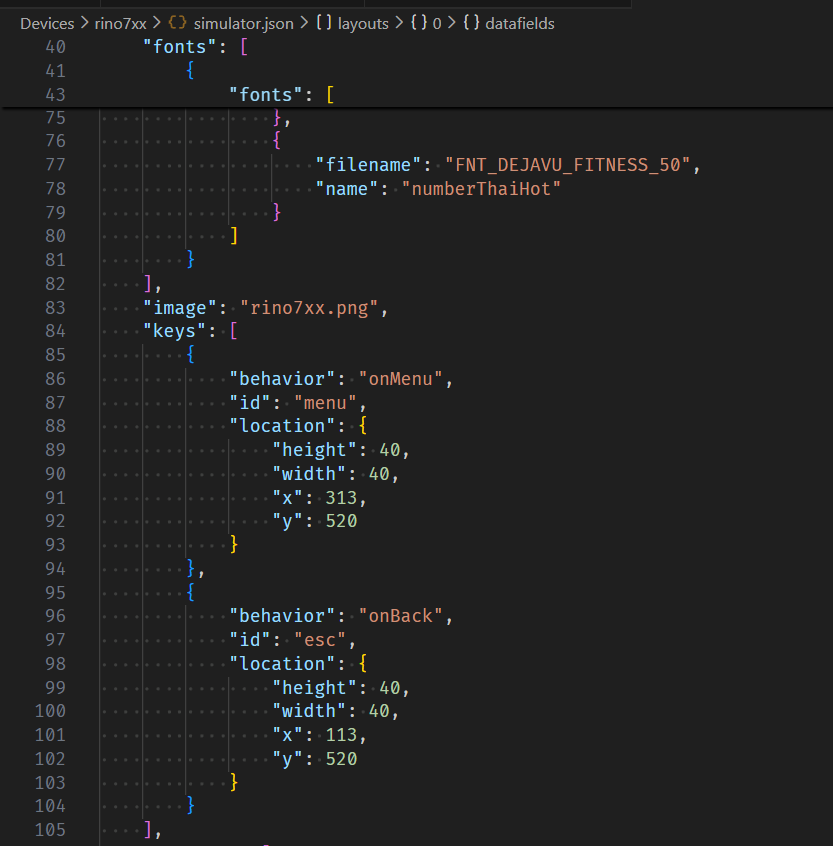
    Well, as jrjackson said, Rino and Oregon have onscreen buttons which work in Connect IQ (for the back and menu behaviours).

    If you look at oregon7xx / rino8xx's simulator.json, there is an entry in the "keys" array with the onMenu behaviour and another entry with the onBack behaviour. Ofc these are really just onscreen buttons and not physical keys. I just ran a CIQ data field in the sim for rino7xx, and I see both the back and menu buttons. I see the same thing with a CIQ device app in the sim. Perhaps there are some cases where the buttons aren't visible, but that seems kind of unlikely tbh (why would Garmin expose these in CIQ with standard onBack and onMenu behaviour if they're not reliably available?)

    There are no keys at all in simulator.json for etrextouch.

    Even the CIQ device reference shows that Rino and Oregon support the "esc" and "menu" keys:

    https://developer.garmin.com/connect-iq/device-reference/ 

    The same reference shows Etrex Touch as supporting no keys at all.

    So I don't think it's like Rino and Oregon at all with regards to onMenu (and onBack) - those devices have *virtual* onscreen buttons for menu and back which work in CIQ just like their physical counterparts, but Etrex Touch does not.

    It seems to me that you might be hung up on the idea that a button/"key" in CIQ must be a physical button, but clearly it doesn't have to be. Or maybe you're not focusing on the fact that we are talking about the menu button here.

    rino7xx:

    etrextouch:

    With the oregon/rino you need to handle your own screen button for enter/start/select

    Be that as it may, jrjackson is talking about onMenu.

    I will also point out that those devices do have the select behaviour (which is not the same as enter/start) - as with some other touch devices (like Vivoactive 3), it's triggered by tapping on a selectable item.

    For example, on vivoactive3, you select a native activity or menu item by tapping on it. On this watch, pressing the sole button does not select things (natively).

    Judging from simulator.json of most of the other touch-first watches (i.e. watches with touchscreen and fewer than 5 buttons, like vivoactive4), you don't (natively) select using a button either, but only by tapping the touchscreen. A couple of exceptions are the newer VA6 and Venu X1, where you can either press a button or tap the screen to select things.

    Ofc all the 5-button "touch-optional" watches like Forerunner and Fenix use the START button to select the currently highlighted item (and if they have a touchscreen, you can also tap on a selectable item).

    In fact, out of 162 CIQ devices, I only see 2 which lack onSelect (based on simulator.json): fr45 and garminswim2. This is probably because those devices only support CIQ watch faces and no other app types, so there's no need for any CIQ-supported keys or behaviours at all.

  • Is this new behavior from Garmin

    It does seem that etrextouch is the only device from Garmin which has no built-in UI control/gesture/element to trigger a context-sensitive menu in CIQ.

    Other devices have one of:

    - dedicated physical button for onMenu (e.g. handful of old watches - short press of the menu button)

    - physical button shortcut to trigger onMenu (e.g. most watches - long press of a certain button)

    - onscreen button to trigger onMenu (e.g. Montana, Rino, Oregon)

    - touchscreen "gesture" to trigger onMenu (i.e. long-press touchscreen in Vivoactive 3)

    - CIQ-supported action menu indicator (the new Vivoactive and Venu devices)

    But as we can see from the list above, even the devices other than etrextouch have diverse ways to show a context-sensitive menu.

  • Thanks guys for digging up some of this info.  I have actual users reporting same problem, so its not just something where maybe the simulator wasn't complete.   Plus the Garmin device reference info flowstate posted showing no "menu" key.   So assuming this device does not, and never will have a standard/legacy menu operation and will have to code one up.