Screen physical size list

Is there anywhere I can find a canonical list of screen physical sizes for each device? i.e. in inches or cm or whatever?

It doesn't seem to be present in the SDK content (with the exception of devices that have a "ppi" entry in simulator.json that would permit a calculation)

  • I don't think so. The sim doesn't even have a way to display devices at (or relative to) physical size, so AMOLED watches end up looking twice as big as MIP watches in the sim, since everything is displayed with 1 simulator pixel per device pixel.

    The funny thing is CIQ dev docs refer to a device's "physical size" in pixels, as if the physical size is wholly determined by the number of pixels.

    Might have to look up / scrape Garmin spec sheets.

  • I've confirmed using the product comparison tool that the manual calculations using the listed display inch lengths is exactly, or approximately, the simulator.json ppi values. For my intent of making a graphical resource auto-scaler for physical sizes, it would be fine.

    The product comparison tool exposes a nice JSON API actually.

    e.g. Forerunner 945 vs Forerunner 945 LTE:

    curl 'www.garmin.com/.../getProductDataByPids'

    And another endpoint will provide the mapping between pId, partNumber and product name:

  • Thanks!

    Pro tip - if you want to prevent the forum from annoyingly shortening URLs, either use a code block (Insert > Code) or surround URLs in square brackets

    [https://www.garmin.com/compare/api/getProductDataByPids?locale=en-US&pId=621922&pId=698632]

    [https://www.garmin.com/compare/api/getDisplayableProducts?locale=en-US]

    Unfortunately sometimes the square bracket trick doesn't work.

    In rare cases it will fail when the URL is a literal link as opposed to plain text, before you press the Reply button. (The square bracket trick prevents two things from happening *after* you press Reply: auto-linkification of plain text URLs and shortening of links.) You can avoid auto-linkification before pressing Reply by refraining from pressing SPACE or ENTER after typing or pasting a link. And you can remove an existing link by placing the text cursor anywhere over the link, pressing CTRL-K / CMD-K and deleting the text in the Url field.

    It's also very likely (or guaranteed?) to fail if you are posting in a bug report / ideas subforum.

  • In continuing to study this, I've found that the part numbers listed by [https://www.garmin.com/compare/api/getDisplayableProducts?locale=en-US] (e.g. Forerunner 945 is 010-02063-10 from en-US or 010-02063-02 from en-AU) match the "hardwarePartNumber" field in compiler.json (e.g. Forerunner 945 is 010-02063-00). The last two digits are the region code.

    I've discovered that a locale=en-US query doesn't emit a comprehensive product set as I was hoping it would. For example, some of the instinct2 series (010-02626-XX) isn't in en-US or en-CA, but appears in en-GB and en-AU. I wonder how many locale-specific devices there are out there Sweat smile

  • Between en-US and en-GB locales I was able to find at least one region-specific hardware part ID for each device family available in the SDK. All except the "epix" (010-01247-00), which doesn't seem to exist in their product database in any locale.

  • Alright. After some rough and tumble with variable data quality in Garmin's product comparison tool data, I managed to build some tooling to provide device-specific scale based on screen PPI for most device IDs in the SDK.

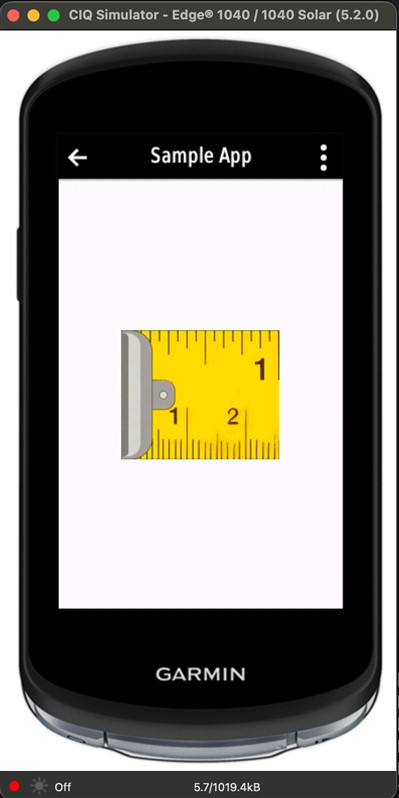
    I made a demo where an inch of tape measure is displayed at the correct physical scale. Here's the edge1040 in the simulator:

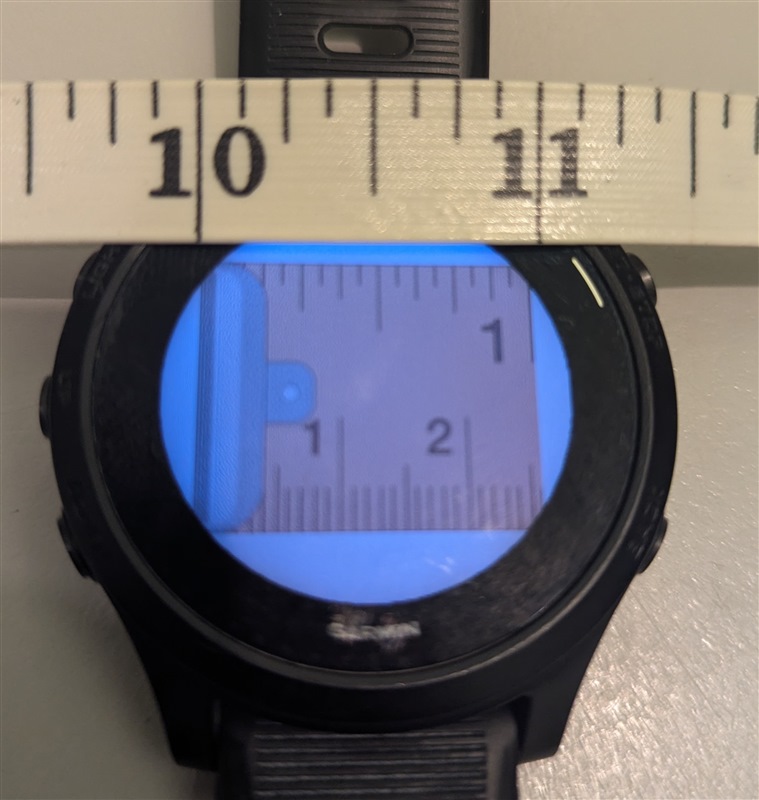
    And here's my physical FR945 with banana actual tape measure for scale:

    This demo is here: [https://github.com/semolina-solutions/rules_ciq/tree/main/samples/screen_ppi]

    The way it works is to pull data from Garmin's product comparison JSON API, doing the appropriate transformations from device ID to hardware part ID to product ID. Naturally it's not inherently reliable, but Shrug

    The current use case in a couple of my projects is to display the smallest low-pixel font I can that's still legible, and scaling by proportion of screen pixel width or height wasn't working well because some screens have significantly different pixel density to others.

  • Nice.

    But what is the use-case for this?

    BTW: I'm not sure if it is a good idea to add it as a png. Wouldn't svg be better? Though maybe it's the same as it's transformed to raster graphics during build :( It can work for certain screen sizes, but what about those future devices that are high ppi? Now this might or might not be relevant, depending on other things. Like whether you enable migration (if yes, then you'll want to think how to make it future proof. One thing is that you pull the ppi information from the internet, because then in theory you won't need to update the code or recompile for a future device) On the other hand if you plan to do new builds when new devices come out then you don't even need to do the web request, as in that cas you can fetch the ppi per device in a script and add it as a constant to something like: source-<device>/ppi.mc

  • Heya. My use case is in my last paragraph above.

    This example with the tape measure is a contrived example; in my real use case I'm scaling a bmfont rather than an image.

    The source image could be a SVG, sure. The example primarily demonstrates that the displayed pixel size is ~correctly calculated based on available screen PPI knowledge.

    I considered making a static table and committing it to the repo. That might still be a good future option, and perhaps the same interpreter program could be used to build the initial list. Anyway, for now it's just all integrated into the build system I'm crafting; alongside downloading and preparing other dependencies, these queries are also made in the background.