I created a structured workout in the Garmin Connect.
How do I export it to a fit file to use it in the simulator > Simulation > Activity Data > Data source as a Workout FIT File?
I created a structured workout in the Garmin Connect.
How do I export it to a fit file to use it in the simulator > Simulation > Activity Data > Data source as a Workout FIT File?
I can speak only for Edge devices:
-Send the created workout from GC to the Edge device
-copy the workout fit file from the device folder /Workouts to the PC you are developing with
-load the fit file as workout into the simulator and start
Time starts, power and heartrate are created randomly.
I wanted to do the same, but there is no easy way.
I found this: https://github.com/jpickup/GarminTools/
with this you can create a Fit file from a csv, how is describe in the documentation.
Alternatively you can download the FIT-SDK from Garmin. There you can transform a Fit File to a CSV and back, the Syntax is described in the FIT-SDK docs.
Like mcinner1 said, you can send a workout to your device and copy the FIT file from the device's workout folder, although this seems like a pain.
You can also try this github python library I found which apparently allows you to download workouts as FIT files: https://github.com/cyberjunky/python-garminconnect
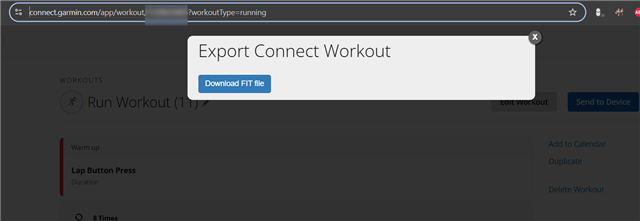
Based on that library, here's a browser script to download a Connect workout as a FIT file:
https://pastebin.com/raw/bRbkjg6S
1) Log in to connect.garmin.com
2) Navigate to the workout you wish to download
3) Paste this script into your browser dev tools. A modal will pop up with a download button

You can also install it as a bookmarklet for convenience (https://caiorss.github.io/bookmarklet-maker/)
How the script works
- Workouts are located at URLs which look like:
[https://connect.garmin.com/app/workout/WORKOUTID]
- The corresponding Connect API call to get the FIT file is:
[https://connect.garmin.com/gc-api/workout-service/workout/FIT/WORKOUTID]
- API calls such as this currently require the following header for auth:
connect-csrf-token: CSRF_TOKEN
Obtain CSRF_TOKEN as follows:
const CSRF_TOKEN = document.querySelector('meta[name="csrf-token"]')
- The script gets the workout ID from the current URL and makes the corresponding API call to get the FIT file